


HandHoldly guides
Extension Actions
Run a HandHoldly live guide on any website, and pick the steps of a walkthrough on your own page.
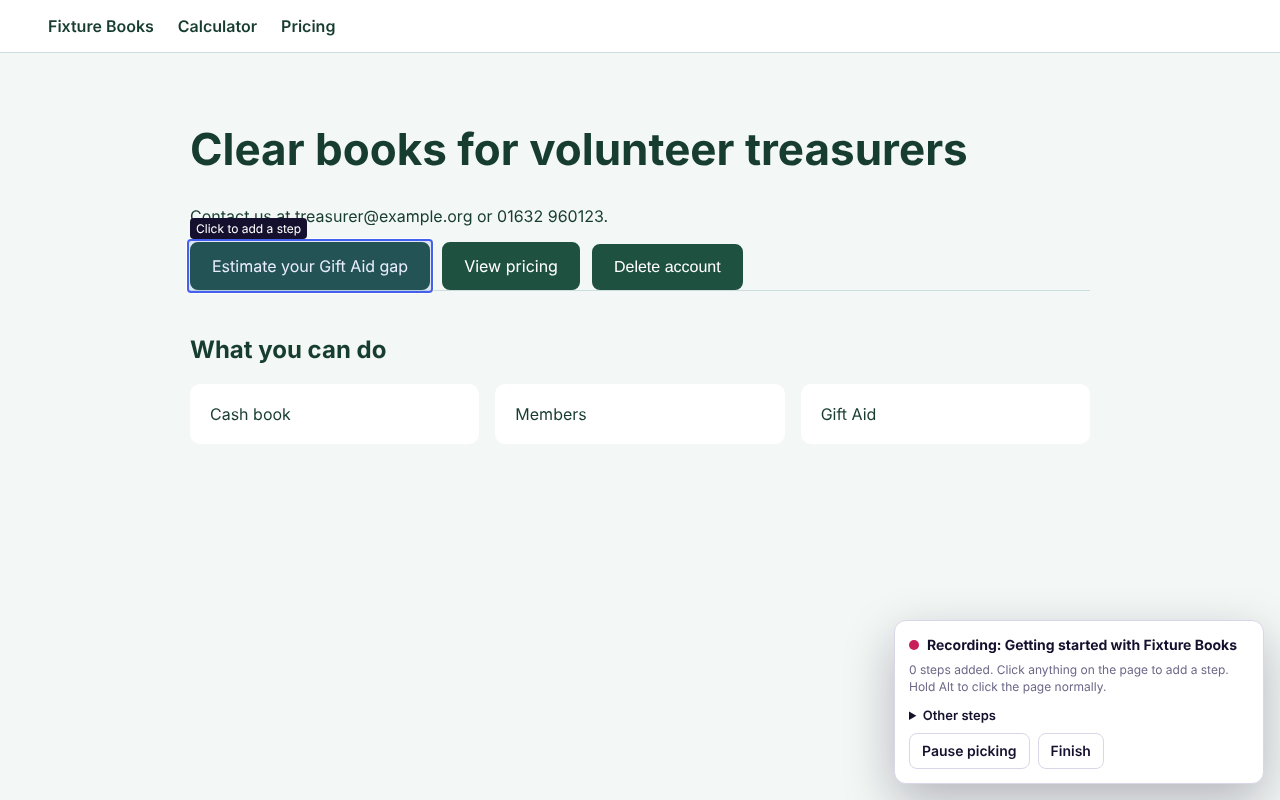
HandHoldly guides helps you run interactive HandHoldly walkthroughs directly on the website you are currently viewing, while also giving walkthrough creators a practical way to record new steps on their own pages. The extension combines two closely connected uses in one tool: a playback experience for launching live guides from a HandHoldly share link, and a recording experience for selecting page elements and sending those steps back to HandHoldly for use in a walkthrough. This makes it useful for interactive onboarding, internal training, product tours, process support, and repeatable documentation on real websites instead of static screenshots or isolated demos.
For playback, you can paste a HandHoldly walkthrough link into the extension popup and start a guided experience on the active tab. The guide runs on top of the real page, dims the surrounding interface, highlights one element at a time, and presents each step in a spoken, guided format. Two guidance styles are supported. In “Let me try” mode, the person follows the instructions and performs the clicks themselves. In “Show me” mode, the guide demonstrates actions for them. The package is designed to continue the walkthrough across navigation, so the guide can remain in progress after page changes and even between sites when permission has been granted. This continuity makes the extension well suited for flows that span more than one screen or page.
The extension also keeps the experience practical over time. Progress is stored per tab in session storage, and after a page finishes loading, the extension checks whether a guide is already active and restores it when needed. This means users do not have to restart from the beginning each time they navigate. The popup also stores a short list of recently used walkthrough links in local storage, making it faster to relaunch guides that are used often.
Recording is the second major capability. By pasting a HandHoldly pairing link into the popup, you can start record mode on the current page. In this mode, the extension overlays the site with a visual highlighter and recording panel. As you point to elements, it identifies likely interactive targets and prepares descriptive steps based on the structure and meaning of the element, using cues such as buttons, fields, labels, placeholders, roles, and options. This approach helps produce recorded steps that are more meaningful and reusable than steps based only on screen position.
The recording flow is designed to support real documentation work. Clicks are intercepted while recording so the page does not react unexpectedly, but holding the Alt key allows normal interaction when needed, such as opening a menu or moving to another page before continuing. The extension can run recorder logic in all frames of a tab and routes selected picks back through the background script to HandHoldly. The popup can also indicate whether recording is already active in the current tab and how many steps have been added.
Another notable part of the extension is its handling of sensitive fields. The picker logic identifies password inputs, one-time codes, card details, and similar secret fields as sensitive. Their actual values are not read. Instead, those fields are represented as secret-type steps so walkthrough creators can refer to named secrets in HandHoldly without capturing confidential data from the page.
Key Features:
- Launch a live HandHoldly walkthrough on the current website by pasting a share link into the popup.
- Choose between “Let me try” mode and “Show me” mode for different styles of guided assistance.
- Run guides directly on live pages with dimming, spotlighting, highlighted elements, and spoken steps.
- Preserve guide progress per tab so walkthroughs can continue after page loads and navigation.
- Keep up to five recent walkthrough links locally for quicker relaunch.
- Record walkthrough steps directly on your own page using a HandHoldly pairing link.
- Treat passwords, one-time codes, card details, and similar fields as secrets without reading their values.
How It Works:
1. Open the website where you want to play a guide or record walkthrough steps.
2. Open the HandHoldly guides extension popup.
3. For playback, paste a HandHoldly share link, choose a guidance mode, and grant permission for the current site.
4. The extension starts the guide on the active tab, dims the page, highlights the relevant element, and presents each spoken step.
5. If the process continues to another page, the extension restores the walkthrough after navigation when appropriate.
6. For recording, paste a HandHoldly pairing link and start record mode on the current page.
7. Select page elements to add steps, and use Alt-click when you need to interact with the site normally before continuing.
Privacy: - This extension stores recent links locally, keeps guide and recording state in browser session storage, and communicates with HandHoldly to run guides and send recorded steps. It is designed not to read values from sensitive fields such as passwords, one-time codes, or card details.