


BiliShelf Video Library
Extension Actions
Save Bilibili videos to a local library with search, tags, batch management, and backups.
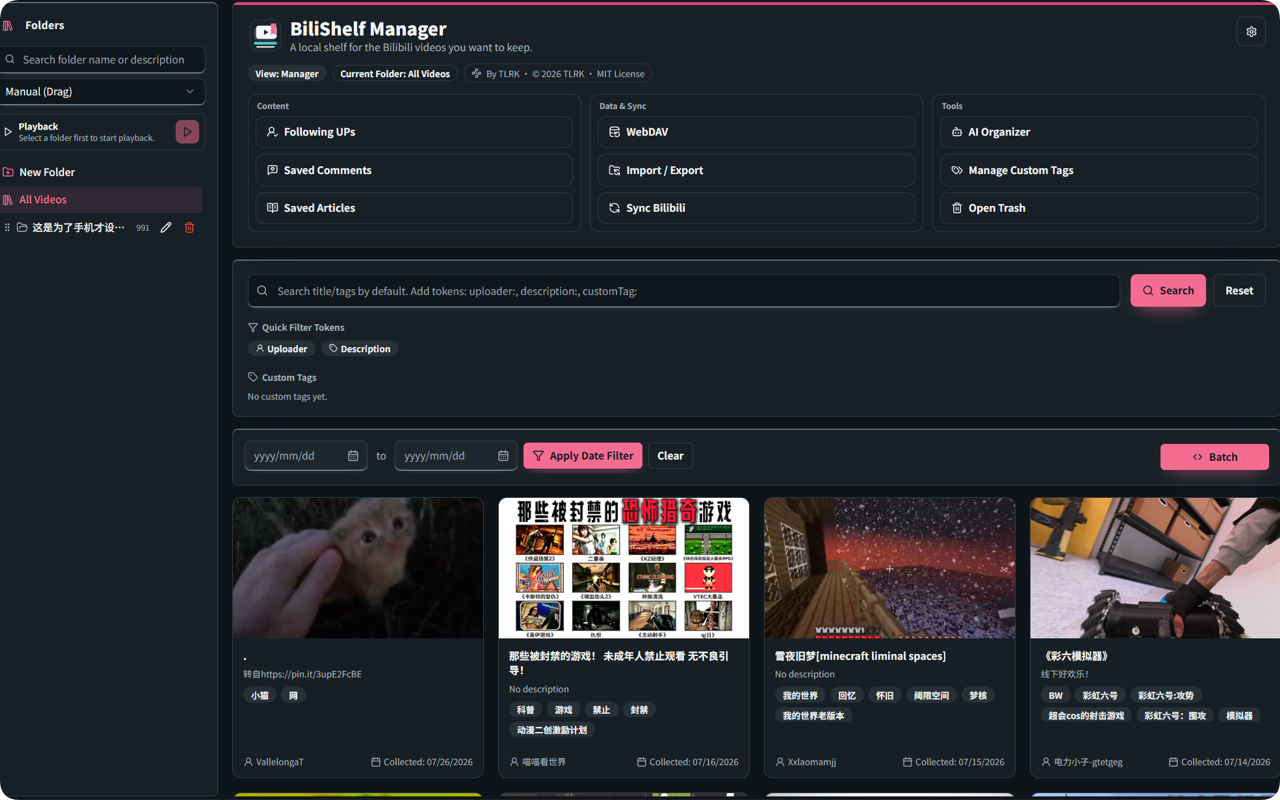
What It Solves:
BiliShelf is mainly built to solve these common problems:
Native Bilibili favorites have limited quantity, hierarchy, and management flexibility
You may want to search videos more precisely by title, uploader, description, tags, or date range
A single video may belong to multiple organization dimensions and needs to be managed across folders
When a video becomes unavailable, you may be left with only a dead link and no title, cover, or context
You may want to keep your favorite data locally for the long term, with export, backup, and restore support
Current Features:
Local-first: data is stored locally in the browser by default
Folder management: create, rename, sort, describe, delete, and restore from trash
AI organization: generate a classification plan for a selected scope from natural-language requirements, review it before applying, and retain snapshots for undo
Article favorites: save content from Bilibili article pages and organize it with article folders that are separate from video folders
Comment favorites: save comments from video pages, Watch Later pages, and article pages, including comment images and original-comment links
Custom tags: manage tags and use existing tags for autocomplete / selection while favoriting
Search capabilities:
global keyword search
filter by title, uploader, description, Bilibili tags, and custom tags
filter by date range
Batch operations: move, copy, and delete videos
Floating favorite panel: save videos directly from Bilibili video pages into local folders
Quick favorite shortcut: default is Ctrl+Alt+1, then press Enter to confirm
Folder playlist playback: open playable videos from the current folder in sequence
Followed UPs: batch import the current account's followed creators and quickly search / jump to their spaces inside the extension
Sync import:
supports selecting Bilibili favorite folders and syncing them into local storage
processes folders one by one in the current list order instead of sending all requests at once
supports resume, automatic cooldown, and throttling strategies that try to reduce risk-control triggers
Favorite-action listener: enabled by default; watches favorite actions on Bilibili and reconciles them back into local data
Video detail cards for saved videos, reducing the "I know I saved something, but I no longer know what it was" problem after invalidation
Import / export: supports JSON / CSV
WebDAV backup: it is recommended to create the target directory in advance; supports configuration, connectivity testing, backup upload, download, and restore
Management-center experience: supports dark / light themes and CN / EN switching