

Tabory — Easy Tab Manager
Extension Actions
An easy, rule-based tab manager for Chrome.
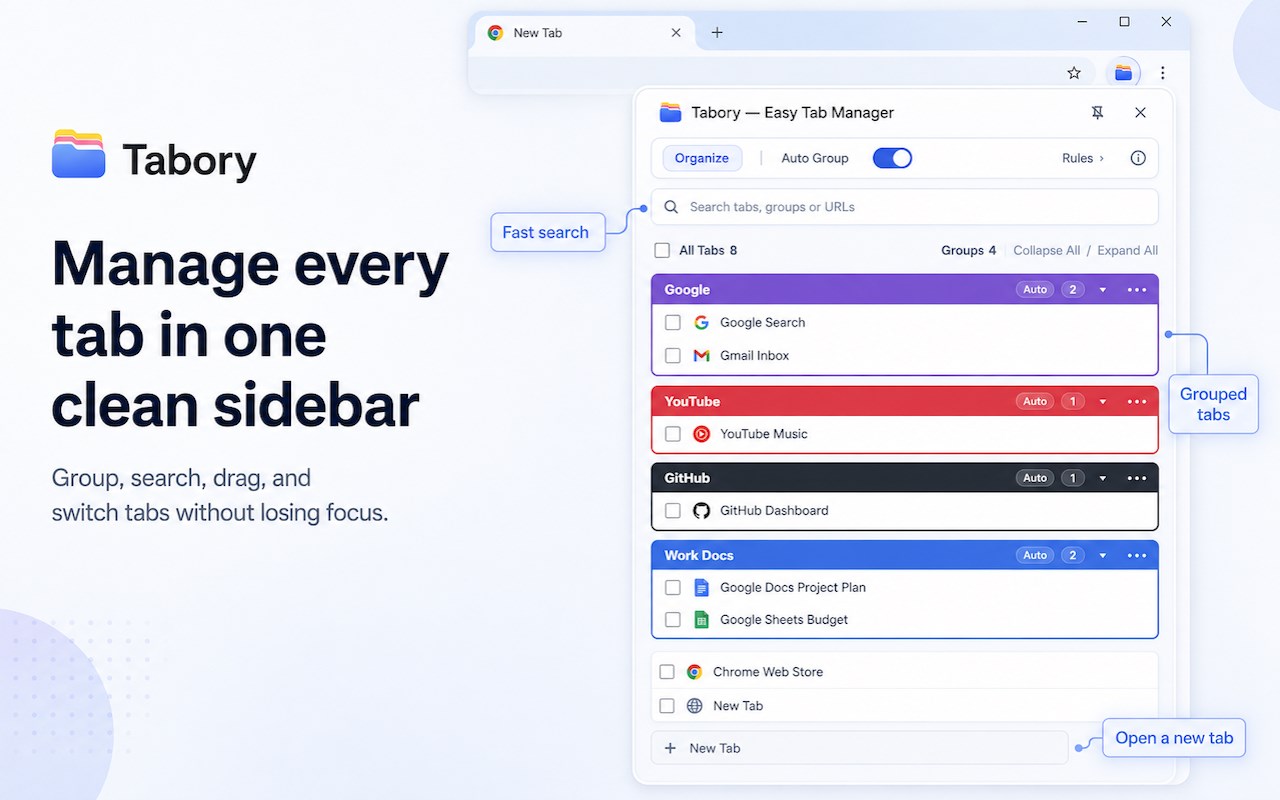
Tabory — Easy Tab Manager helps you keep your browser organized with smarter tab grouping, fast tab search, and a clean vertical tab view.
When you have too many tabs open, Tabory helps you turn browser clutter into clear, easy-to-manage groups. You can organize the current window with one click, automatically group new tabs by rules such as website or domain, and quickly find the tab you need by title, group name, or URL.
Tabory is designed to fit naturally into your browsing workflow. It does not change how you use Microsoft Edge — it simply gives you a clearer and more focused way to manage many tabs at once.
Key features:
One-click tab organization
Quickly tidy up the current window and group related tabs automatically.
Automatic tab grouping
Keep new tabs organized as you browse, based on grouping rules.
Group tabs by website or domain
Automatically collect tabs from the same website into clear, easy-to-manage tab groups.
Custom grouping rules
Create higher-priority rules for specific websites, keywords, titles, or URLs.
Vertical tab view
View and manage your tabs in a clean side panel layout, especially useful when many tabs are open.
Fast tab search
Search across tab titles, group names, and URLs to quickly find the page you need.
Drag-and-drop organization
Move tabs and groups freely to adjust your workspace the way you want.
Manual and automatic group status
Clearly see whether a group is automatically managed or manually adjusted, so Tabory does not unexpectedly change groups you have customized.
Simple tab and group actions
Close, manage, organize, and adjust grouped tabs directly from the side panel.
Tabory is built for people who work with many tabs every day — researchers, developers, product managers, students, and anyone who wants a cleaner, more focused browsing experience in Microsoft Edge.