

Watch Later Tidy for YouTube™ & YouTube Music
Extension Actions
Bulk delete or unlike on YouTube and YouTube Music. Search Watch Later, playlists, Liked videos and songs, escape the 5,000 limit.
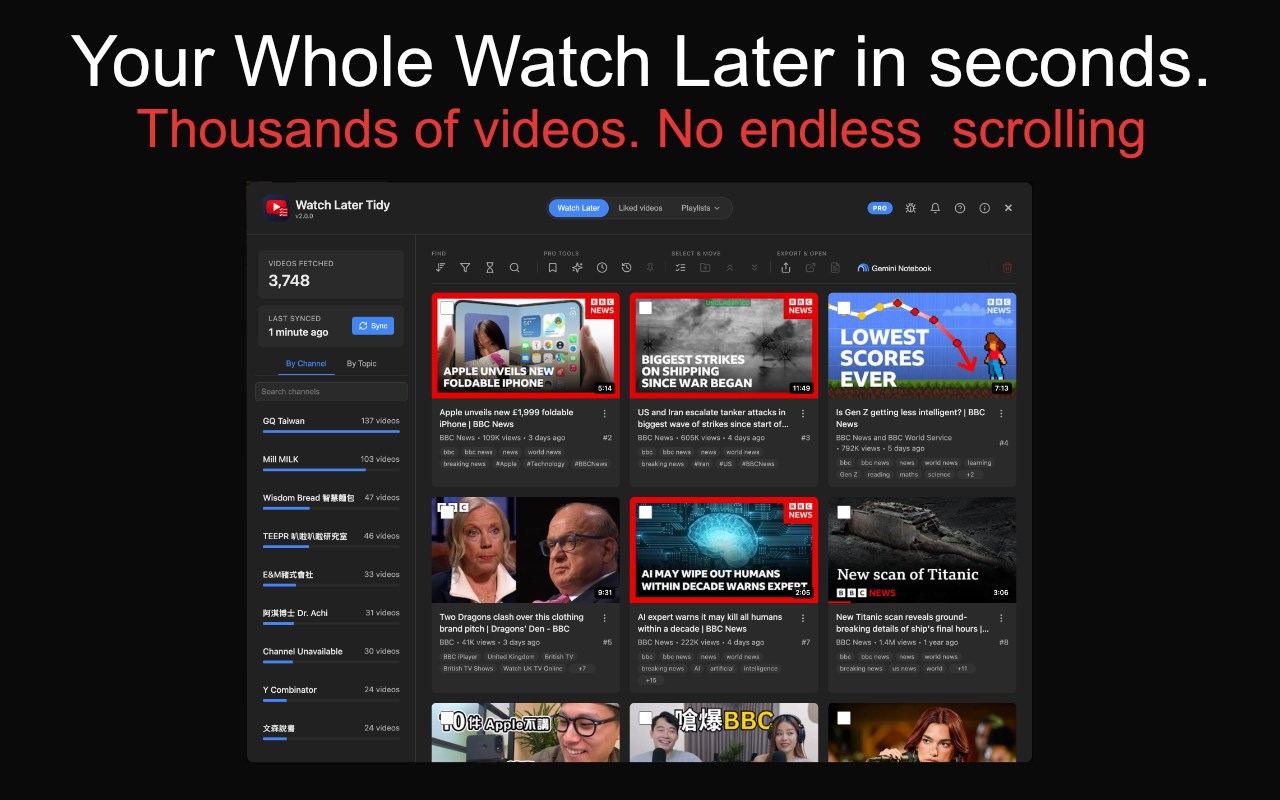
Watch Later Tidy for YouTube™ & YouTube Music searches your Watch Later, your Liked videos and every playlist in your library as you type, by title, channel or tag. Send what you find to NotebookLM (now called Gemini Notebook) as sources, or bulk delete, unlike, move and copy it, and escape the 5,000-video limit.
📋 Your YouTube Watch Later playlist is a graveyard. Videos saved years ago, a queue so long you stopped trusting it, and scrolling is the only tool you have. Then you hit the 5,000-video limit and YouTube freezes you out: nothing new until you dig through the pile and delete. One. Video. At. A. Time.
Watch Later Tidy fixes all of it: a dashboard over your YouTube page that breaks the playlist down by channel or topic (a storage manager for your queue), then filters, sorts, reorders and bulk-deletes. Minutes instead of hours.
The feature list below is free, with one limit for new installs, set out under it. An optional paid tier, TidyWL Pro, lifts that limit and adds clean-up rules, undo and a watch-list builder.
🚀 HOW IT WORKS
1. Install the extension, then open your Watch Later page (youtube.com/playlist?list=WL), your Liked videos, or any playlist in your library.
2. Click the Watch Later Tidy icon in the browser toolbar — pin it from the extensions menu if you don't see it — then "Open Dashboard".
3. Hit Sync and wait for the progress counter to finish.
4. Search by title, channel or tag, or browse by channel or topic, then filter, sort, select, bulk-delete, reorder or export.
No account. No sign-in. No setup. No permissions beyond your current YouTube session.
✨ NEW IN v2.8.0
🔎 Search all videos from the sidebar search. ▶️ Play the videos you tick as one queue, in one tab. ⚡ A big sync opens the list at once and fills in the details behind it, about 8 minutes for 4,000 videos; until then, Music only and No music leave out videos not read yet. 🖥️ A dashboard sized to your screen, from 1080p to 4K.
🛠️ FULL FEATURE LIST (free, with the one limit below)
🔍 Search by title, channel or tag as you type, across thousands of videos.
🏷️ The uploader's own tags on every card, clickable as filters — stack several to narrow.
🗑️ Bulk delete selected videos, with live progress, a stop button and Retry for any that fail.
❤️ Watch Later, Liked videos and every playlist in your library in one dashboard, in All / Videos / Music tabs — pick one, or tick several to see them merged: one card per video, a chip for each playlist it's in, and Copy, Move and Delete across them.
🔄 Sync every ticked playlist in one run or one at a time, and delete a playlist you own, or take a saved one off your library.
💔 Remove likes in bulk, through the same flow as deletion.
📊 A sidebar with channel breakdown bars, sorted by count, that collapses out of the way.
🏷️ By Topic view: local keyword clustering, no API calls. Filter to a topic or hide it.
🎚️ One Filter menu: watched status (with a progress threshold you set), duration (presets or a custom range), music, and availability, in any combination.
🔃 Sort by playlist order, duration, published date, views or title A–Z, or group the grid by channel under foldable headings.
📝 Download transcripts for one video or hundreds, as timestamped text files named after each video.
📓 Send selected videos to Gemini Notebook (formerly NotebookLM) as sources.
📁 Move or copy videos to another playlist, or create one inline (Private / Unlisted / Public).
↕️ Reorder by Move to Top, Move to Bottom or drag-and-drop, one video or many.
💾 Export to JSON or CSV (UTF-8 BOM, non-Latin titles intact).
👤 Multi-account aware, brand channels included.
🌗 Light and dark theme, WCAG-AA contrast, keyboard navigation and ARIA labels.
🆓 THE ONE FREE LIMIT
Installed from v2.5.0 on? Removing part of a list, where you pick which videos go, counts against 1,000 free removals every 30 days, starting with the first one; the dashboard shows when they come back. Emptying a whole list, deleting one video from its menu, removing likes and copying never count. Installed earlier? Removals stay unlimited. Pro has no limit.
💎 WHAT TIDYWL PRO ADDS
Pro is an optional subscription: US$4.99 per month or US$47.88 per year, bought at https://tidywl.com/pro/ through Paddle, our merchant of record, so the extension never sees your card details. Any Pro charge can be refunded in full within 14 days. One key covers three devices; the About panel shows them and cancels any time.
♾️ No limit on removing videos.
🧹 Three clean-up rules — remove dead entries, archive videos watched past 95% to a private "TidyWL Archive" playlist, and a monthly rule that moves the oldest slice there. Each shows the list and asks first.
📌 Pin a video "keep forever" and nothing removes it — not a rule, not a bulk or single delete, not an unlike. A Move becomes a Copy.
👁️ Operations preview — before a bulk delete or unlike, see the exact videos it will touch and untick any.
↩️ Undo — every video you delete is kept on that device for 90 days, 10,000 records by default and raisable.
☑️ Tick several sidebar channels or topics and see all their videos.
🔎 Search video descriptions too, and find a saved playlist by its creator.
🔖 Saved views — name a filter combination ("unwatched lectures over 20 minutes") and get back to it in one click.
🕒 Lineup — say how much time you have and it builds a ranked watch list from your own saved videos.
💬 Feature requests and support answered first.
❓ FAQ
Does it need a YouTube API key or OAuth login?
No. It uses the same internal endpoints your browser already calls. No API key, no OAuth, no account setup. Pro is unlocked by a licence key you paste in, not by signing in.
Does it work on YouTube Music?
In part. There is no dashboard on music.youtube.com itself: "Open Dashboard" on a playlist there takes you to the same playlist on youtube.com, where the dashboard manages it. Liked music opens Liked videos, which holds the songs you like, so you can unlike them in bulk there.
Can I undo a deletion?
On the free tier, no — deletions are permanent on YouTube's side, so export first if you want a snapshot. Pro remembers deletions for 90 days on the device that made them and puts a video back: at the top of Watch Later, and by default at the end of other playlists. It cannot undo a removed like: YouTube treats that as un-liking, not a playlist edit.
What happens if my Pro subscription ends?
The paid features stop and the free extension carries on as before, with the removal limit if you installed from v2.5.0 on. Nothing on your device is deleted; saved views and delete history wait until you resubscribe.
🔒 PRIVACY
Your playlist stays on your device. No login, no account, no servers holding your videos. There is no analytics SDK, no advertising, and nothing is sold or shared.
What does go to tidywl.com:
- A request for a public config file and a notices file, with no identifiers and no payload, so the extension survives YouTube changing its page layout and can show you a notice.
- A random install identifier (not linked to you or your Google account) and your lifetime counts — videos deleted, likes removed, videos moved, bulk operations run, Lineups built and saved, days you opened the dashboard, the size of your Watch Later, whether each removal took the whole list or part of it, how often a free install opened the Pro plans and from where, how many notices you were shown and clicked, and your browser. Never a title, a video ID, a channel or a timestamp. There is no setting in the extension to turn this off; uninstalling stops it. Records not updated for 12 months are deleted.
- Only if you buy Pro: your licence key (or the Transaction ID from your receipt, if the key is lost) and the device name you type, so we can check the key and show you your own devices. Nothing about your playlists or your Google account goes with it.
Full policy: https://tidywl.com/privacy/
The Lineup reads your watch history and subscriptions to rank your saved videos, on your device with your own YouTube session, and sends none of it anywhere. "Send to Gemini Notebook" is the one flow that sends video links elsewhere: to Google's Gemini Notebook, with your own Google session, when you press it.
Two optional permissions are requested only when you first use the feature that needs them, never at install: Gemini Notebook access, so the videos you pick can be added as sources; and saving downloads, for transcript files. Decline either and everything else carries on working.
⚠️ HONEST LIMITATIONS
- The free tier has no undo: deletions and removed likes are permanent. Pro's undo covers deletions only, for 90 days, on the device that made them — not a cloud backup, and it cannot restore a removed like.
- Removing a like is not a playlist edit — YouTube treats it as un-liking, which can affect your recommendations.
- Removing likes is paced at a few a second, so 300 take about three minutes.
- Reorder is hidden on Liked videos: YouTube orders that list by when you liked things.
- Playlists saved from other people can be searched and copied from, but not cleaned up or reordered — only their owner can change them.
- Pro's monthly clean-up rule only runs when your YouTube playlist is sorted by date added. If it isn't, the rule says so and does nothing rather than guessing.
- Uses YouTube's internal, undocumented API. It can break when YouTube changes it; a remote config patches many breakages without an extension update.
💬 COMMUNITY
Join the Discord to report bugs, request features or say hi: https://discord.gg/sTvjfp4sCk
Built by an indie developer who hit the 5,000-video limit and had enough. Not affiliated with YouTube or Google. YouTube and YouTube Music are trademarks of Google LLC. 🚀
Latest reviews
- Brandon
- Works great