


Just Replace HTTP — Redirect & Rewrite URLs (Regex)
Extension Actions
- Live on Store
Redirect and rewrite HTTP request URLs with regex rules. Map any URL to another, toggle rules on and off. Free, no account, no ads.
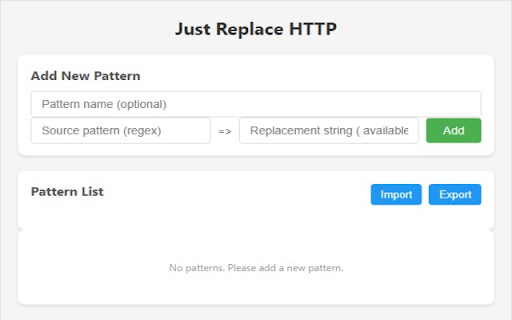
Redirect and rewrite HTTP request URLs with regex rules — before the request leaves your browser.
Point a production API at localhost. Send CDN assets to a staging bucket. Swap a version number in
a script URL. Rewrite a query string. You write a regex for the URL you want to catch and a
replacement for what it should become, and every matching request goes to the new address instead.
WHAT IT DOES
• Redirect any request URL to another URL
• Match with full regular expressions, including capture group references ($1, $2, …)
• Turn each rule on or off individually, without deleting it
• Name your rules so a long list stays readable
• Copy an existing rule into the editor to make a variant in one click
• Export and import your whole rule list as JSON — move it between machines or share it with a
teammate
• Badge on the toolbar icon shows how many rules are currently active, so you never forget a
redirect is running
WHO IT IS FOR
Front-end and full-stack developers who need to test against a different backend without touching
the application code. QA engineers pointing a build at a test environment. Anyone debugging a
third-party script they cannot edit.
HOW IT WORKS
Built on Manifest V3 and Chrome's declarativeNetRequest API. Rules are compiled into native
browser redirect rules — the extension never reads your request bodies, never proxies your
traffic, and never sends anything to a server. There is no account, no sign-in, and no telemetry.
Your rules live in your browser's IndexedDB and nowhere else.
FREE
The URL-redirect feature that paid HTTP interceptors charge a monthly fee for, at no cost. No
trial, no seat limits, no upsell.
LANGUAGES
English, Korean, French, Spanish, Arabic, Russian, Chinese (Simplified). The interface follows
your Chrome language automatically.
OPEN SOURCE
Latest reviews
- Vlad HyoYoul Lee
- Almost a must-have extension for developers! Extremely useful in real-world scenarios. I keep this extension enabled whenever I’m doing web development, debugging, or local testing. In environments where browsers automatically redirect to HTTPS, this tool makes it easy to keep HTTP requests as-is or quickly modify specific request patterns. I haven’t found anything more intuitive and effective for this purpose. It’s especially useful when testing across multiple web environments, allowing seamless switching without extra configuration. * Simple and intuitive UI The settings are straightforward, and you can replace target strings immediately. It saves a lot of time by eliminating unnecessary redirects or manual request adjustments during development.. * Improves development & testing workflow Maintaining HTTP requests is often essential in local or test environments, and this extension handles that perfectly. There’s no need to repeatedly tweak server settings, which significantly improves productivity. * Lightweight with minimal performance impact It’s focused on doing one job well, uses very little system resources, and has no noticeable impact on Chrome’s performance. Overall: A highly recommended extension for developers and testers alike—simple, reliable, and incredibly practical when testing across multiple environments.