


1688 Search By Image
Extension Actions
- Live on Store
Right-click any image to search on 1688! Find products fast and dropship easily with this powerful image search tool.
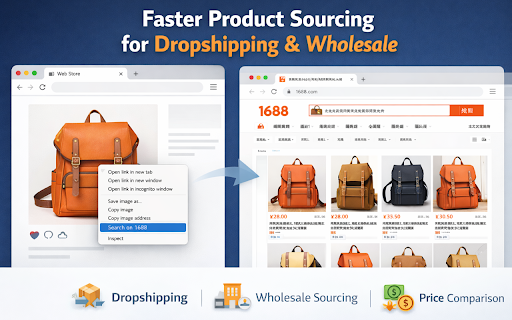
Find the Same Product on 1688 Using Any Image (One Right-Click)
1688 Search by Image makes product sourcing faster by letting you search 1688.com using an image from anywhere on the web. Simply right-click an image and select “Search on 1688”—the extension opens a new tab and starts your image-based search.
Perfect for dropshippers, wholesalers, and sourcing teams who want to find suppliers and compare prices quickly.
⭐ Key Features
✅ Right-Click “Search on 1688”
Adds a context-menu option to search images directly on 1688.com.
✅ Works on Any Website
Use any product photo from shops, social media, or competitor sites.
✅ Fast Product Sourcing Workflow
Quickly find similar items, suppliers, and alternatives on 1688.
✅ Lightweight & Simple
No setup—install and start searching.
✅ Privacy-Focused
Only uses the image you choose to search when you click the context menu.
🧠 How to Use
➜ Find any image on the web
➜ Right-click the image
➜ Select “Search on 1688”
➜ View results on 1688.com in a new tab
🔒 Privacy
This extension does not collect or sell personal data. It only triggers a 1688 image search when you choose the menu option.
❓ FAQs
1) Do I need to upload images manually?
No—just right-click an image and select “Search on 1688”.
2) Does it work on any website?
Yes. It works on most websites where images can be right-clicked (some sites may block right-click or protect images).
3) Where does the search open?
It opens the 1688 image search in a new tab.
4) Does it store my images or browsing data?
No. It does not store images or track your browsing—search happens only when you click the context menu option.
5) Why doesn’t it work on some images?
Some images are protected, loaded in a special way, or blocked from right-click access—those may not be searchable.