


VidSense
Extension Actions
AI-powered answers for YouTube videos in the current tab.
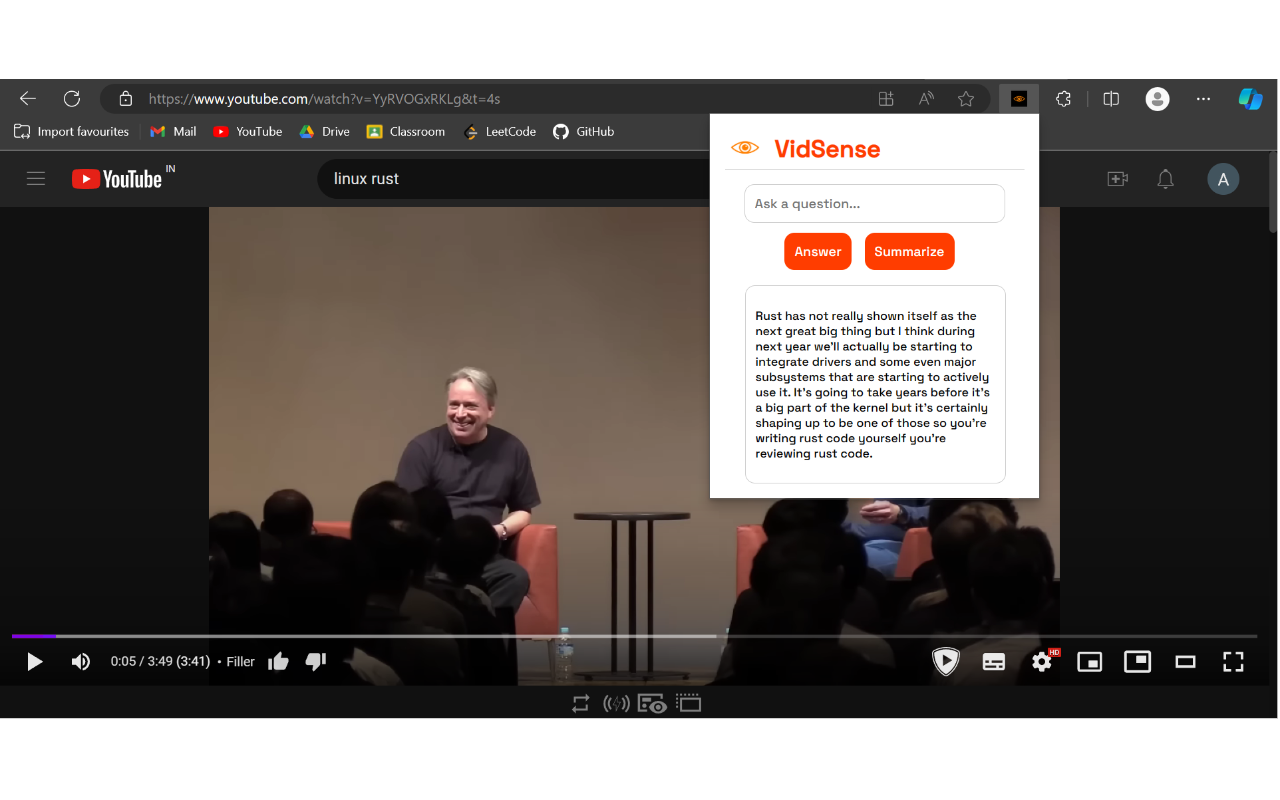
Introducing VidSense – Your Quick Answer and Summary Companion for YouTube!
🔍 Have you ever wanted instant answers or a quick summary while watching YouTube videos? VidSense is here to make your online learning and video exploration more efficient!
🌟 Key Features:
1️⃣ Answer Questions Instantly: Simply input your question, and VidSense will fetch relevant answers from the video's transcript using advanced language models.
2️⃣ Effortless Summaries: Want a quick overview? Click the Summarize button, and VidSense will generate a concise summary based on the video's content.
3️⃣ Seamless Integration: VidSense smoothly integrates into your YouTube experience, enhancing your ability to extract valuable information without leaving the page.
4️⃣ Time-Saving Technology: Say goodbye to manually searching through lengthy videos – VidSense leverages cutting-edge APIs to provide swift and accurate responses.
🚀 Getting Started:
Ensure Python is installed on your PC.
Download the VidSense-Pc package from here-https://github.com/apoorvsxna/VidSense/releases/download/v2.0/VidSense-PC.zip
Run 'install-packages.bat' to set up necessary dependencies.
Activate VidSense by running 'start.bat' before using the extension.
Enter your question or click Summarize.
Get instant answers or a quick summary without missing a beat!
🛑 Wrap Up Your Session:
When done, run 'stop.bat' to conclude your VidSense session.
🤖 VidSense combines the power of YouTube transcripts and state-of-the-art language models, ensuring a seamless and efficient way to interact with video content.
⚡️ Elevate your YouTube experience with VidSense – Download now for a smarter, faster way to engage with videos!