


RoleBeacon Job Importer
Extension Actions
- Live on Store
Import a job posting into RoleBeacon Create Tailored Resume.
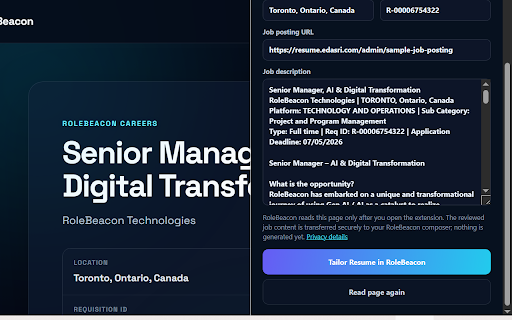
RoleBeacon Job Importer brings any job posting straight into RoleBeacon's Create Tailored Resume flow — no more copying and pasting job descriptions by hand.
How it works
Open a job posting on any site — LinkedIn, Workday, Greenhouse, or a company careers page.
Click the RoleBeacon icon in your toolbar. The extension reads that one page and extracts the job title, company, location, posting ID, posting URL, and full description.
Review and edit anything before it goes anywhere — nothing is sent until you confirm it.
Click "Tailor Resume in RoleBeacon" to open the extracted job in your RoleBeacon account, ready to generate an ATS-ready tailored resume.
Built to only do this one thing
RoleBeacon Job Importer reads the job posting you're currently viewing, lets you review or edit what it found, and transfers your approved content into RoleBeacon's Create Tailored Resume flow. That's the entire scope of what it does.
It only accesses the page you're on when you click the icon — no background browsing history, no access to other tabs, no tracking across sites.
It doesn't read cookies, downloads, or your clipboard, and it doesn't retain access to job sites after you close the popup.
Extracted content is held briefly in your browser's session storage — just long enough to hand off to RoleBeacon — and is automatically deleted after 15 minutes if unused.
Nothing is used for advertising or extension analytics, sold, or shared with unrelated third parties.
Who it's for
Anyone using RoleBeacon to build ATS-ready, tailored resumes who wants to skip manually retyping job descriptions for every application.
Full privacy details: https://resume.edasri.com/privacy/chrome-extension