


JustShowMe: Annotate, Snip & Record
Extension Actions
Record, snip, and annotate webpages privately. No account, no cloud, no tracking.
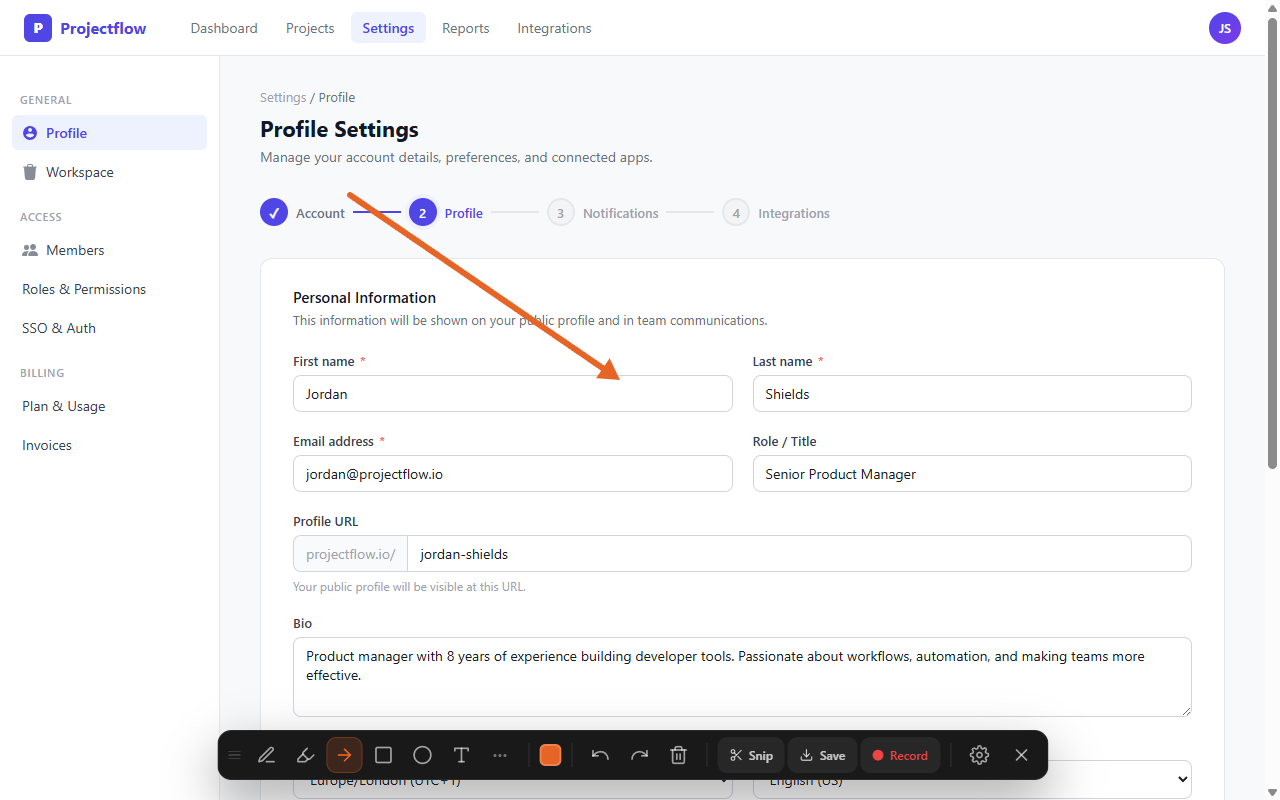
STOP EXPLAINING. JUST SHOW ME.
JustShowMe is the ultimate private screen recorder and screenshot annotation tool. Effortlessly draw on and capture your screen, record high-quality tab video, and add professional image markups without ever creating an account.
Perfect for developers, QA testers, and designers who need a fast, local-first alternative to Loom or Awesome Screenshot, or a modern browser-based alternative to Snagit or Skitch.
🛡️ PRIVATE BY DESIGN
Most tools force you to sign up and host your captures on their servers. We don't.
• No Accounts: Start using it the second you install it.
• Zero Cloud: No uploads, no backend, no third-party tracking.
• Offline Ready: Everything runs locally in your browser.
• Security Minded: Content scripts are only injected when you click the icon. Your browsing session is never observed without an explicit action. A lightweight service worker handles coordination but has no access to page content.
✨ FEATURES (FREE FOREVER)
We don't hide basic tools behind "feature walls." Get the full toolkit for free:
• Pro Drawing Suite: Freehand pen, highlighters, arrows, shapes, and text labels.
• Smart Tools: Numbered Step Markers, Blur/Redact for sensitive info, and a Laser Pointer.
• Full-Page Capture: Automatically scroll and capture entire webpages at HiDPI resolution.
• Precision Snip: Crop specific regions of your viewport instantly.
• Video Recording: Record your tab (up to 60s) as MP4 or WebM with a 3-2-1 countdown.
• Design Guides: Toggle alignment grids and measurement tools to point out UI issues.
• Clipboard Ready: Automatically copied for instant pasting into Slack, Jira, or GitHub.
🛠️ HOW IT WORKS
1. Click the JustShowMe icon in your toolbar.
2. Annotate using the floating toolbar.
3. Save via Full-Page, Snip, or Record.
4. Paste your result directly into your workflow for bug reporting or visual feedback.
🚀 JUSTSHOWME PRO ($6/mo or $48/yr)
For power users who need more than the basics:
• Unlimited Recording: Remove the 60-second cap.
• Clean Output: No watermarks on video recordings.
• Live Annotations: Draw, highlight, and point while recording video.
• Pause & Resume: Full control over your recording flow.
• GIF Export: Convert your clips into lightweight, shareable GIFs.
🆕 WHAT'S NEW (v1.7)
- Element picker: click what you mean instead of drawing a box around it
- Selector export (extension): Point at any control and get CSS, XPath and framework locators — three ranked candidates, one click to copy
- Measure or snip an element: Hover a button to measure its width or height, or snip it exactly, with no dragging
- All like this: One pick selects every matching element on the page
- Before/after compare: Capture two states and show them side by side, each pane labelled with its own URL. Your comparison survives reloads and navigation.
- Spotlight tool: Dim the page and cut out only what matters — several spotlights at once, a choice of shape, soft edges, and a magnify + glow style
- Annotation motion: Marching dashes, draw-on retrace and pulsing emphasis to hold attention during a live call. Solid or dashed on any annotation. Saved images and exports stay still.
- Snap to grid: Shift+G snaps annotations to a lattice with a cell size you pick. Hold Ctrl to place freely.
- Any colour you like: A custom picker sits alongside the nine presets, and the row now shows which colour you're actually drawing with.
- Multi-monitor, fixed (desktop): Drag the toolbar to any monitor, choose which screen to record, and keep annotations in place on full-screen saves. Blur, the magnifier and secondary windows all land on the right display.
- Toolbar rework: Picking a tool opens its style controls straight away, and you can take action buttons off the bar entirely.
- Settings, tidied: The toolbar gear now holds just the two things you change mid-task — which action buttons sit on the bar, and the snap grid size. Everything else moved to the options page, where it's grouped and easier to find.
- Accessibility polish: Focus rings appear instantly on every control, and hidden toolbars stay out of the tab order.
- Various bug fixes: GIFs now export at full device resolution and honour auto-copy, Pro no longer stays gated after activation, and the desktop toolbar registers your first click.
🆕 WHAT'S NEW (v1.6.3)
- Accessibility Tooling that gives you visual representations to share with you teams
- Added Focus Path Recording: A new feature to track and visualize keyboard focus paths through a page
- Added Accessibility Scan: Integration with axe-core library for scanning accessibility issues
- Multi-select copy/duplicate/delete added
- resize annotations
🆕 WHAT'S NEW (v1.5)
- Sketchpad, enhanced (extension): One button now opens it three ways — an in-page panel, a full blank tab, or a screenshot of the page ready to annotate. The blank and screenshot tabs even work on browser and PDF pages where the overlay can't run. Handy when a page pop-up blocks the in-page text tool.
- Editor window (desktop): Annotate any capture in a dedicated window before saving or exporting.
- Export panel: Copy your annotated image as an image, Markdown, or HTML — or save it straight to a file — from one place, on both platforms.
- Various bug fixes: Colour picker in the editor, desktop magnifier, Full-page capture fixes and general stability.
🆕 WHAT'S NEW (v1.4)
- Custom Shape tool: Draw multi-point polygons and custom shapes — in both annotation overlays and the Sketchpad
- Annotation fixes: Cleaner arrow and circle rendering, no more stray keystrokes reaching the page
- Sketchpad polish: Smoother freehand drawing and a batch of stability fixes
- Security hardening: Reinforced app security
- Various Bug fixes
🆕 WHAT'S NEW (v1.3)
- OCR text extraction: Extract text from screenshots with on-device OCR (no upload)
- Object fill options: Added solid as a fill option for Rectangle and Circle annotations
- Edit text annotations: Double-click any placed text to re-open and edit it — no need to delete and retype
- Sketchpad window: Draw out ideas on a blank canvas during presentations, with light, dark, and grid backgrounds
- Vertical toolbar improvements: Cleaner single-column layout and tighter spacing when the toolbar is pinned to a side edge
- Richer clipboard copy: Multi-format clipboard write so pastes carry through in more apps
- Unlimited page height: Full-page captures now work on extra-tall pages
- Loading indicators: Toolbar spinners during background tasks (capture, OCR, encoding)
- Performance & security: Faster startup, lower memory, and security hardening across the app
- App version in settings: Quickly check which build you're on from the settings panel
🆕 WHAT'S NEW (v1.2)
- Emoji stickers: New sticker tool for quick visual callouts
- Move tool: Select, reposition, and bulk-delete annotations after placing them
- Text tool: Size presets, proper baseline, resize, and newline support
- Video trim editor: Trim your recording before saving, with Save / Save Trim / Discard options
- Minimize to pill: Collapse the recording toolbar to a compact pill while recording continues
- Trial & licensing system: Built-in trial and LemonSqueezy-powered Pro upgrades
- Settings updates: Organised settings and added more quality of life settings to customise the toolbar.
📧 SUPPORT & FEEDBACK
Have a feature request or found a bug? We’re a small team and read every email. Reach out at [email protected].