
Domo - domain name info: WHOIS, RDAP, DNS & history lookup
Extension Actions
- Extension status: Featured
- Live on Store
Super detailed info for any domain name: registration status & dates, WHOIS, RDAP, DNS records, Name Servers, and more
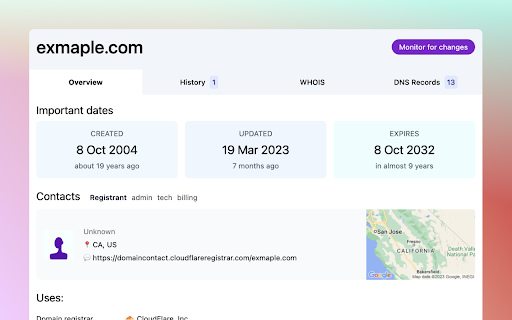
This extension started as a small project: see the expiry date of a domain.
More functionality was added in time, and now the extension can show you everything about a domain name: WHO registered it, important dates (created or expiry), DNS Records, mentions in the news, WHOIS, RDAP, and more.
Highlights:
- Shows domain availability: registered, available or for sale
- Show at which registrar the domain is registered
- Important domain dates: registration date, expiry date
- Registrant info (if public): person/company name, location, contact details
- Info about Name Servers
- DNS records: lists all subdomains
- Domain history: timeline of domain changes in WHOIS, DNS or public sales
- Does not track or record browser history. The only info used is the domain name in current tab when extension icon is clicked
Change log:
- v2.6 - Updated layout for History tab, added multiple DNS resolvers
- v2.5 - Fixes for links to register domains
- v2.4 - Load faster & more accurate domain info, using a mix of RDAP & WHOIS info
- v2.3 - Discover more DNS records (subdomains) and wildcard (*) record
- v2.2 - Show friendly message when WHOIS data can't be loaded
- v2.1 - Load info about IPs on mouse hover in DNS Records tab
- v2 - new UI, new & faster API
Latest reviews
- Kevin
- Im an independent rookie security researcher here are my findings. Scope: Network activity & Software permissions Network activity: This software only makes network connections when explicitly opening the extension The software will always connect to the back-end API server owned by dmns.app (the developer). Im told this API server connects to other servers for whois data. The endpoints are stated in the documentation on the docs.dmns.app website. Depending on the domain you want to lookup the software may directly connect to third parties for more info about the domain. Domain connections: 1) domains-api.com (Back-end API) 2) i1.wp.com (Third party) 3) a.nei.cloudflare.com (Third party) 4) i.clarity.ms (Third party) 5) Google & Cloudflare DNS servers Permissions: - This extension can read and change your data on sites. This permission was automatic granted by Google Chrome. This permission can be revoked and is not required for the extension to function. Environment details: Extension version: 2.6.5 Chrome version: 147.0.7727.55 Host device: Ubuntu 24.04.4 LTS x86_64 Tools used: Portmaster, Wireshark Disclaimer: Due to the nature of my tools and experience the information provided may be inaccurate. This report is to provide a basic overview. Conduct your own research to validate this extension.
- Imran Majeed
- Perfect!, All details on click, Thanks
- Aaron Freed
- Absolutely amazing! Gives top data. Exactly what I need.
- Andrew Elmasry
- Nice
- Ankit Sheoran
- thnku for making this extension i love this extension, saving my lots of time
- Yakov Lindholm
- not working, just crashing
- Omed SEO
- Used it today for the first time and it is really amazing!
- Jonathan
- Pretty fast, accurate data, and modern design. Love it.
- Jonathan
- Pretty fast, accurate data, and modern design. Love it.