
More Colors for Calendar!
Extension Actions
- Extension status: Featured
Adds more colors to Google Calendar!
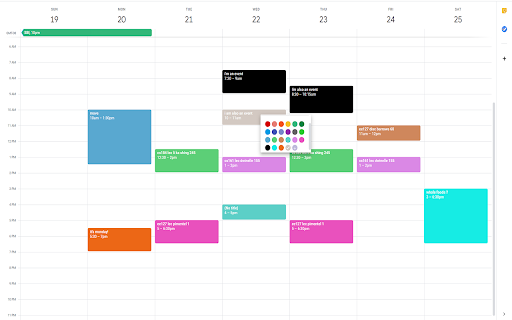
Adds more colors to Google Calendar's color selection menu.
HOW TO USE:
This extension adds the ability to insert custom colors into Google Calendar events. Upon installing the extension, you might need to refresh Google Calendar for it to load.
Once the extension has been installed, you can access the custom color creation by either right clicking events (accessing the color palette), or double clicking the event and accessing the other color palette within the advanced event details page.
You can verify that the extension has been installed properly by the existence of an additional circle in the color palette with a plus (+) sign. Clicking on this plus sign should prompt you to insert a custom color defined by a hexcode (For example, typing 000000 will give you the color black. One recommended place to find colors is https://htmlcolorcodes.com/). Pressing "OK" on the color entry prompt will add this custom color to your color palette for coloring events.
You can remove custom colors from your color palette by clicking on the extension icon in your browser's extension bar. This will open a small window where clicking on a color will remove it from the extension and your color palette.
NEW FEATURE: The window that was used for removing custom colors now contains a button to toggle between cloud and local mode. Originally, this extension only ran on cloud mode. This allowed your calendar colors to be synced across different computers and browsers. However, it also came with the limitation of max 512 events. Now, with the local mode, this limitation has been increased dramatically. Choose whichever option is better for you! You can toggle between the two as well, and they are managed independently.
Feedback greatly appreciated!
Note:
The colors are only available on the web version of Google Calendar.
The colors will only be consistent on one browser on a computer unless Google Chrome sync is enabled, in which case the colors will be tied to your Google Chrome profile.
Newest Update (1/7/2023):
Fix a lot of things.
Latest reviews
- Zara Lindskog
- It does not work
- Ciara Coates
- Doesn't work, defaults to red
- Emman None
- This one is working, check it : https://chromewebstore.google.com/detail/more-colors-for-calendar/njddnjkbpcjlaiighfmiogihdoghmhgd?authuser=0&hl=en
- hugo
- This extension works, check it out! https://chromewebstore.google.com/detail/more-colors-for-calendar/njddnjkbpcjlaiighfmiogihdoghmhgd?authuser=0&hl=en
- Kenny S.
- Absolute garbage, not sure why this is a "featured" extension. This completely broke my calendar and I can't find a way to fix it! My calendar doesn't even display my events properly anymore. I went from some colors to absolutely none. I don't see any options in the color menu when creating an event. When I back out from creating an event everything turns black. This should be removed from the web store.
- Catherine Cooke
- Doesn't work, defaults to red
- Chaniece Chen
- I was so excited I didn't even look properly at the star rating lol! It does not work. The color shows up as an option but defaults to red. :( So sad. Hopefully I can find an extension that will actually do what I want.
- Chris Hippolyte
- I did everything from restart Chrome to starting a New Calendar. Does not work. Although you can see the plus sign and new color in the options, it just defaults to red when you select the custom color...
- Vilde
- Does not work.
- Đặng Phương Mai
- it just change the colour back to red when u reselect it. u cant even delete a colour that u have chosen
- Judy Roenke
- 0 stars. does not work. Just changes events to red
- DHPH Office
- Does not work! Let's you choose a new colour and accepts it, then defaults the colour back to red when you save the event.
- Riley Wenger
- Does not work at all
- Alex Peterson
- Does not work
- Mina L.
- I can add colors but they dont show up on my events. It just changes the color to one of the normal google calendar ones...
- Amelia Szymanowska
- doesnt work
- Michelle Rudman
- Easy enough to use, clear directions. However, all colors entered default to red in the calendar view. This will not add the new colors selected into your calendar.
- Amelia George
- 0 Stars if I could. Doesn't work.
- Ericka Kantar
- Only choosing one star because I cannot give anything less. No matter how many times I enter a custom color, it will default back to red once saved. You'd think with a years worth of reviews saying the same thing google would look into this issue...but here we are. 🫠
- Zachary Yaro
- It lets me input a custom color, but it unfortunately always changes to red when I save the event (regardless of what color the event was prior, and regardless of the default color for the calendar it belongs to).
- Lucas Ellman
- Broken. Defaults to red
- Anobleds
- Does not work at all ! I write the HEX color code and it appears, but once I chose it, it only gives me RED ! So what a scam. I wanted cute colors and it will only give me RED. Please fix this !!
- George Sampson
- Doesn't work at all, just defaults the colour back to red, shame
- Blonde Redskin
- doesn't work at all even after changes suggested by user kakawapa
- Kelsie Goldman
- It shows only red, regardless of which color you specify! It does not work! BUMMER!
- Tanya Stratford
- It doesn't work. When you choose one of the new colors it actually chooses one of the preset ones instead. This is broken
- Weymar Camargo
- It shows only red, regardless of which color you specify! It does NOT work!
- Emily Phelps
- Doesnt work at all. WHYYYYYYYYY??! I got so excited and then so disappointed.
- Rainer Roessler
- Used to work, now it shows only red, regardles of which color you specify
- George Patsan
- Same just defaults back to Red useless.
- Charna Ambers
- This doesn't work for me. It's a shame. :(
- VL Charlie
- It didn't work, it just picks red by default even when I pick a new color 😔
- cameron rockwell
- Does not work. Extension will claim it is a custom colour, but only shows one of the Google Calendar standard options.
- CS Calendar
- Great idea; Very disappointing execution. "Adding" new color options is easy. However, in my experience, not a single one of the new colors is displayed when selected.
- Cassidy Scott
- This doesn't work. I added new colors to my palette, and when i tried to click the color I added, it changed the event to red instead of the color I clicked
- Barney Rubble
- 000000 gives a red color, how do you make it do black. The idiot who designed this must be colorblind!
- Annika Garrett
- Works well when you add the first color but any additional colors you add will not make it to your calendar. It will add them to your dock of colors but just chose one of the google presets at random when you chose another color you've added. In theory great, but unfortunately does not deliver.
- Gelene Johnston
- I am also having the issue where it defaults straight to red, regardless. Incredibly frustrating.
- H. Biorn
- only red :(
- Anna Keniston
- not working :/
- Juliette Huot
- Unfortunately, all the colors end up showing as red no matter what hexcode I enter :( Hopefully this will be fixed soon...
- Steven Barnes
- As others have reported, this does not currently work - every colour shows as red.
- Natasha Fox
- As mentioned by others - does not work, every colour is red
- sarah williams
- Does not work. I added new colors to the palette using hexcodes, but everything results in red.
- Nofar Schottlender
- It doesnt work.... every time I choose a color I added, it colors it in red. too bad... It was very helpful when it worked
- Scott Toledo
- The app was good for awhile but it stopped functioning normally by early March. Now as of April 17, it is no longer working with the buttons having no functionality.
- Liam Rhodes
- stopped working
- Olivia Tennant
- please fix the new bug devs; was a great tool until it stopped working this month.
- Main Account
- Doesn't work!
- Gas Pro, LLC
- DOES NOT WORK...