
WhatsGreen Multi Messenger
Malware Detected
This extension has been flagged as potentially malicious.
Extension Delisted
This extension is no longer available in the official store. Delisted on 2025-09-16.
Extension Actions
- Unpublished Long Ago
- No Privacy Policy
Fácil acceso a WhatsApp, Line, Telegram, FB Messenger y muchos más a través de la barra de herramientas de Chrome.
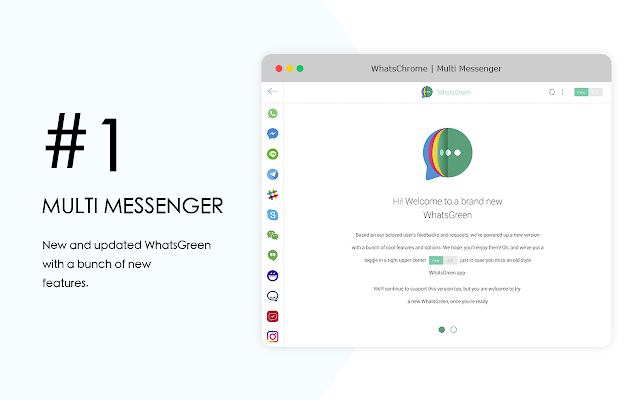
WhatsGreen Multi Messenger is the easiest way to chat with friends from Chrome Browser without a phone. With WhatsGreen Multi Messenger you will never miss a message again while working on your PC.
Instead of checking phone every time, WhatsGreen Multi Messenger is a fast way to send and read messages from most popular apps like WhatsApp, LINE, Telegram, FB Messenger, Wechat, Yahoo Messenger, Slack, Hangouts, Skype, Instagram, Gmail, Twitter, Facebook, Hipchat, Crew MSN, and Spotify.
During your surfing the web and opening other web pages, simply click to the extension button and window chat will be show on the current page.
WhatsGreen Multi Messenger is an irreplaceable assistant with:
- Support desktop notifications, so you will be always notified about new WhatsApp, Messenger, Hangout, Skype and Telegram messages even when you aren't checking the web page.
- Fast Launch for WhatsApp, Telegram, Hangout, Skype, FB Messenger, Instagram, Gmail, Twitter, Facebook, Wechat, Yahoo Messenger, Slack, Hipchat, Crew MSN, Line and Spotify.
WhatsGreen helps with an access to the official web clients like WhatsApp, Telegram, Hangout, Skype, FB Messenger, Instagram, Gmail, Twitter, Facebook, Wechat, Yahoo Messenger, Slack, Hipchat, Crew MSN, Line and Spotify easier and in a more convenient way.
Instead of checking phone every time, WhatsGreen for Whatsapp™ is a fast way to send and read Whatsapp messages.
WhatsGreen for Whatsapp™ is the easiest way to check WhatsApp messages from Chrome Browser without phone. Clicking on the toolbar WhatsGreen Extension icon, renders WhatsApp Web in a small UI attached to the toolbar popup.
WhatsApp Web is a web application that people at WhatsApp Inc have created to enable chat through the browser window. With WhatsGreen for Whatsapp Web you will never miss a message again while working on your PC.
- The Extension doesn't require any permission from the users. Not affiliated with WhatsApp.
- WhatsGreen for WhatsApp™ is a helper extension aims to help you access the official WhatsApp web client easier and in a more convenient way. There is no intention on misleading users that these are official applications.
- supports desktop notifications so users are notified of new WhatsApp messages even when not checking the web page.
- Fast Launcher for WhatsApp Web.
- Whatsapp Show amount contact of chat. (on Badge)
- Security chat with https protocol. (Support by WhatsApp™ Inc)
- Whether you are open other web pages, Click of extension then window chat will be show.
WhatsGreen Extension for Whatsapp As all the software I make in my free time, I created this Extension because I wanted the functionality it offers for myself and 4 Everyone. My first need was being able to watch all WhatsApp notifications on my desktop computer, and that was its first feature. As the extension has raised some interest, I'll be maintaining WhatsGreen Extension and new features to WhatsGreen for whatsapp will probably be added in the future.
• How to use it?
To start using WhatsGreen for WhatsApp Web, install this extension and click on the Chrome toolbar button with the WhatsGreen icon. If you are not logged in to WhatsApp Web, you must follow the instructions and scan the QR code with your phone. Remember to check the "Keep me signed in" checkbox so that your session is not closed automatically, or you may miss notifications.
• Privacy & Security
WhatsGreen doesn't read anything you type, send or receive! It doesn't even store any of your login credentials anywhere. Overall, using WhatsGreen for whatsapp does provide a couple of advantages when it comes to security.
• LEGAL
WhatsApp is a trademark of WhatsApp Inc., registered in the U.S. and other countries. WhatsGreen for Whatsapp is an independent project developed by Whatschrome team and has no relationship to WhatsApp or Whatsapp Inc.
Easy access to WhatsApp and all the mainstream messengers via Chrome toolbar
Meet WhatsGreen - an ultimative Multi Messenger, which supports all the mainstream worldwide chats and messengers. Leave jumping from chat to chat and switching between WhatsApp and FB Messenger in the past - one app brings all the communication power to your browser and it's called WhatsGreen.
Latest reviews
- Jiten Rabari
- it is very helpful app
- Lucivaldo Lima
- show
- luis miguel cerron chui
- no esta mal
- Cita Porcal
- got to know about this very late
- Jose Correa
- Buena App
- maria carrasquero
- me encantoooo
- Ismail Hasan
- SOS
- Mahan Rahimi
- Its very good
- Andre Luis
- Não permite conectar mais de uma conta de Whatsapp, pioraram o serviço.
- Alexo Rojas
- Cool. Most popular social sites.
- koi koi
- communication
- Kesitha Himansith Jayasinghe
- This is a very useful extension,and easy to handle and have a good look. HIGHLY RECOMMENDED!!!!
- Hanzal Zohaib
- hanzalzohaib
- Simon Riek
- i need messenger and whatsapp
- abdulaziz abdusamatov
- я еше не попробовал
- dayax ibrahim
- good
- nishabagban bagban
- nisha bagban @ gmail.com
- Connor Lazowy
- one of best extension app
- Abby Miller
- great one
- Veronica Hibl
- wow good service
- Carolina Callegari
- Na nova versão não esta conectando com o Telegram, achei bem funcional, pois junta tudo mais pratico
- Ketty MENASCE
- j'espère pouvoir messenger sur F.B.
- emilly vitoria
- e meuito bom
- Putri Candrakirana
- blm dicoba
- Elijah Mulima
- perfect app i am really enjoying it
- ery supianto
- Sangat bagus dan membantu
- Ariadna Conde
- OK
- GUY CHATELIN KEUBOU
- good
- Amar Nath
- what a google
- antonio de la cruz
- todos bien hasta ahora
- Ks Saklani
- good
- kemoko zby camara
- J'aime
- Ebru Solmaz
- Nice
- النقيب للعلانات
- احبت ذالك
- Mr. O
- Synchronisierung und Funktion ist gut, aber die Ladezeit ist EWIG!!!!!! Dann die ganzen Müllaps....Slack, HipChat, was ist das?!
- Shirlene Leong
- I have issues logging into my line app account. tried both email and qr login, but keep getting 404 error
- Grosir Madu
- love it
- jaolred reed
- i like it
- Radek Skrbek
- You wrote us: "We hope, you'll enjoy them!" But the new version does not work. I try connect whatsapp. The wheel is still spinning. And the Whatsapp does not start. Then I change to old version, it is works.
- Michel Warta
- the killed the best option! As a person with 3 whatsapp acounts (business, private, school) i love the option to have in one application all three working on the same time, but with the update this is not longer possible... so the power of this externsion is for me not longer valid... to bad
- miguel angel pulido ramirez
- me encanto
- Matias Falcucci
- en una palabra, meahencantao
- reyan ahmad reyan ahmad
- reyanahmad
- Angalifu Smith
- So far, Sooo~Fantastic! 🔔🔔🎬🌹💜🔥💜
- Maya Mariano Madias
- bom usar
- Nathy Lopes
- nem pega no meu pc
- Patricia Souza
- muito bom
- mega varshini
- it was best app really amazing
- 허지은[HEO JIEUN]
- what is the purpose of "container" button?
- ERICKSM2009
- MUITO BOM