
Turbo Downloader for Instagram
Extension Actions
- Extension status: Featured
- Live on Store
Download photos, videos and Reels from Instagram.
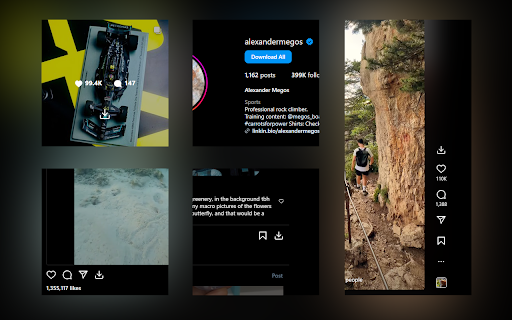
Turbo Downloader for Instagram adds a button to every Instagram post, Reel, and Story so you can quickly and easily download anything while browsing Instagram. The “Download All” button added to Instagram accounts lets you bulk download all their posts in one click.
NOTE: Please reload your Instagram tabs after installing or updating to load the extension.
While browsing Instagram, just hover over a post preview and click the download button to save it. If there are multiple images/videos in the post, they’ll all be saved.
If you’re looking at a post or Reel, check next to the bookmark and share icons for the download button, or try the hotkey Ctrl + Shift + D or Cmd + Shift + D.
A story can be saved with the download button in the top right corner.
When downloading an entire Instagram account, you’ll be prompted to choose a folder. A new folder will be created inside that folder with the name of the account being downloaded. Images and videos will appear in that folder as soon as they get downloaded. For future account downloads, files with the same name in that folder will be skipped.
As of February 21, 2026, version 4.12.16 of Turbo Downloader is up and running. Feel free to reach out to [email protected] if you have questions.
Version 4.12.16 changes:
-Fixed download icon not appearing on posts with multiple images/videos.
Version 4.12.15 changes:
-Fixed download icon not appearing on stories from the home page
Version 4.12.14 changes:
-Added a download all button for stories and highlights
-Fixed "Could not find post" for stories and highlights
-Fixed "Download all" button not appearing on profiles
Version 4.12.13 changes:
-Changed name to Turbo Downloader
-We were required to change our name due to Chrome Web Store policies
Version 4.12.12 changes:
-Fixed download icon not appearing on bookmarked/saved posts
-Fixed download icon not appearing on some highlights
Version 4.12.11 changes:
-Fixed "Could not find post" in some cases
-Fixed download icon not appearing beside the bookmark icon on some posts
-Fixed download icon not appearing in some places when not signed in
-Fixed some images being cropped or downloaded in a lower resolution than available
Version 4.12.9 changes:
-Fixed download icon not appearing while hovering Instagram posts in a grid
-Added a tip for Brave users who are unable to select an accounts download folder
Version 4.12.8 changes:
-Fixed download icon not appearing on some Stories (again)
Version 4.12.7 changes:
-Fixed download icon not appearing on Stories
Version 4.12.6 changes:
-Remove downloads permission
Version 4.12.5 changes:
-Account download folder is now saved.
-Added option to change your account download folder
-Fixed "Could not find post" for some users.
Version 4.12.4 changes:
-Added options page.
-Posts with multiple images/videos now show a download icon by default. Please use the options page if you would like to change this behavior.
-Fixed download icon sometimes appearing in places it shouldn't.
-Fixed "Could not find post" for some users.
Version 4.12.2 changes:
-Fixed download icon sometimes not appearing on Stories.
Version 4.12.1 changes:
-Fixed download icon over carousel media for some users
-Fixed “Could not find post” for most users
Version 4.11.2 changes:
-Download icon on posts with multiple images/videos now downloads everything
-Added a download icon when hovering the image/video of a carousel for only that item
-Fixed “Could not find account” for some users
Version 4.11.1 changes:
-Fixed download icon for some users with dark mode off
-Fixed “Could not find post” for some users
Version 4.11.0 changes:
-New bulk account download now saves files as they're downloaded instead of all at the end
-Fixes bulk account downloads sometimes failing to start
-Fixes bulk account downloads sometimes failing to complete
Version 4.10.5 changes:
-Fixes Reels downloads sometimes downloading a profile picture
-Fixes for smaller screen sizes
Version 4.10.4 changes:
-Fixes "Cannot find post" for some users
-Fixes for some Stories
Version 4.10.0 changes:
-Adds hover downloader
-Fixes for feed downloads
Version 4.9.0 changes:
-Migrated to MV3
-Fixed Feed post downloads
-Updated progress bar for bulk downloads
-Added progress bar for reel/video post downloads
Latest reviews
- Naieem Nasser Yunus
- Super
- suresh kumar
- excellend the best i have seen
- Rando MGuy
- Download stories only works when the profile is opened from home, when opened from search or other page, it wont download and show error toast instead. pls fix
- asnd
- Works for regular posts, doesnt work for reels tho :(
- Cole Saenz
- just what i needed
- Jhansen Ferreira
- isn't working as much things on windows
- Michael Barrows
- I would like to see a function to only download reels in the reels catogory in bulk and not one at a time. When you download all their posts you do get reels, but, not all of them as you can click the reels catagory and see a whole lot of reels that weren't downloaded.
- Taher Elsheikh
- i use this and sort feed (another extension) everyday when repurposing instagram content. thanks dev!
- Leaguefan93
- Extension is broken when trying to download stories, downloading profile content still works but stories gives an error saying "Unable to download requested story, please refresh the page", it has been like this for about 4 days now. Will edit my review when this is fixed, as for now it's 1 star, fix this issue and i will change it back to 5.
- Tanay Rathi
- not showing download option
- Andy Farman
- It does not download s***
- Dynamo Dynamo
- literally the best one out there, solved such a big problem for me as i need to download hundreds of reels everyday for my ecom store. Wish i could donate to them somehow but couldn't find their website.
- Maqbool Ahmed
- Outstanding Extensions. Fast and Complete Video and Images Download. Amazing
- sanjay 97
- Superb extension, it helped me to download all my Instagram posts almost 300 in one go in only 10-15 minutes. Saved a lot of my time. Thanks for creating this extension. :-)
- Nelson Villalobos
- easy, functional, the best
- Jake Ortiz
- Its getting stopped while using!
- Gift Okpare
- love it
- Ahmad Sohail Wahab
- Can it please be in a way to date them according to the date in which the files were posted. That would make it easier to sort them. Thank you, it was extremely helpful.
- Jungkook
- the download all option doesn't go past a certain number of downloads at a time. No matter how much i try. pls fix that.
- Jonathan Joestar
- Doesn't work at all
- John Ly
- Best IG scraping software on chrome by far. If I could make one request. Please add a time delay option for downloads. Something that staggers the downloading a number of seconds. Downloading a thousand pics/vids in a few minutes has to be flagging IG and will eventually lead to a ban?
- Lale
- What happened to download all button?
- Abhishek Shah
- THANKS FOR QUICK FIX. DOWNLOAD ALL WORKING AGAIN..
- SLeqit
- Works
- Johnny Dragovic
- The extension is excellent. I hope you will add a filtering feature (images only or video only) and specify a final download date.
- Daniel Najafi
- used to be the go-to reliable extension... but as many others have explained the bulk download button + only downloading 1 image and never the one you want. What a shame. This was SO good before. Team if you're reading this, the fix is simple, don't overdo it and try to reinvent the wheel :)
- Person000
- The download button never appears when you view the photo, which means you have to go to the profile to search for it in the gallery and download it from outside, ugh. It feels like the developers have lost interest in this extension.
- Raymund John Gil Luzon
- Please fix the bulk download issue.
- Arnab Ghosh
- The most issue recently is, insta home page eating more ram with this extension and then crush after some time...!!! There should be a option to select video quality... Some reel hi-res download size is like a movie...!!
- Mitchell Yeung
- Used to be able to download multiple images, now it only downloads the first image if there's multiple images. Absolute garbage. Do not use. Would rate 0 stars if I could.
- Susan Redfearn
- It used to work great, but now, it only downloads one image. It never used to be like this... Please fix it!!
- Rô Gaia CR (The Little StrategisT)
- The downloadall button doesn't download reels or stories
- Carlos Wx
- used to be great, but now only downloads 1 image. Why????????
- Marco
- It used to work great but now, like others, it only downloads one image. Please fix.
- Nathan King
- Used to be a perfect extension now it only downloads 1 picture. Never used to be like this...
- Shaina Grant
- I'm having the same issue as everyone else here. It only downloads the first slide, but not the entire slides.
- Jernau Gurgeh
- Now you can only download the first photo if the post includes several pics. Dead extension.
- Soutick Mallick
- If post has multiple photos only able to download first photos. Most bogus extension. 0 star deserving but it's will not count if i don't give any star
- Alex AJ
- why did you guys change it???? it was working perfectly. when i click download, it downloads the whole carousel. its perfect. but now, it only downloads the first image. why.
- Xr Y88
- now it only download the first reels/image on the first slide, download all button is missing, also before this when downloading more than 10 slide post, sometimes it only download 10 slide and didnt download the rest of the slide, need to update it plz
- AndyRatchick
- Stopped working when it comes to only downloading a single image from a post with multiple ones. There used to be a button over each image which would download that single image, while the one near the share/bookmark icons downloaded them all. Now it just downloads the first one, no matter what, and the download button no longer shows on the individual images.
- Toan Nguyen
- Great extension but now individual picture download has a bug of downloading the same picture and not the one I wanted to download. Need to fix this bug.
- Russell Silva
- Needs to be updated, some features currently aren't working. Doesn't download all photos from an album correctly or allow you to download a specific photo from an album other than the first.
- SW W
- It was great but Instagram just updated I guess and a lot of the features is no longer functioning.
- James Brown
- Not sure if this extension was updated, but the ability to click into multiple pictures and download an individual one no longer exists. Not very useful anymore if you have to download a whole handful of images you don't want.
- Logan Braveheart
- Does not (Download All) work on "Reels" so this is useless! All it does is download photos from posts.
- Eric Russell
- Leaving a review since it looks like it's pretty low at this point. So far does exactly what I need! Been looking for something like this! I've been right clicking, saving and having to scroll though all the other BS files that adds. This is nice! If I find any issues I'll adjust, but hopefully any other bugs that have been reported here are being addressed. Seems they're pretty active with updates which is sweet for an extension!
- Görkem Nurata (Aernath)
- Worked for me. No problems for now, thanks!
- Jason biggs
- does what i need it to do.
- optimus prime
- good but sometimes stop working