
Genesis: Sort By Rotation
Extension Actions
CRX ID
pbfjkepobfjbgemhfoiejehiaceppcbp
Status
- No Privacy Policy
- Live on Store
Description from extension meta
Adds ability to sort by Rotation Group (A, B, Virtual) in Gradebook view. For use in Bernards Township.
Image from store
Description from store
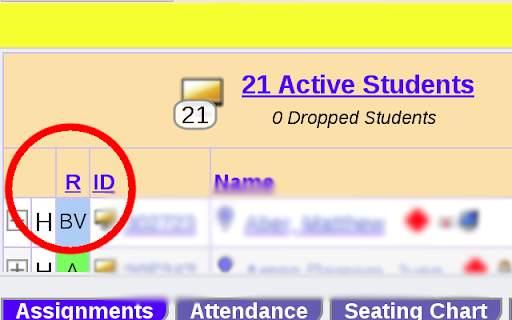
There's an "R" column (Rotation) next to each student's name in your Genesis gradebook that shows a combination of letters:
- "A" = Group A Blended
- "B" = Group B Blended
- "AV" = Group A Virtual
- "BV" = Group B Virtual
Installing this will turn that "R" blue and allow you to click it like every other column to sort by Rotation.
You will also be able to sort by "RG" (Rotation Group) in your attendance screen as well as sort by First Name.
This extension is for use in the Bernards Township district only.