
تحسينات مرئية لـ Google Meet ™
Extension Actions
CRX ID
fondjoepdngpdimiojnpikbajiakobhb
Description from extension meta
يحسن تجربة Google Meet ™ عبر 3 ميزات مرئية
Image from store
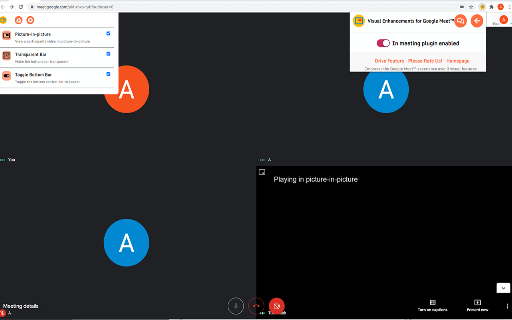
Description from store
تتيح لك التحسينات المرئية المجانية لبرنامج Google Meet ™ تمكين / تعطيل مجموعة التأثيرات المرئية لمكالمات Google Meet.
يمكنك استخدام مجموعة من الميزات في صفحة الاجتماع مباشرة أو من شريط أدوات الملحق.
★ الميزات الرئيسية:
✔ صورة داخل صورة
اعرض فيديو للمشاركين في وضع صورة داخل صورة
✔ شريط شفاف
اجعل الشريط السفلي شفافًا
✔ تبديل الشريط السفلي
بدّل شريط التحكم السفلي لتظهر أو تخفي الشريط السفلي
Latest reviews
- Teresa Guzman (Terri)
- when you're working from home is excellent to manage your privacy
- Sau
- beautiful PiP Picture in Picture mode, thank you!
- Cursos Virtuales
- Funciona muy bien.
- Nora MB
- oooooooooooooooooooooooooooooooo
- Martin Vlach
- Absolutely Perfect! For online collaboration, gaming… It converts the Meet screen into a simple resizeable window without any bars and buttons that you can put aywhere on your screen and it stays always on top. Yep!
- Martin Vlach
- Absolutely Perfect! For online collaboration, gaming… It converts the Meet screen into a simple resizeable window without any bars and buttons that you can put aywhere on your screen and it stays always on top. Yep!
- atharva (18)
- was the da best
- atharva (18)
- was the da best
- Liseth Valentina Mican Martinez
- no sirve
- Astrid C:
- Tengo un problema y me a pasado en todos mis dispositivos el picture in picture no me funciona no se si sera la aplicación o mi opera
- Jerónimo De La Torre
- Es muy buena extensión.
- David Andrei
- ok
- Sarah Sami
- it really is very helpful tbvh. Like...bottom bar who? i can even toggle it and picture in picture just is an ease in itself. gr8
- Sarah Sami
- it really is very helpful tbvh. Like...bottom bar who? i can even toggle it and picture in picture just is an ease in itself. gr8
- Maly Casas-Cordero Guerra
- Excelente aplicación de Chrome, muchas gracias.
- Brayan Camilo Rivera Martinez
- c x
- Brayan Camilo Rivera Martinez
- c x
- Cristobal Canchis
- esta bien
- Ece Yurdugül
- İşe yarıyor
- Miguel Vasquez
- Cabia para bien, solo me gustaria que pudieras acercar la pantalla
- Calvin Bedell
- Very useful for Google Meets, with you being able to have a picture-in-picture video of someone else while you are doing an assignment, having the bar being able to be toggled on and off to pop up and down, it was truly great. The bottom bar that covers the screen is now gone, and that you can have it be transparent is also great because you can see right through. And, the fact that you don't have to pay for any of the features, or get something like a "pro" version is AMAZING. Truly an amazing extension.
- Calvin Bedell
- Very useful for Google Meets, with you being able to have a picture-in-picture video of someone else while you are doing an assignment, having the bar being able to be toggled on and off to pop up and down, it was truly great. The bottom bar that covers the screen is now gone, and that you can have it be transparent is also great because you can see right through. And, the fact that you don't have to pay for any of the features, or get something like a "pro" version is AMAZING. Truly an amazing extension.
- Raffaele Piras
- quando la barra si abbassa sarebbe bello che lo spazio lasciato libero venisse usato per ingrandire il rimanente
- Lisett Vasquez
- è figissima
- Zify m.
- Just great, simple does what it says. Bye bottom bar!
- Zify m.
- Just great, simple does what it says. Bye bottom bar!
- Lorella De Luca
- mi aspettavo che eliminando la barra inferiore venisse dato più spazio al contenuto. In realtà lo spazio occupato dalla barra diventa nero senza recuperare nulla... Peccato.
- Edson Espinoza
- Pésimo, no eran más sencillo dejar las funciones anteriores? Ok hace que la barra inferior pueda desaparecer sin embargo sigue dejando es espacio vacío. Antes podías maximizar la presentación con F11 y podías verlo a pantalla completa sin embargo ahora ya no. Pésimo
- Jesus P.M.
- Es lo que estaba buscando. Mejoraría si el espacio de la barra lo ocupara la presentación.
- DELICIA VICTORIA FEDELE
- Buscaba ocultar la barra de Reunión y la extensión me sirvió perfectamente. Lo que si, para mejorar es que se amplíe el margen de presentación, a la vez que la oculta, es decir, que reduzca los márgenes. Muchas gracias!
- Leandro Velarde Tancara
- MEJOR
- Angélica Cortés
- Es útil, se pone en transparente y ya no se ve la barra, el espacio sigue ahí. Lo genial sería que se ocultará y el ese espacio se usará para la pantalla de presentación.
- Esteban Rodriguez
- Es buena, pero pueden mejorarla... Me refiero a que si esconde la barra, pero al esconderla queda ese espacio y no lo ocupa el de la presentación. Seria excelente si se pudiera.
- Laita Digital
- Genial funciona perfectamente con cualquier tipo de cuenta ⭐ En este os mostraré CÓMO UTILIZARLA paso a paso 😀👍 https://youtu.be/vDnIesFPhIw
- PEREZ MEDELLIN BRUNO
- Quita la barra, pero estaría bien si también quitara las notificaciones de cuando alguien se une, sale, etc. Si pudiera dejar solo el video sería perfecta
- Angel Matias Alzate Cardona
- muy buena
- frog
- the pip features are great because a lot of times i want to see the meet presentation while on a different tab. but my favorite features are the bottom bar ones. whenever I used to move my mouse it would move all around but with this its wayyyyy easier. most of the extensions I've used for these issues you need to pay for the "pro" version. but this is all free! and it doesn't slow down my computer.
- coraorac
- the pip features are great because a lot of times i want to see the meet presentation while on a different tab. but my favorite features are the bottom bar ones. whenever I used to move my mouse it would move all around but with this its wayyyyy easier. most of the extensions I've used for these issues you need to pay for the "pro" version. but this is all free! and it doesn't slow down my computer.
- Pavel Nekvapil
- FAJNE
- Juan Carlos Alvarez
- Vine buscando la opción de ocultar la barra inferior al estar dentro de una Google Meet debido a que tapaba parte de la presentación. Veo que lo que hace esta extensión es reducir el tamaño de la pantalla presentada por lo que se podría prescindir de ocultar la barra o de ponerla transparente. En todo caso me sirvió porque lo que buscaba era ver toda la pantalla que me estaban presentando. Gracias.
- Alexis Jair Linares Varas
- Podrían hace que al fijar la pantalla que están presentando aumente su tamaño como antes, porque se queda vacío el espacio donde estaba esa barra. Gracias de antemano.
- Jorge Bielsa Callau
- Necesario después de bloquear la barra por defecto en la actualización
- LordRuddiestGaming
- amasin
- ADAN ANDREI RUIZ LEMUS
- solo Gracias, molestaba un poco
- Juan José Juárez de la Cruz
- Con la actualización de febrero de 2021, ya no se puede desaparecer la barra inferior
- ThatsCoolToo
- Thank you. Bottom bar has been DEFEATED!!!
- gucci
- Thank you. Bottom bar has been DEFEATED!!!
- JIvan BMtz
- ¡Muy útil! Tener la habilidad de ver la cámara (Imagen en imagen) de alguien mientras estas en otra ventana (ya sea del navegador) o pestaña me encanta. Y poder decidir si quitar la barra inferior o no, es lo mejor, ya que a veces me molestaba antes. 10/10
- 31 SAMARTH NIJSURE
- it was good
- FENIX
- me ayudó a ocultar la barra inferior, podrían hace que al fijar la pantalla que están presentando aumente su tamaño como antes, porque se queda vacio el espacio donde estaba esa barra