
Goniometer
Extension Actions
- Extension status: Featured
- Live on Store
Virtual Goniometer by Ryan Mo
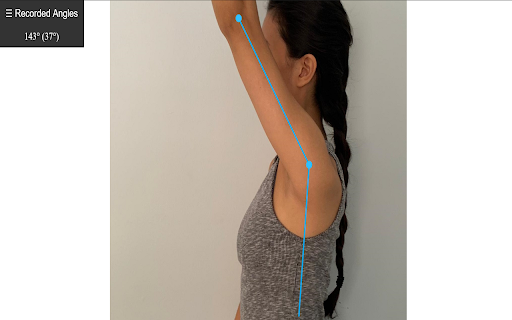
This virtual goniometer is an easy to use tool for clinicians to measure angles of joint range of motion during live virtual care sessions.
After opening the extension by clicking on the icon, please click the "Start Measuring" button. Next, press the "\" (backslash) key on the keyboard to begin taking measurements.
When finished, click the "Stop Measuring" button. While taking measurements, you will be unable to interact with other buttons in the video call until the Stop Measuring button is clicked.
Click to mark the points of your stationary goniometer arm, the axis of rotation, and the measuring arm.
As you are measuring there will be a live display of the current angle, with the supplementary angle in brackets.
Find all measured angles recorded in the left side panel, and easily copy all values with the copy button.
To hide the "Recorded Angles" tab in the top left corner of the page, press the "`" (backquote or backtick) key which is next to the number 1 on the keyboard.
This extension should work on any video conferencing platform that uses Chrome. So far, it has been tested on Zoom, MS Teams, OTN, Adracare, and Doxy. If there are other platforms that do not currently work and you would like to have it supported, please send me an email and I will get back to you when possible.
To use the goniometer on photos from your computer, use the following instructions:
- Right click the extension icon in the top right of your browser > click manage extensions > click allow access to file URLs
- Drag and drop the image into the Chrome browser
You should now be able to use the extension on local images.
Latest reviews
- Danuta McCall
- I am having trouble using this on zoom or of PDFs that I have open on the internet through google chrome. For zoom, I do not see anything pop up or an option for "start measuring". Does it work on the Zoom desktop app as well as zoom calls opened through zoom via google chrome? For PDFs open through chrome, I click the extension and press the "\" key but no measurement options pop up. Would love to use this extension in both of those settings!
- Alexandria Tran
- Works great! You open up the shortcut, which works on most websites, and use "\" to begin the tool. It saves the history of measurements, though I'd like to recommend being able to display angles larger than 180°
- Alessandro Fazio
- doesn 't woerk
- CHARLES BEWSEY
- Works fine. Backslash didn't work for me though, pressing the ~/# button did however.
- Kassie Kolbeck
- I have a Mac book and pressing the backslash button does not work.
- 程鹏昊
- nice tool
- ryan
- Fantastic execution on a simple concept. Massively underrated extension imo. This is useful for any angle measurement purpose. Doesn't get in the way & I love how the angles are recorded & saved. Thanks for publishing :)
- ryan
- Fantastic execution on a simple concept. Massively underrated extension imo. This is useful for any angle measurement purpose. Doesn't get in the way & I love how the angles are recorded & saved. Thanks for publishing :)
- Nikko Orolfo
- not working
- Nikko Orolfo
- not working
- Agaspher Lukich
- Not always works
- Agaspher Lukich
- Not always works
- Jonathan
- Terrific Functionality!
- Jonathan
- Terrific Functionality!
- Y G
- Great tool for virtual care!!
- Y G
- Great tool for virtual care!!