
Video Playback Extension
Extension Actions
A full-featured video and audio player extension. Control playback speed, skipping, rewinding and more.
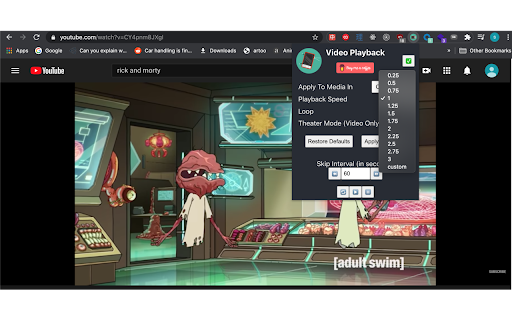
Speed up, slow down, advance and rewind HTML5 audio/video elements either with shortcuts or using a clean, elegant interface.
Optimize your media experience by:
- controlling media on just your current active or across all tabs in Chrome
- customizing playback speed
- skipping forward or backward by custom time intervals
- looping
- restarting media from the very beginning
- playing
- pausing
- an experimental Theater Mode (for video only)
- customizable one key shortcuts for all actions
Once the extension is installed, navigate to any page with an HTML5 video or audio element and click on the extension to bring down the Player User Interface. Any changes made will affect all audio/video elements on the page and you can optionally control media across all tabs in Chrome using the Player UI.
Default Shortcuts:
- `s` = Decrease playback speed by .25
- `w` = Increase playback speed by .25
- `l` = Loop
- `o` = Pause
- `p` = Play
- `e` = Reset playback speed
- `r` = Restart
- `a`= Skip backward by the Skip Interval set in the Player UI
- `d` = Skip forward by the Skip Interval set in the Player UI
- `t` = Theater Mode
Latest reviews
- Elsaa Valdez
- wont work because i cant reverse the video.
- John Thomas Lynn
- Just what I was looking for. There is a video player on a website I use that prevents skipping forward/backwards as well as any other hotkeys during video watching. This tool allowed me to use the hotkeys while watching the videos. Thank you!
- Kalulu Le
- Works flawlessly
- T. F. (LeeToFa)
- Thank you, but it stopping loop doesn't work on instagram. Example: https://www.instagram.com/p/CcOH5UOjlru/
- T. F. (LeeToFa)
- Thank you, but it stopping loop doesn't work on instagram. Example: https://www.instagram.com/p/CcOH5UOjlru/
- Christina Cho
- Super useful!! Thanks!!!!
- Christina Cho
- Super useful!! Thanks!!!!