
GoodPlan Notes
Extension Actions
- Extension status: Unlisted
- Live on Store
Popup notes ⚛ Weekly & Daily view ⚛ Rich editor ☑ ToDos ⚛ Google Calendar ☀ Weather ☝ Daily facts
GoodPlan is the best digital smart notebook, and it’s free.
Stop making disorganized notes on your phone, or in text documents on your desktop. From now on have it all neat and clean in only one place with GoodPlan.
This is not just another notepad!
While really simple and easy to use, the functionalities of GoodPlan make it nothing less than an authentic smart note-taking extension for your browser.
You don’t need to keep the important stuff in your mind all the time. Put it down on GoodPlan and get yourself some peace of mind and mental clarity.
Try it out. You will find that you can think much better when everything you need to remember is written down in notes, to access anytime.
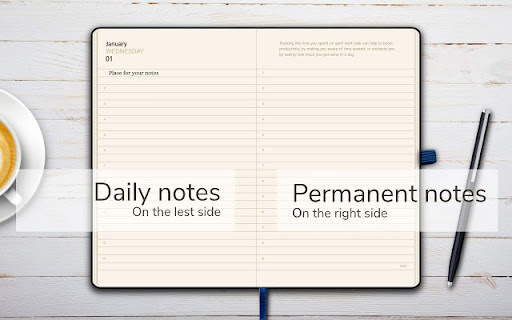
GoodPlan comes with a great-looking, functional design in which you can choose to display your notes by day or by week… with space at the side for permanent notes that you want to show up every day (the really important stuff).
You can use it as a journal, bucket list, or simply to make notes stored by date with different format options like font, weight, colour, and more.
Your thoughts, notes, ToDos and even Google Calendar events… are all just one click away after installing GoodPlan.
Read on for a list of features and reviews, or install it now and see for yourself!
FEATURES:
------------------
⋆ Your notes separated by date
You can easily add your notes for any day you choose.
⋆ Daily and permanent notes
Daily notes on the left side and permanent notes on the right side. You can enlarge either of those with a click to show only daily or permanent notes.
⋆ Weekly view
See and edit your notes for the entire week.
⋆ Rich editor
Format your notes as you like (bold, cursive, bullet points, colours, etc.)
⋆ GoodPlan icon
Quick access to your notes via the GoodPlan icon in top right corner in the browser. By clicking on the icon you can either open the entire notebook or just a small popup with the current day. You can change that in the settings to your liking.
⋆ Smart popup notes
Once you click on the GoodPlan icon, you will immediately see the notes for the current day. Very useful if you want to make notes while watching a video!
⋆ ToDos
ToDos are very useful to stay organised day by day. You can see the your progress from past days or you can prepare ToDos for the future with checkable boxes.
⋆ Google Calendar integration
You can choose which calendars from Google you want to see in the notes, and on each day where you have events.
⋆ Sticky calendar
For fast navigation between dates you can use a calendar which shows circles around dates that have notes.
⋆ Full-page editor
You have the option of using full-page view to edit your current note with complete focus.
⋆ Weather updates
On the today page you can see the current weather temperature, sunset and sunrise time, and wind speed.
⋆ Dark mode
Switches between dark and light modes according to time so that when it's getting darker in your room the notes don't hurt your eyes
⋆ Skeuomorphic design
Beautiful and minimal interface which mimics real cozy environment.
⋆ 3D animation
Nice flipping page effect and coffee smoke in the dark mode.
⋆ Daily facts and tips
To keep you informed about how to stay healthy and productive!
⋆ No account needed
Once the extension is installed you can write your notes right away.
⋆ Work offline
Even without an Internet connection all your notes will be accessible to you.
⋆ Language Support
The extension support English, español, português, русский, हिन्दी, العربية, 中文 (简体)
⋆ Flexible configuration
By default we replace your new tab page with the notes. If you prefer to use your default page you can change it back on the Option page. Also, you can change how the G-icon behaves .
⋆ Simple, instant and FREE
it's very easy and straight forward to use the extension, and it's free.
Premium features:
⋆ Backup
Secure your notes with our cloud backup.
⋆ Synchronization
Access your notes from multiple devices.
⋆ No ads
Focus on what matters most - your notes.
USER REVIEWS:
-------------------------
Cathy Lewis - ★★★★★
«Love this! I've been trying to develop the discipline for daily short journaling and this is just the trick. Also, a great place to keep running lists. Thanks!»
Aladin Hrustanovic - ★★★★★
«And also the way it looks, design, loving it!, keep the simplicity please and don’t turn it into a complicated program».
Deirdre O’Donovan - ★★★★★
«A simple browser extension that opens up as a blank note pad. Focused and practical, with nothing distracting on it. The zoom feature is good».
Roshni Patel - ★★★★★
«Best Planner app I've ever used».
Helena Ferguson - ★★★★★
«Really simple and easy to use, set it as my default browser and reminds me of my to do list every time! So much simpler and less fiddly then most other to do list extensions!»
NOTES:
------------
We follow Chrome's minimum permissions policy and only request the following permissions:
• "New tab page": Enables to show the notes once a new tab is opened. It can be adjusted in the settings of the extension.
• "Geo location": Enables to show weather updates. Dark mode depends on it.
• "Storage": Enables the extension to store notes and settings locally in your browser, like cookies.
Your privacy is our top concern
The GoodPlan Notes Chrome extension encrypts your notes before storing them in the local storage and only uses encrypted connection for backup and sync notes on our servers.
By installing the extension, you agree to GoodPlan Notes' terms and conditions (https://goodplan.app/terms-and-conditions.html) and privacy policy (https://goodplan.app/privacy-policy.html).
Install GoodPlan now and start making your life simpler, clearer, and more organized!