
Blackboard Grades UVM
Extension Actions
- Live on Store
used to view calculated UVM Blackboard Grades
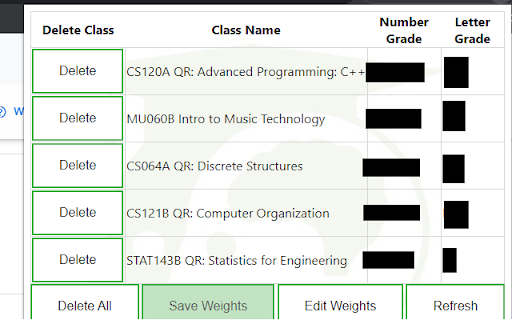
If UVM students know anything about struggle, it's probably Blackboard. And while we can't do Blackboard's job for them, we figured we could make things a little easier for UVM students...
Introducing Blackboard Grades UVM, a new way to view your grades!
You no longer need to do those tedious calculations yourself when you can't see your final grade. this extension will get all of your grade information and do the calculations for you! Just login to blackboard, click the extension, edit and save your weights (first time only), and you're good to go!
Code: Sam Gusick
Concept & Art: Evan Siegel
Instructions:
1. log in to blackboard
2. click the extension to load and view classes
3. fill in the assignment types with the weights from your syllabus (first time Only, saves automatically)
4. Enjoy!
FAQ:
Q: How do I use it?
A: Click the extension icon in the top right corner of your browser
Q: My class says N/A, why?
A: the extension could not pull the grade info for various reasons. Either your class did not create a grade page or there are no grades entered. if this occurs and neither are the case, report a bug. Do keep in mind that the format of blackboard grades across classes is very different, it's impossible for the extension to account for all of these differences.
Q: I'm having an issue that's not answered here.
A: click "report a bug" in the extension and fill out the form with your issue.
Latest reviews
- Sam Gusick
- :D