
Circle Mouse Gestures (pie menu)
Extension Actions
- Extension status: Featured
- Live on Store
Circle menu with actions on right mouse click
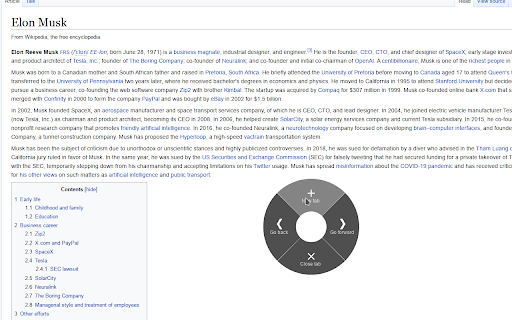
This extension introduces convenient circle menu (so-called pie menu) to improve interaction with your browser. Just hold down the right mouse button, highlight one of the preset actions and release the button.
Circle menu recreates the way mouse gestures were represented in good old Opera 12 browser, and allows to clearly see all available gestures, with no need to remember them all.
Circle Mouse Gestures is supposed to provide a better implementation of mouse gestures and drag gestures, while replacing the regular context menu at the same time — but regular context menu is always there whenever you need it. Perfect for fullscreen browsing!
Extension features:
- Regular actions, such as 'Go back', 'New tab', 'Scroll to top' etc.
- Separate gestures for links, images, input fields etc.
- Support for rocker gestures and mouse wheel gestures
- Supports horizontal wheel gestures - great for mouses with horizontal scroll wheel, such as MX Master 3
- Support for trigger on long left click
- Great customization options - add actions levels, set their width and color for each action
Additional tools:
- Link preview (like in Safari on mac)
- Tab switcher (vertical/horizontal/grid), with ability to quickly switch, search and close tabs
- Bookmarks viewer (list/grid), with ability to search and open bookmarks
- Image viewer, with ability to zoom and rotate given image
- Page shrinker, which adds horizontal space to page for easier reading on some websites
Latest reviews
- Shubham Dhakal
- really great use and saved lots of lots time, thanks to provide us this
- Attila Zsolt Horváth
- Easy to use, just exactly what I needed. I use it a lot and saved a lot of time for me. Thank you for making it.
- Lucid Trader
- Most useful extension which I always install it in my browser
- Buddhist Wisdom
- Simple and great. Do its work.
- Gábor Klement
- Hidden gem. I love when I find an actually useful extension. Easy 5 stars.
- Unknownub
- really convenient and just perfect
- Kellan Lutz
- I would like to see a feature added to the settings for Menu for text selection that allows you to "search for selected text on any site."
- obama unknown
- Game changer thing.
- Eren Seymen
- awesome
- Alex D
- WOW! A really nice approach to mouse gestures. I am very concerned about all the data access it needs but it is probably for the functionality.
- Jesús Manuel Díez Gómez
- I have used mouse gestures from Opera v4 and Firefox FireGestures, to crxMouse or smartUp in Chrome, but I had never tried the circular menu of Opera v12. I have to say that I really liked this new way of interacting in navigation, it seems to me an advance in speed, simplicity and clarity. The implementation for Chrome and Firefox is excellent, everything works very well and with many options to suit all tastes. Thanks for your great work Max.
- Sovann Sey
- It's soo good!! especially for Pen tablet usage.
- ali rahbari
- it's very interesting and i love it. unfortunately not work on brave V1.75.10.
- Annmary Abraham
- probably the coolest extension
- Greg Alexander
- Don't normally review apps, but this one is a bit special.
- Özdemir Öktem
- It's a very nice extension. I wish there was a settings export
- Özdemir Öktem
- It's a very nice extension. I wish there was a settings export
- C Lparacasei
- nice one! I think found something instead smartUp! thanks.
- winker
- The best app among mouse gesture control applications.
- vho ydi
- Very nice extension, hopefully you can adjust the default zoom of the preview link and the size of the default display box
- vho ydi
- Very nice extension, hopefully you can adjust the default zoom of the preview link and the size of the default display box
- Ga Gu
- Excellent!
- Ga Gu
- Excellent!
- Ochir Abib
- This is a great extension that I wish had just a little bit more customizability to make it even better.
- Ecom Suntek
- Simple and perfect
- Morskoy Lev
- Спасибо. Хорошая идея, но ждал большего от расширения. Оно конфликтует с Mouse Gestures, который управляется зажимом RMB. А на LMB вообще нереально делать что либо в браузере. Нельзя что бы пользователь сам указывал клавишу активации? Я бы например поставил на MMB. Настроек довольно мало, хотелось бы больше. Так же мало опций, которые можно выбирать в кружках. Из мелочей - бесит белый фон окна настройки расширения. Присутствуют баги. Расширение клёвое, точнее идея, но невозможно пользоваться ксожалению, в основном изза конфликтов с Mouse gestures
- Samuele gg
- L'opzione "copia testo" è stata rimossa o non è disponibile. Nell'immagine di esempio dell'estensione era disponibile. The "copy text" option has been removed or is unavailable. In the example image of the extension was available.
- Борис Иванов
- Вау! Просто perfecto! Ещё бы реально допилить сюда фичу с запуском своих скриптов и просто сказка будет!
- Jody Dickerson
- This is a great extension that I wish had just a little bit more customizability to make it even better. I am an Assistive Technology Specialist and many clients have conditions that make mouse movement difficult; the ability to trigger this menu with a single click, or keyboard shortcut, and then have it stay open would help them greatly as many use a trackball or joystick and holding down the mouse while moving in difficult or impossible. Additionally being able to trigger custom keyboard shortcuts would make this an all-in-one activation for other extensions as well, which would be wonderful :)
- Jody Dickerson
- This is a great extension that I wish had just a little bit more customizability to make it even better. I am an Assistive Technology Specialist and many clients have conditions that make mouse movement difficult; the ability to trigger this menu with a single click, or keyboard shortcut, and then have it stay open would help them greatly as many use a trackball or joystick and holding down the mouse while moving in difficult or impossible. Additionally being able to trigger custom keyboard shortcuts would make this an all-in-one activation for other extensions as well, which would be wonderful :)
- boO mLa
- Amazing - great extention. Love the new way to maneuver around :)
- boO mLa
- Amazing - great extention. Love the new way to maneuver around :)
- Евгений *
- Супер. Очень интересное решение. Буду обкатывать.
- Егор Кларк
- Крутая штука. Только на эдже меню появляется не при нажатии правой кл., а при зажатии.
- Manu
- Great extension, pie menus best menus.
- Manu
- Great extension, pie menus best menus.
- Эдуард Мухаметзянов
- Много настроек и возможностей, но в течение минуты понял, что для меня это очень сложно. Я привык к традиционному интерфейсу браузера Chrome (точнее, к Maxthon).
- Festum Qin
- Interesting idea
- Festum Qin
- Interesting idea
- CEO MENTALCOM
- Love this! Please fix malfunctioning copy text function (doesn't copy/past anything) and search (text field is empty) on chromium 101 (Ubuntu).
- CEO MENTALCOM
- Love this! Please fix malfunctioning copy text function (doesn't copy/past anything) and search (text field is empty) on chromium 101 (Ubuntu).
- Dean Andrews
- This is a great addition to my chromebook. Thank you
- Dean Andrews
- This is a great addition to my chromebook. Thank you
- Rafael Sanchez
- I have been looking for something like this for a long time!
- Rafael Sanchez
- I have been looking for something like this for a long time!
- Павел
- Очень понравилось. Вот бы свои пункты меню добавлять. Менять иконки, JS скрипты запускать. Меню закладок очень не хватает. Вынести css для оформления. В телеграмме открыть чат делились бы там своими твиками..
- Sergey Andreev
- Просто отлично.
- AstrallFaust
- Безумно удобное, но хотелось бы выбирать где картинки смотреть и перевод читать)
- Dmitry
- Удобное расширение, спасибо
- Luis Rivas
- Es una de las mejores extensiones que hay y facilita la navegacion :D