
ビデオスピードコントローラー
Extension Actions
- Extension status: Featured
この拡張機能を有効にして、Netflix ビデオ、Prime Video、Hot Star などのビデオ速度を制御します
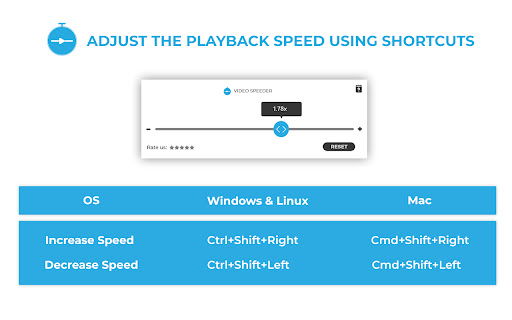
Do you find it difficult to adjust the video playback speed on streaming platforms like Netflix, Amazon Prime Video, and Disney+ Hotstar?
Presenting Video Speed Controller, a Google Chrome extension that lets you fine-tune the playback settings on your favourite streaming website.
0.5X, 0.75x, 1.5x...the extension supports all kinds of playback settings.
How to use Video Speed Controller Extension:
- Install the extension (one-time process).
- Open any video on your desired streaming website.
- Click on the extension’s icon.
- Use the extension’s pop-up to specify the video playback settings.
- The chosen settings are applied to the video.
Now sit back and relax! Play around with the playback options to see what fits you the best.
Version 2.0.0 changes:
>> Works on all streaming sites
>> Supports on every video playback
>> Supports up to 10 languages
>> Improved UI & bug fixes
Privacy Policy link: https://videospeeder.com/privacy-policy/
Latest reviews
- fuad haddad
- WORKS! and thats what matters
- Christina Hazel
- easy to use and works great! as a marketing manager I love that it can speed up videos on IG - very helpful.
- Ayrton Frank
- It disables CTRL+SHIFT+Arrow to select text on the whole browser if the extension is enabled
- Mark Aman
- best speed controller i have ever used without any complexity
- Anthony
- Works as it should , no issues so far.
- Jaykishan Mandani
- It is automatically manipulating video speed.
- hariram roj
- the best speed controller in the chrome extension
- Chandar Pal
- best for me
- Atul Notaka
- please add a on and off switch where i can enable and disable it easily
- Việt Đỗ
- ok as
- manraj ghuman
- perfect
- Light Riyuzaki
- It cancels the ctrl+shift+ arrow key to highlight words shortcut. It replaces that function of the shortcut to control the speed regardless of whether you have the video or the extension opened up or not. Please fix this.
- Reyansh Bhavsar
- Great! Works with almost all kinds of websites
- Karel Auf
- Works everywhere. I have been using it for two months and it became my most valued extension. Saves time on the sites where you would have to change the speed, provides speed control where it wouldn't be otherwise possible and also provides more settings than what other sides offer.
- Nghoni Mtebule
- works on eevery site ive used it on no complaints
- A
- works where the "global speed" extension doesn't
- emmanuel abebe
- Works with all websites I've used from YouTube to Instagram etc. etc. I love how discreet it can be on the menu bar! I wish it came with a DIAL FORMAT in addition to its already very functional scaler model, It would be great to have a certain KEY COMBINATION THAT COULD EASILY OPEN ITS MENU, and/or That THE MENU WAS MORE EASILY ACCESSIBLE [preferably NEAR the PLAY/PAUSE (on the bottom left) and IN BETWEEN the SKIP buttons/toggles of FFWD and RWD options, or anywhere along the bottom of the player screen where those options usually are; though I can see how something that immersive can be difficult since websites can be so uniquely different from one another. Besides that, OVERALL it is a GREAT FUNCTIONAL tool. I give it a 4.98/5 score, only because it could be better in very preferential ways in my opinion.
- CouponsWala Content
- please add progress bar rest all is good. :)
- Alok
- working good on most of website. but not working properly on intsgram video. please fix thix.
- Khamsat Muhamed
- File: background.js (lines 122-165, 274-303) Suspicious Behavior: The extension fetches a "platform list" from the remote server and stores it locally. When users visit sites on this list, special tracking/injection behavior is triggered. Why it is dangerous: The extension operator can remotely target specific websites (e.g., banking sites, social media) for special behavior. This is characteristic of adware, affiliate fraud, or targeted malware.
- Soham Mallya
- works properly ig👾👾
- Anthony Y
- The problem I have is that it keeps landing on random defaults. randomly starts at 4x or .6x or whatever. could it always default to start at 1x and then we adjust from there? thanks!
- Jason Godwin
- Works perfectly! Please add Shortcut Buttons for 2x speed and 1x speed!
- Akhila Chintalapati
- Excellent! It Works!
- Pratishtha Chaturvedi
- works well!!
- Vikas Meena
- automatics 4x switch problem
- Nicole
- Good, does what it promises.
- MOAZAM SULTAN
- Make it accessible on top of video but it is still best!
- Ahmed Abdalla
- doesn't have shortcuts
- Yacine destroyer
- The best speed controller
- Vinod Kumar
- thanks realy solved my problem
- Simo Cathro-Oliver
- Works really well! I appreciate that a service like this exists!
- Kayla
- can even speed up ads :)
- 2 of Spades
- Works perfectly. Youtube for some reason isn't giving me the option for 1.5x and 2x speed, so this is a great replacement.
- Vishal Dixit
- Not working...
- Doug Walker
- It works to speed up the video, but not the progress bar of the video.
- Deepak Bhati
- Works very well.
- M E
- Excellent
- Adyasha Aurosikha Nayak
- AMAZINGGGGGGGGGGGGG
- Logan Tanner
- Exactly what my ADHA-impatient mind needed to speed through online videos. One suggestions would be to include some preset, or customizable speed settings. 1x, 1.5x, 2x, etc. You know, like how you save radio stations in your car to a preset button? That would be nice rather than manually sliding all the time.
- Ethan Trachtenberg
- Easy to use and works effectively!
- Adam Fritz
- Got it for Prime, and it even works on the ads! (including countdown timer)
- Shishir Singh
- working for jiohotstar
- K Berkay K
- amazing, been using for months
- lilli heart
- Id like an option to exclude some sites! like youtube music i would like to not speed up but i love it on regular youtube!!
- Shannon Bawden
- i love it, works great across all sites, even speeds up unskippable ads lol
- LORDLY
- great
- Bill Shroyer
- It works, but it keeps changing the speed to either 0x or 4x for no apparent reason. It's easy enough to reset, but even so, that gets a little tiring after awhile. Haven't been able to identify if it's a conflict with another extension or anything. Still, it's useful enough to keep.
- Joana M.
- i love this!
- Mohammad Kaddah
- add more options pls