
Prentus | Job Tracker, AI Networking, & Application Helper
Extension Actions
Track jobs. Grow your network. Apply faster with AI. It's time to land your dream job 2x faster.
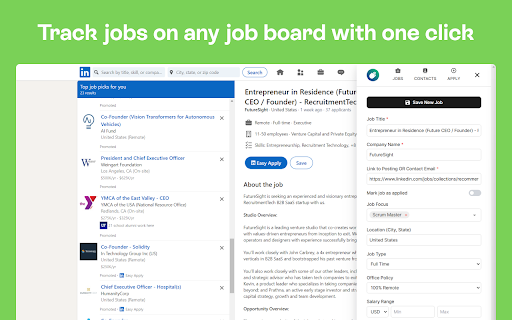
Prentus puts your entire job search in one place. Track every application, auto-fill job forms in one click, and use AI to write better outreach and application answers — all without leaving the page you're on.
NOTE: This extension requires a Prentus account. If your school or program uses Prentus, log in at https://app.prentus.com to get started.
📑 ONE-CLICK JOB TRACKING
Click the Prentus icon on any job listing to save it. The job title, company, salary, location, and description are pulled in automatically from LinkedIn, Indeed, ZipRecruiter, Glassdoor, and more. Track your progress with stages, notes, reminders, and interview logs. Don't see your favorite job site? Message us and we'll add it within 1 week, guaranteed.
✍ AUTO-FILL APPLICATIONS
Enter your info once. Apply everywhere. Prentus fills in your experience, education, and links on Workday, Lever, Greenhouse, Jobvite, Breezy, and more. Stop retyping your resume into every application.
🤖 AI APPLICATION ANSWERS
Prompt questions on job applications are tedious to write over and over. Paste the question into the extension to get a tailored answer based on your professional profile in Prentus. Apply to more jobs in less time without sacrificing quality.
🌐 NETWORK TRACKER
See the Prentus pop-up on any LinkedIn profile to save contacts in seconds. Add details, goals, and activities. Track your networking progress with weekly goals. Find connections to hiring managers at companies you're applying to.
📧 AI EMAIL IN GMAIL
Write professional outreach emails right inside Gmail. Choose a tone, goal, and description to generate messages based on your profile. Track every email to the contact's record in Prentus. Build a network of hundreds without losing track.
📊 AI JOB TOOLS
Every tracked job unlocks AI-powered tools. Generate tailored cover letters and interview prep questions based on the specific job description — all with one click.
LINKS
Website: https://prentus.com
Support: [email protected]
LinkedIn: https://linkedin.com/company/prentus
Latest reviews
- Adam Hatcher
- Worked in July 2025 and has been broken since. There is absolutely no way this is a 4.7 star app.
- Mark Oakley
- Very buggy. Doesn't track contacts automatically at all. Jobs are hit and miss. And today it stopped working entirely and just opens the Prentus website
- William Carson
- Waaaay easier than keeping track of jobs myself with Microsoft Excel.
- William Carson
- Waaaay easier than keeping track of jobs myself with Microsoft Excel.
- D “SCOTTPILGRIM1919” Hawk
- makes job searching convenient and simple.
- D “SCOTTPILGRIM1919” Hawk
- makes job searching convenient and simple.
- William Gainsborough
- Makes the entire search easier. Grape job. 5 Stars.
- William Gainsborough
- Makes the entire search easier. Grape job. 5 Stars.
- Sam Bovarnick
- As a very early career dev, Prentus has been a really exciting new tool in the job search. I'm stoked to be an early adopter.
- Sam Bovarnick
- As a very early career dev, Prentus has been a really exciting new tool in the job search. I'm stoked to be an early adopter.
- Sonic Spectrum
- Inability to add my school and college. They have very limited number of schools and colleges listed here
- Sonic Spectrum
- Inability to add my school and college. They have very limited number of schools and colleges listed here
- bana twal
- Really love this extension. It works great across my linked in and indeed. Those are the two main sources I use. It is easy to track jobs and I love that. Nice to keep everything in one place.
- bana twal
- Really love this extension. It works great across my linked in and indeed. Those are the two main sources I use. It is easy to track jobs and I love that. Nice to keep everything in one place.
- Thomas Peek
- Wonderful tool for the job hunting quiver. highly recommend it to anyone in the market for a job.
- Thomas Peek
- Wonderful tool for the job hunting quiver. highly recommend it to anyone in the market for a job.
- Dillon Hess
- I'm loving the platform so far. Can't wait to see how it evolves!
- Dillon Hess
- I'm loving the platform so far. Can't wait to see how it evolves!
- Omojola Adesina
- Wow, this extension is helpful and it's user friendly.
- Omojola Adesina
- Wow, this extension is helpful and it's user friendly.
- Marwa Bahr
- Very Helpful extension! Excited to utilize it more in my job search process.
- Marwa Bahr
- Very Helpful extension! Excited to utilize it more in my job search process.
- Eric Mills
- VERY useful extension. It is helping me stay organized and on top of my job hunt very conveniently. Cool layout/UI, too. =)
- Eric Mills
- VERY useful extension. It is helping me stay organized and on top of my job hunt very conveniently. Cool layout/UI, too. =)
- Boris Veselov
- Thank you to the creators of Prentus. So far it's been easy to use and lot's of helpful things on the website. I hope it helps me and other like-minded individuals to break into tech.
- Boris Veselov
- Thank you to the creators of Prentus. So far it's been easy to use and lot's of helpful things on the website. I hope it helps me and other like-minded individuals to break into tech.
- Danielle Lewis
- This is super helpful!
- Danielle Lewis
- This is super helpful!
- James Boyette
- TLDR: Prentus is the most useful job search tool in my kit. It cuts out a lot of the extra work that causes friction and/or frustration for me, and makes the job search if not enjoyable, at least a lot easier! As a junior software developer, I've had to go on multiple hunts for a new role when the last contract expired, downsizing occurred, etc., etc. Most of the time, that process is utterly excruciating. I've used other platforms (like CareerScore) in the past, but Prentus has been my go-to for years, now. It has a substantial feature-set and the quick + friendly customer support is awesome. How does the app help me? The Chrome extension quickly grabs all of the relevant data from a given job (on LinkedIn, Indeed, AngelList, etc.) and stores it for me to view later. Sometimes I try a "quantity over quality" (200 applications in a week?) approach, and sometimes the opposite (careful research on a company, a thoughtful cover letter, coffee meetings with current engineers, etc.). Either way, after banging out numerous applications, I frankly don't remember who are what I've done. It's blur. And I need a nap + an ice cream. Prentus allows me to go to my account and quickly + accurately review these applications. Some of the use cases that I frequently use the app + extension for: - Want to set a reminder to send a follow-up, "thank you" message, or for that first screener interview? You can do it in the app. - Want to perform data analysis? Find out whether you're applying as often, or as much as you think you are? See how many of those applications are actually getting accepted, or advanced to later interview rounds? See if the new resume you started using last month is performing better or worse compared to your old one? You can do it in the app. - Want to set To-Do tasks for yourself for all of this and more via either a Trello or calendar-styled view? You can do it in the app. There are even a bunch of options and resources on the app that allow you to interact and collaborate with fellow grads of your boot camp (if you've signed up for Prentus via your boot camp). And if you run into a potential bug, they get back to you *exceptionally* fast - either with a clarification on how to do what you wanted to do, or a promised fix within the week. In summary, #wouldRecommendHighly
- James Boyette
- TLDR: Prentus is the most useful job search tool in my kit. It cuts out a lot of the extra work that causes friction and/or frustration for me, and makes the job search if not enjoyable, at least a lot easier! As a junior software developer, I've had to go on multiple hunts for a new role when the last contract expired, downsizing occurred, etc., etc. Most of the time, that process is utterly excruciating. I've used other platforms (like CareerScore) in the past, but Prentus has been my go-to for years, now. It has a substantial feature-set and the quick + friendly customer support is awesome. How does the app help me? The Chrome extension quickly grabs all of the relevant data from a given job (on LinkedIn, Indeed, AngelList, etc.) and stores it for me to view later. Sometimes I try a "quantity over quality" (200 applications in a week?) approach, and sometimes the opposite (careful research on a company, a thoughtful cover letter, coffee meetings with current engineers, etc.). Either way, after banging out numerous applications, I frankly don't remember who are what I've done. It's blur. And I need a nap + an ice cream. Prentus allows me to go to my account and quickly + accurately review these applications. Some of the use cases that I frequently use the app + extension for: - Want to set a reminder to send a follow-up, "thank you" message, or for that first screener interview? You can do it in the app. - Want to perform data analysis? Find out whether you're applying as often, or as much as you think you are? See how many of those applications are actually getting accepted, or advanced to later interview rounds? See if the new resume you started using last month is performing better or worse compared to your old one? You can do it in the app. - Want to set To-Do tasks for yourself for all of this and more via either a Trello or calendar-styled view? You can do it in the app. There are even a bunch of options and resources on the app that allow you to interact and collaborate with fellow grads of your boot camp (if you've signed up for Prentus via your boot camp). And if you run into a potential bug, they get back to you *exceptionally* fast - either with a clarification on how to do what you wanted to do, or a promised fix within the week. In summary, #wouldRecommendHighly
- Arjun Kahlon
- The extension is useful but has a few bugs that need to be addressed. Mainly, it constantly logs me out and prompts me to sign back in.
- Arjun Kahlon
- The extension is useful but has a few bugs that need to be addressed. Mainly, it constantly logs me out and prompts me to sign back in.
- Jacob Harvey
- Super easy to use! When I am applying to a job I can just click the little icon which brings up a nice form that gets pre filled out with the role name, company name, location, and the job posting link. You can then add the remote policy, role focus, and write down some additional notes if you want. I then click the check box that says mark job as applied, then click add job and boom! Added to my job board without even having to leave the site that I was on. This extension makes it super simple to track my applications and I love it!
- Jacob Harvey
- Super easy to use! When I am applying to a job I can just click the little icon which brings up a nice form that gets pre filled out with the role name, company name, location, and the job posting link. You can then add the remote policy, role focus, and write down some additional notes if you want. I then click the check box that says mark job as applied, then click add job and boom! Added to my job board without even having to leave the site that I was on. This extension makes it super simple to track my applications and I love it!