
Jira Assistant: Worklog, Sprint report, etc
Extension Actions
- Extension status: Featured
Help to track & upload work done on a Jira Ticket on timely basis and generate Worklog, Sprint and other custom reports.
For more information or to explore other browser options, please visit our official website: https://www.jiraassistant.com
Additionally, if you are interested in beta testing or using the latest build of our app, you can access it here: https://app.jiraassistant.com
For a visual demonstration of Jira Assistant's features, you can watch our YouTube videos: https://www.youtube.com/watch?list=PLxDBQLgpBhsDGppYrDqARYULukk7XFJPV&v=HsWq7cT3Qq0
Features Overview:
Effortless Worklog Management: Easily add worklogs with drag-and-drop and copy features.
- Efficient Time Tracking: Utilize a timer for precise time tracking on your worklogs.
- Bulk Import: Streamline worklog and issue management by uploading CSV files in bulk.
- Comprehensive Reporting: Access various reports related to worklogs, sprints, estimates, and custom generated reports.
- Calendar Integration: Seamlessly integrate with your calendar to automatically generate worklogs for meetings with a single click.
- Customization Options: Personalize your experience with custom dashboards, Quick view, personalized skins, and other settings.
- Multi-Server Support: Connect with multiple Jira servers/accounts and switch between instances effortlessly.
- Planning Poker: Facilitate team collaboration with built-in planning poker functionality.
- Say Do Ratio report: Generates say do ratio report which helps tracking trend related to velocity, say-do-ratio, status wise time spent on sprints, etc
- Export Options: Export reports or grids in CSV, Excel, and PDF formats.
- Status-Based Insights: Gain insights with status-wise time spent reports available as gadgets.
Dashboard:
- Create Your Dashboards: Craft multiple dashboards tailored to your needs.
- Custom Gadgets: Add your reports to your dashboard as gadgets.
- Sharing and Customization: Share your gadgets/reports with others and customize your dashboard layout.
- Drag-and-Drop: Easily rearrange gadget order to suit your preferences.
Calendar / Worklog:
- Effortless Worklog Management: Log and upload work against Jira Tickets and view them in a convenient calendar format.
- Tracking Made Easy: Keep tabs on missing or pending worklogs for individual days.
- Clone Worklogs: Duplicate existing worklogs effortlessly.
- Integrate with Calendars: Integrate with Google/Outlook Calendar to automatically generate worklogs for meetings.
Menu:
- Customize Your Menu: Tailor what's displayed when you click on the JA icon in your browser.
- Multiple Display Options: Choose between a customized menu list, launching specific pages, or displaying a dashboard in a small popover.
Groups:
- Efficient Group Management: Link Jira groups or create multiple groups and organize your team members accordingly.
- Enhanced Reporting: Utilize these groups in conjunction with other reports.
- Timezone Flexibility: Set different timezones for individual users and groups to ensure accurate worklog reporting.
Worklog Report:
- Detailed Worklog Insights: View daywise reports for selected user groups and customize timezones for specific date ranges.
- Sprint Tracking: Monitor worklogs for one or more sprints or a chosen date range.
- Project-Wise Summary: Access user project-wise summaries of all worklogs.
- Advanced Filtering: Filter worklogs based on creation date thresholds or custom JQL queries.
Sprint Report:
- Sprint Insights: Review reports based on sprints and export them to Excel with multiple tabs.
- Velocity Chart: Visualize sprint progress using a line graph.
Estimate vs. Actual Report:
- Estimation Analysis: Examine Estimate vs. Actual reports based on worklog details, whether story point-based or estimated hours-based.
- Customizable Reports: Generate reports for individual projects, tickets, or a combination of both.
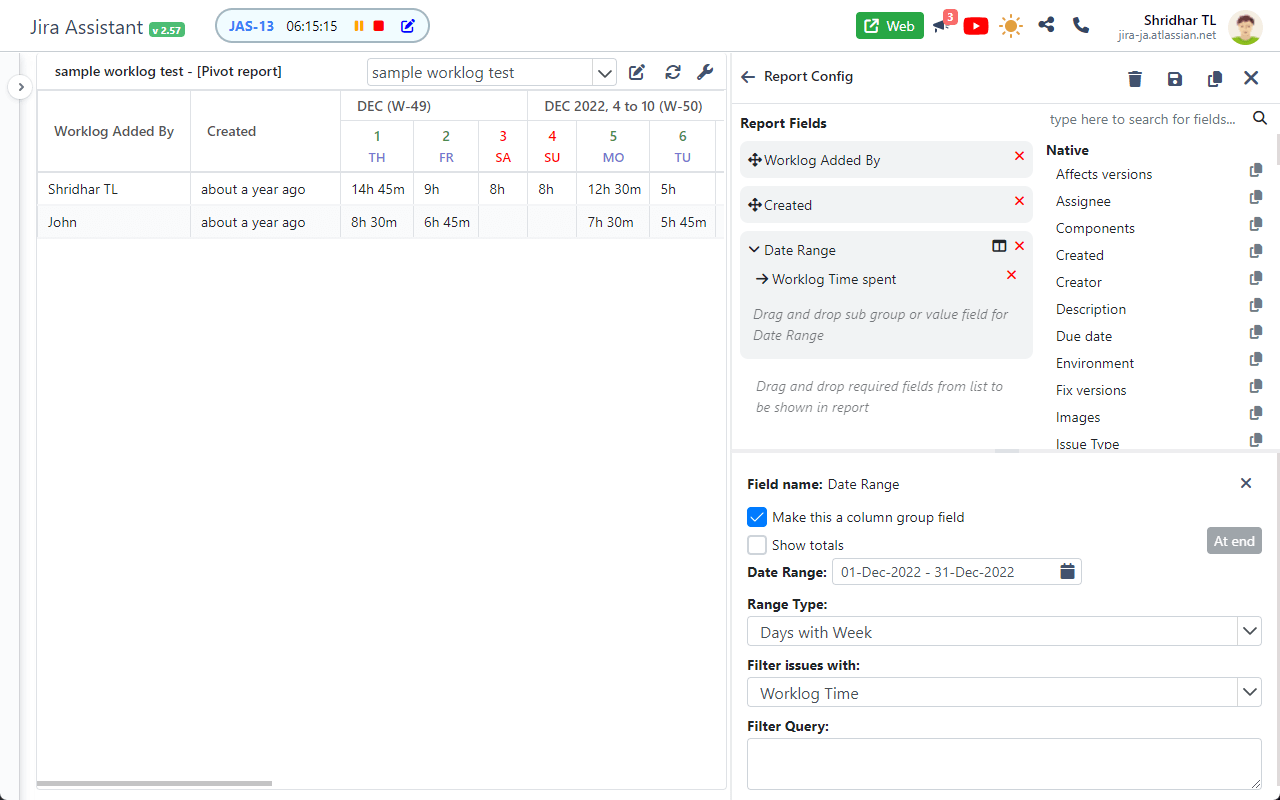
Pivot Report:
- Build your own tabular report with row and column grouping.
Custom Report:
- Tailored Reports: Create reports with custom fields and formats using custom filters.
- Expression Customization: Utilize custom expressions for data formatting and display.
Other Features:
- Personalization: Choose from multiple skins to customize the look and feel of the tool.
- Notifications: Receive notifications and meeting URLs based on your configurations.
- Work Log Reminders: Stay on top of daily worklog entries with Chrome notifications.
- Comment Notifications: Be alerted to new comments added in Jira, specifically related to your tickets or tagged comments.
- For guidance on setting up Jira Assistant, please refer to our YouTube video:
YouTube video to help you set up: https://www.youtube.com/embed/HsWq7cT3Qq0?rel=0&autoplay=1&showinfo=0&cc_load_policy=1
If you find Jira Assistant valuable, please consider supporting us through donations: https://paypal.me/shridhartl
Latest reviews
- Christopher
- I love this extension but it no longer works as the API it uses has been removed. Have to use the Web Version for now :(
- Lan
- 5c5810fd.weaksharedptr.com注册送永久流量的,专线支持GPT,可以试试,节点多,又快又稳,晚高峰看8K视频完全不卡!(手机电脑全平台互通)
- Patrick
- I love the calendar / worklogs feature. It makes it really easy to log the work done during the day.