
Remove HTML Elements
Extension Actions
Easily remove desired HTML5 elements with just one click!
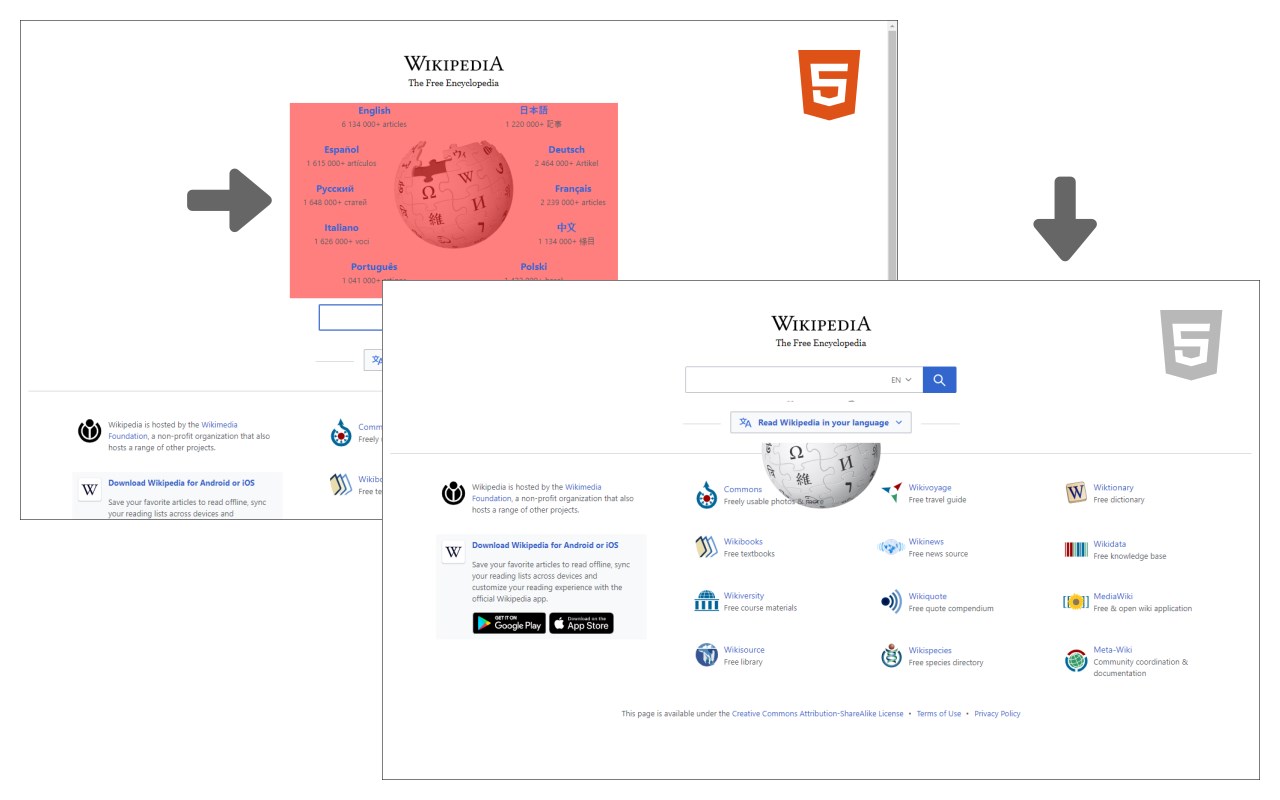
Remove HTML Elements add-on let you easily remove desired elements in any HTML5 webpage.
Simply click on the toolbar button to activate the add-on. Please note that this add-on requires "user action" to be activated. Once it is active, please hover on any element within the page with your mouse. When the mouse pointer is over any HTML5 element, it will highlighted with red color. Now, when you click on the highlighted element, it will be removed from the page.
Please note that, this add-on does not delete the elements from the page, instead, it changes the display property to "none". The add-on supports undo operation via (Ctrl + Z) keyboard combination.
If you found a bug to report, or have a feature request in mind, please fill the bug report form in the add-on's homepage (https://mybrowseraddon.com/remove-html-elements.html).
Latest reviews
- Ed
- It was working great in Microsoft Edge but, now blocked elements have returned. When I "re-block" them, they return after a refresh of the page.
- David
- Removed elements come back when you return to or refresh the page
- Matt
- element comes back after page refresh
- Senuka
- fun
- 77
- 非常有用,页面限制,多余的内容,一点即删!
- Gabriele
- Exactly what I was looking for: a point-and-click replacement for the "Delete Element" feature of the developer tools. I use it for fast removal of GDPR cookie consent and paywalls: instead of using developer tools to chase elements up the DOM, this extension allows the user to quickly find the topmost container of the element to delete, and to remove it with a click. It also sits discreetly in the toolbar, not doing anything until activated, which is a huge plus for my extension paranoia. Kudos to the developer.