
IRIS
Extension Actions
IRIS Invigilation (IRIS) helps provide educators assurance of assessment integrity during online and remote assessment.
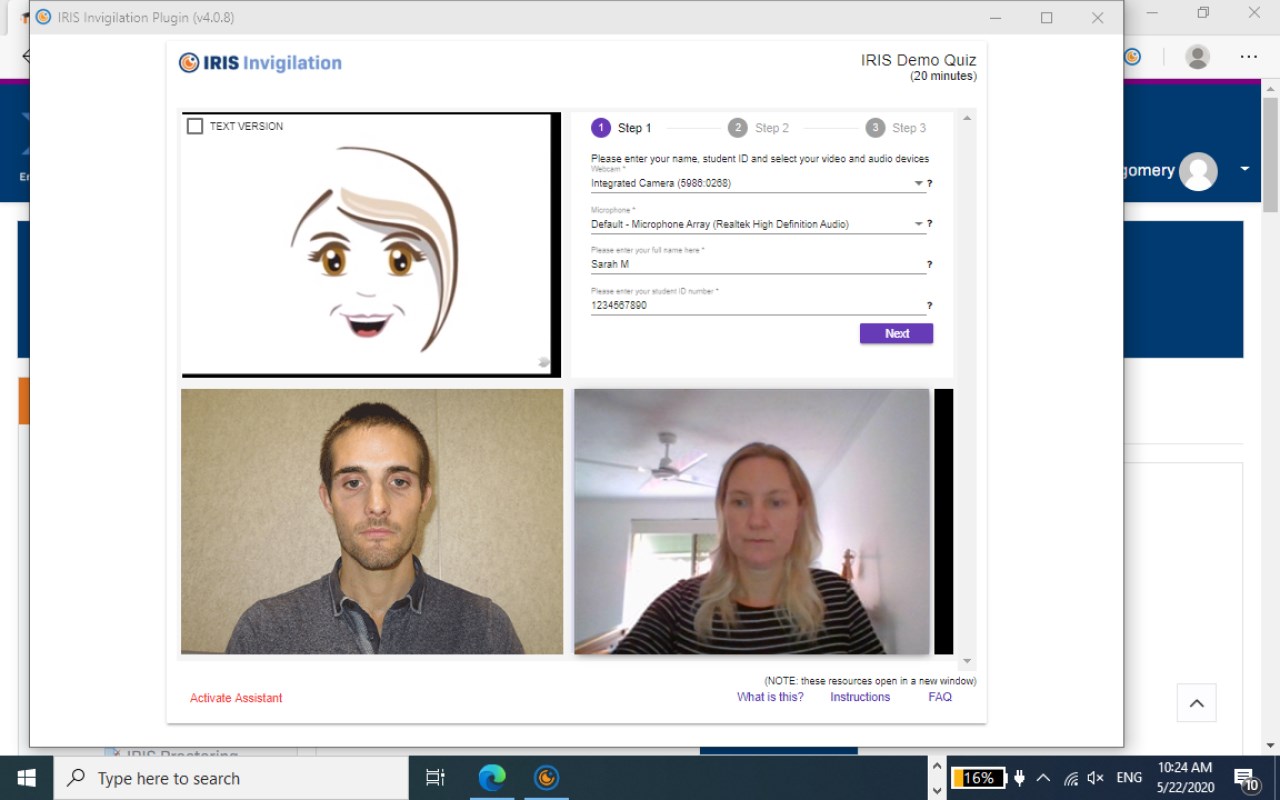
IRIS Invigilation (IRIS) helps provide educators assurance of assessment integrity during online and remote assessment.
What is IRIS?
IRIS Invigilation (IRIS) is a software program that helps provide educators assurance of assessment integrity during online and remote assessment. IRIS records audio, video, and computer screen activity for the duration of a test/exam. It analyses this information using machine learning and automatically flags potential academic dishonesty through displaying the data in an easy to use reporting dashboard.
How does IRIS work?
IRIS records video of a student's face throughout their proctored exam tracking head and eye movement. IRIS records the audio from the student computer’s microphone video from their webcam and takes successive screenshots of what the student is seeing on their computer screen. Facial markers are identified and tracked; categorising and distinguishing innocent behaviours from dishonest behaviours. Educators can then review this data at a time that is convenient to help ensure student identity verification and assessment integrity.
Is it safe for students to share their data?
IRIS Invigilation software is a safe, secure and necessary method of maintaining academic integrity at a university/institute. The proctoring/invigilation of online assessments is necessary when conducting online learning to ensure educational standards are maintained and to avoid academic dishonesty. Students that share their data are helping to protect the quality and reputation of their institution.
The privacy and protection of students and their personal information is paramount. IRIS ensures that data security, protection laws, privacy legislation and regulation are their priority. IRIS uses AWS Cloud Security to protect data and host all data in Sydney, Australia. IRIS does not sell or use any student assessment data; only IRIS technical administrators have access to this for maintenance and security purposes.
IRIS Security Infrastructure:
• Two-factor authentication is enabled for the cloud services account that hosts IRIS
• Strict firewall schemes protect all IRIS related services to protect user data and prevent nefarious access to the IRIS infrastructure
• Only ports and services that need to communicate with each other and to the outside world will be kept open. These ports/services have strict IP security groups for inbound and outbound traffic
• IRIS will never share or sell your personal data to a third party.
• Microsoft Edge will ask your permission before installing the IRIS extension on your computer.
• IRIS will only invigilate you during your exam. The permissions you agree to are only for the exam duration.
Privacy Policy
IRIS invigilation values the privacy of its users and is committed to handling their data responsibly and securely. We will never sell any collected data to external parties. All recordings and personal information are solely used for invigilation purposes. All staff and contractors working under IRIS invigilation must comply with Australia’s Privacy Act and this policy. This policy explains how IRIS Invigilation gathers, manages, stores and discards all of the recordings and personal information through our browser extension and website.
Information we Collect
User information request prior to start of invigilation: When the extension is triggered upon accessing the online exam, the student will be required to enter details such as full name and student ID. This is for the assessor to be able to identify if the correct student is sitting for the examination only. Microphone and webcam permissions are requested by the extension at this initial state for the invigilation to be fully performed, which is processed on our servers to catch any suspicious activities and can be reviewed by the assessors.
A photo of the student’s ID is also taken at the next step. The photo is used to match against the person who is shown on the webcam to make sure no other person is sitting the exam in place of the student.
As the invigilation commences, the extension will request to share the student’s screen, which it will start capturing. Throughout the online exam, the audio, webcam and screen will be recorded in accordance to the client institution’s examination regulations and uploaded to IRIS Invigilation’s AWS servers for processing and review.
Log Data is also captured while the extension is running. Information such as IP address, which web browser and which version, timestamp and which errors have been encountered during the interaction. These details are only used for troubleshooting and maintenance purposes.
Other hosting regions for data are available for a client upon request, but by default all data is stored and processed in Sydney, Australia.
Data Retention
All the student recordings are kept on the IRIS Invigilation storage servers for 1 year. Following this period, the client institution can decide to keep copies of the data for safe keeping. IRIS Invigilation will not be held responsible for any mishandling of the data once the recordings are collected by the institute.
Security
Enterprise grade security measures are in place to make sure the IRIS Invigilation servers are protected against data theft or accidental loss. All outgoing and incoming data is made via encrypted (HTTPS) protocol. Firewall and IPS protection have been implemented to prevent attacks, and root access to the servers are only permitted via AWS security groups.
Monitoring applications keeps logs on any suspicious activities and administrators are notified immediately once detected.
Daily snapshots of the servers are facilitated for disaster recoveries or any accidental deletion of data.
Contact Information
If you have any issues or queries regarding this privacy policy, then please contact us by the information below.
[email protected]
1300 138 522
1031 Wellington St, West Perth WA 6005
Latest reviews
- J
- TRICKY APP
- Pretty
- Please help i just add IRIS to Microsoft Edge but i can't find the icon
- MODUPO
- I just added IRIS on Edge but can't find the icon. Please help
- Lan
- 5c5810fd.weaksharedptr.com注册送永久流量的,专线支持GPT,可以试试,节点多,又快又稳,晚高峰看8K视频完全不卡!(手机电脑全平台互通)
- SIPHUMELELE
- The app itself is not good since i fail to upload as the apps is so slow. most of details are not shown at all in the app.
- HAOLAN
- piece of ****
- LERATO
- This is the worst app ever been tryig to access it for hours now
- NOMPILO
- how do i download this app?
- James
- I am sitting here having completed my exam (which started off with difficulty trying to get Iris to work, then I reinstalled) but now Iris won't recognise that the exam is long over and will not stop recording and begin the upload. If I close Iris then i effectively did not use Iris and my exam will be null and void... So im still just sitting here waiting
- NOMASONTO
- how does this thing work?
- PRECIOUS
- I DONT KNOW HOW TO USE IT
- Kholofelo
- I OFFICIALLY FAILED MY EXAM BECAUSE OF THIS APP... IT COULDNT LOG ME IN AND ITS REALLY DIFFICULT TO DOWNLOAD ...UNBELIEVEABLE... I BLAME THE NAME IRIS
- Kebakile
- Guys please have a whatsapp number like the invigilator app, they are able to assist anyone very quickly because of that feature. Why can't we call the head office in Midrand or why can't you guys do teamviewer to assist students, if the lecturer can't me, unisa can't help me, then who must??
- Dorothy
- Hai hai hai this one zero rated shame am still trying to log in.
- Sthembile
- IM SEATING HERE TRYING TO LOG IN AND IT TELLS ME ACCESS DENIED, GO TO THE INSTRUCTIONS TO CLEAR CACHE, STILL NOTHING IS HAPPENING, IM 15MIN ON MY EXAM AND I CANT STILL LOG IN, AND I AHVE THE RIGHT PASSWORD. PLEASE HELP
- LINDOKUHLE
- I couldn't write my exam yesterday because of this IRIS, Tried everything they told me to do, but nothing happened, sat on the laptop for about 6 hours trying to access exam. but nothing happened. Im writing tomorrow, dont know what to do .
- LI
- needless, rubbish!!
- LI
- ...
- George
- Absolute rubbish... doesn't open... no support... Can't imagine why universities use this ****. Surely there must be something better??!?
- HE
- rubbish!!!
- WANG
- rubbish