
Browser Notepd
Extension Actions
A Browser Notepad extension
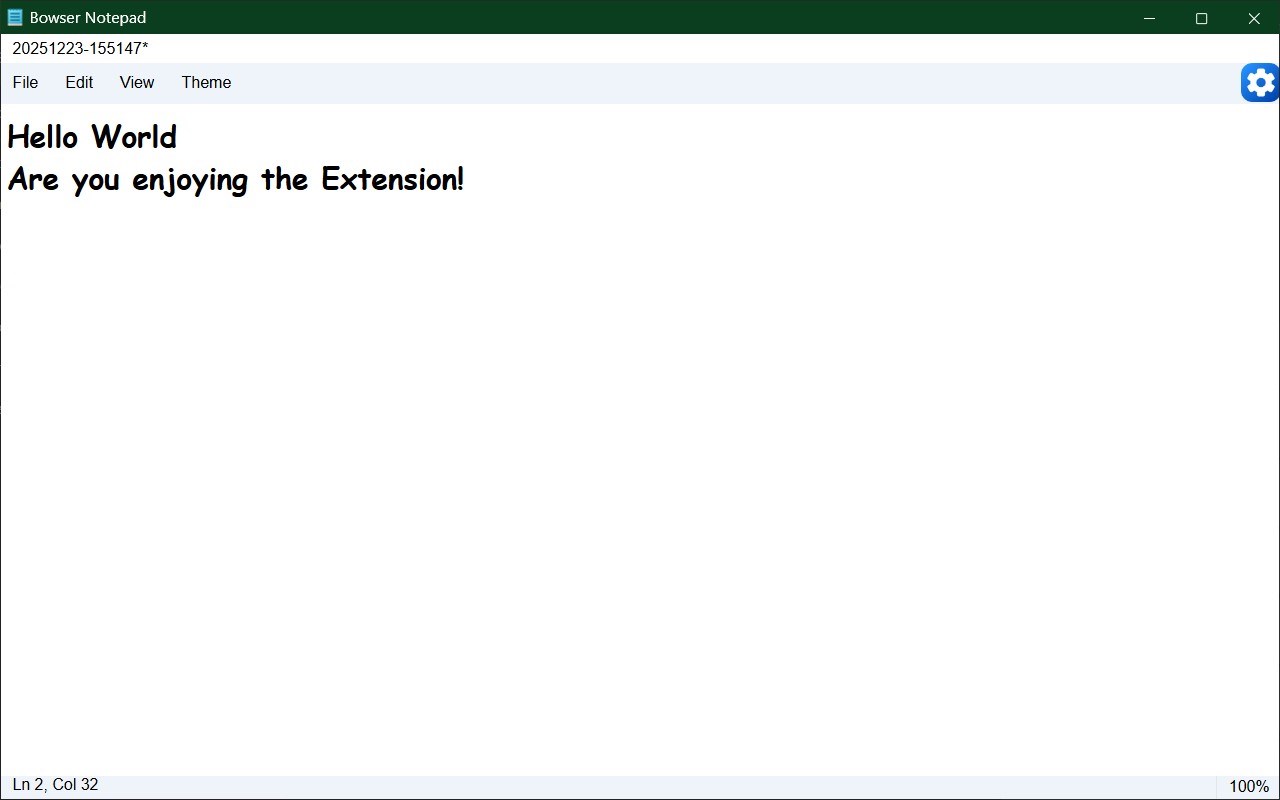
Browser Notepad is a sophisticated and user-friendly extension tailored for seamless note-taking directly within your browser environment. It provides a rich set of features designed to enhance productivity by enabling quick jotting down of ideas, organizing to-do lists, or saving important text snippets without the need to leave your current browsing session. Combining the simplicity of a classic desktop notepad with modern browser capabilities, Browser Notepad offers a distraction-free and instantly accessible workspace that adapts to your personal preferences and workflow needs.
The extension opens a clean, minimalist editor window that focuses solely on your writing and editing tasks. Its intuitive interface includes menus for managing files, editing text, adjusting viewing preferences, and customizing settings, all without clutter. You can easily create new notes, open existing documents stored in your browser or locally, save changes, print content, and export notes in standard file formats for sharing or archiving purposes. With robust session management via IndexedDB, your notes are persistently stored within your browser, ensuring no loss of data even if the browser is closed unexpectedly.
Browser Notepad’s editing environment is optimized for efficiency and precision. It supports fundamental text operations such as cut, copy, paste, undo, redo, and a powerful find and replace function to streamline text manipulation tasks. Real-time line and column tracking displayed in the status bar assists writers and coders in maintaining accurate positioning within documents. The extension supports a variety of customization options, including adjustable font family, size, and style, toggling word wrap, and the ability to switch between light and dark themes instantly, allowing users to tailor the appearance of their workspace. All preferences are saved automatically, delivering a consistent editing experience every time the extension is launched.
The menus provide straightforward access to a comprehensive range of functionalities: the File menu handles operations like new note creation, opening files from both local storage and the browser database (IndexedDB), saving notes either to local disk or the built-in browser storage, and printing documents. The Edit menu offers classic text editing features along with an advanced search and replace tool. The View menu enables customization of the interface with options to show or hide the status bar, adjust font sizes, and control word wrap settings. The Settings pane further allows in-depth personalization to fine-tune your note-taking environment. Through clear toast notifications and dialog prompts, users receive immediate feedback on file operations and editor actions, ensuring smooth and informed interaction.
Security and privacy are core principles behind Browser Notepad. All your data — notes, settings, and theme preferences — are stored exclusively on your device storage or in browser storage(IndexedDB), preventing any external data transmission. This design choice guarantees that your personal information and creative work remain confidential and secure, free from third-party access or cloud sync vulnerabilities. Moreover, the lightweight coding and efficient resource management ensure the extension operates swiftly without burdening your system.
Ideal for students, professionals, writers, and anyone seeking a reliable and flexible note-taking tool directly integrated into their browsing experience, Browser Notepad bridges the gap between simple text editors and advanced productivity utilities. It provides essential features including customizable fonts, a powerful search and replace mechanism, themes catering to different lighting conditions, and versatile file management supporting both browser-based saving and local disk exports.
Key Features:
- Instant access to a powerful in-browser notepad adapted for fast and uninterrupted note-taking.
- Comprehensive note management including creation, opening (from browser or local files), editing, saving (in-browser or to disk), printing, and exporting.
- Persistent note storage using IndexedDB to safeguard your work across browsing sessions.
- Robust text editing capabilities: undo/redo, cut, copy, paste, and advanced find and replace for efficient content manipulation.
- Extensive customization options: adjustable font family, size, style, word wrap toggle, status bar visibility, and switchable light/dark themes.
- User-friendly menu-driven interface supporting all major functions with keyboard shortcuts to enhance productivity.
- Real-time feedback via toast notifications and dialog boxes to keep you informed about file operations and editor status.
How It Works:
1. Install the Browser Notepad extension and click the icon in your browser toolbar to open the editor window.
2. Begin typing your notes immediately, enjoying real-time tracking and easy editing features.
3. Navigate the File menu to create new notes, open existing ones either from your device or browser storage, save your current work, or export documents.
4. Use the "Save in Browser" option for persistent storage that keeps your notes accessible even after closing the browser.
5. Customize your workspace through the Settings menu by selecting preferred fonts, toggling word wrap, showing or hiding the status bar, and switching between light and dark themes.
6. Perform editing tasks quickly using menus or keyboard shortcuts for undo, redo, clipboard operations, and the versatile find and replace dialog.
7. Print your notes directly from the extension or export them as files for use outside the browser environment.
Privacy: - No personal data collected. Your notes and customization settings are securely stored locally within your browser and are never transmitted to external servers.
Latest reviews
- Stephen
- Browser Notepad has a nice roomy text area, and appears as a separate panel that you can minimize. It has all the basic abilities of Notepad, including the ability to choose a font. You can save your notes to anywhere in your local drive or OneDrive. The Title is the filename. It has a couple of peculiarities. 1) If you don't have it on your button bar, but call it from the Extensions menu, rather than launch immediately, it adds itself to the button bar, and then hangs a small button onto the button bar, which waits for you to click it to launch the notepad. 2) It doesn't remember its state, so it loads a generic blank note at launch, and you have to turn WordWrap back on with every use. 3) The Backspace key works as expected, but when you press the Delete key, it deletes both the previous character and the following character at the same time, as if you were pressing both keys at once. This bug is mildly annoying. Nevertheless, a very convenient app!
- Ashley
- It's an overall okay app. The design of it is outdated, something like a 2008 program. You have to set up the font settings before you type and it's not a tab that stays on while you are on your sites. It's a separate tab that pops up. It does the job but make sure to save your note since it won't really take you back where you left off.
- Lila
- Notepad is good because I remembered something and saved it and now I am successful!
- tigrine
- Pondant la navigation internet, il n'est plus question de prendre son stylo et son papier pour prendre des notes. Quant vous avez besoin d'ouvrir votre éditeur de texte office ou autre pour le besoin d'écrire un simple texte, ouvrir votre navigateur Edge et prend note avec Notepad. Notepad est une simple application de prise de note, excellente et pratique. Néanmoins, pour des raison d'éstitique, il est souhaitable de changer le bouton ''save as" en "save" ou "enregistrer". Mettre les différents bouton dans une barre "au-dessus" ou "au-dessous" de la zone d'édition du texte. Merci.