
Explain and Send Screenshots
Extension Actions
- Extension status: Featured
Capture or record a video of your screen, write text or arrows and share it. The safest extension with NO crazy permissions!
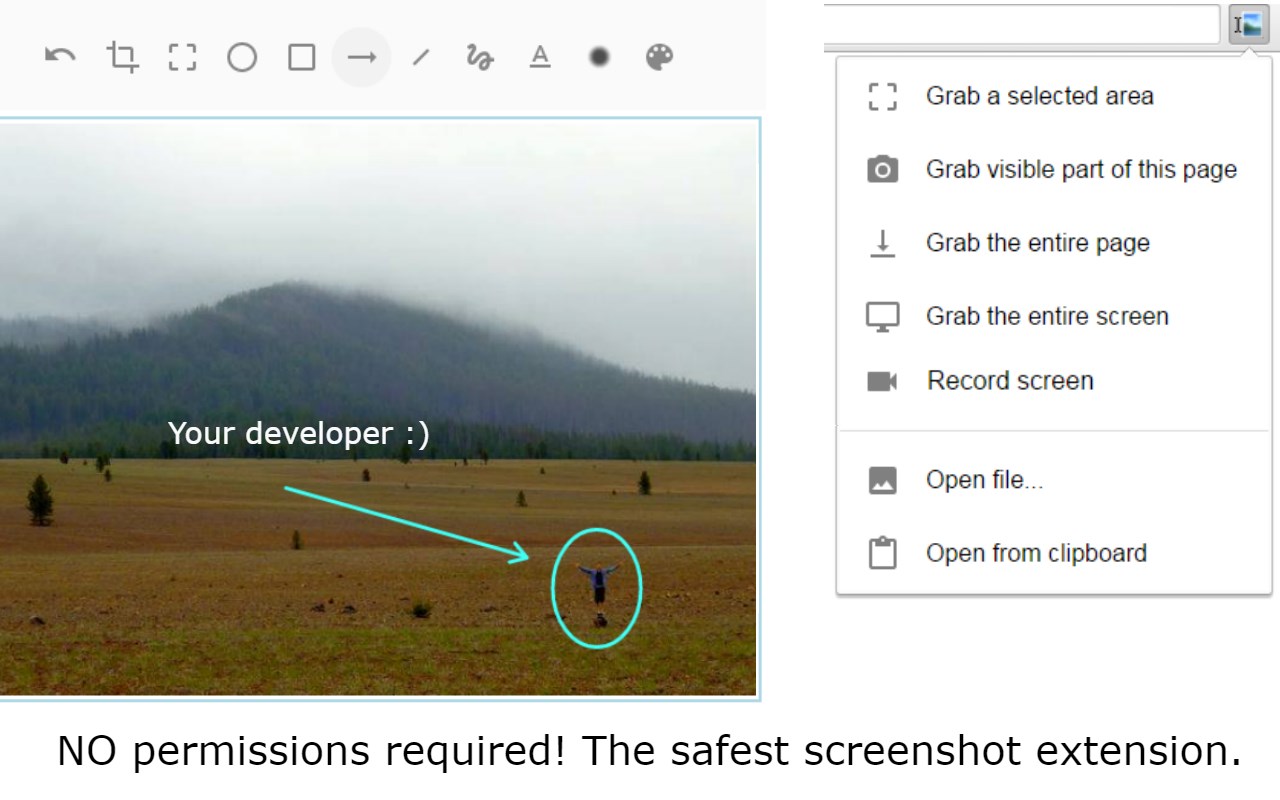
✨ A Secure Screen Capture & Annotation Tool to Capture, record, annotate, and share your screen— all with unmatched privacy and speed.
🛡️ Why The Extension is the Safest Choice
Stop compromising your security for basic screen tools. As an experienced developer, I built this extension to delivers the same robust features without requesting invasive "read and change all your data" permissions found in every other popular screenshot extension.
🚀 Core Features & Capabilities
Quick Capture: Take a full or partial snapshot of any webpage or active window instantly.
Screen Recording: Record a video of your screen and include audio narration via your microphone.
Intuitive Editor: Use the built-in, clean editor to:
Annotate: Draw arrows, circles, and lines to highlight key information.
Edit: Add text, crop, erase, or delete selections.
Privacy: Blur sensitive areas to protect information.
AI Background Removal: Remove and substitute image backgrounds right on your device (done locally with AI).
📤 Seamless Sharing & Workflow
Sharing your annotated image or video is simple and flexible:
Direct Link Sharing: Get a direct cloud link for instant sharing on social media (Facebook, X/Twitter) or in chat apps.
Quick Copy/Paste: Copy the image to the clipboard to easily paste it directly into emails (Gmail, Outlook, etc.) or documents.
Cloud Integration: Supports "Save to Google Drive."
Local Download: Download the image directly to your desktop.
⚙️ Power User Accessibility
Customize your experience for maximum efficiency:
Assign Shortcut Keys for lightning-fast captures.
Use the Right-click Context Menu for quick screen capture options.
Extra features are unlocked for contributors who support my safe development philosophy.
Give it a try and see the difference a secure, powerful tool makes!
Changelog: https://jasonsavard.com/wiki/Explain_and_Send_Screenshots_changelog
Latest reviews
- koyj
- 5c5810fd.weaksharedptr.com注册就送永久流量的,流畅看小电影和直播!免费试用!专线GPT油管!节点多,又快又稳!(手机电脑全平台互通)
- joe
- has an i/o error and no longer functions
- Lan
- 5c5810fd.weaksharedptr.com注册就送永久免费流量!节点多,又快又稳,晚高峰流畅看8K视频!专线GPT网飞油管等!(手机电脑全平台互通)
- Lan
- 5c5810fd.weaksharedptr.com注册送永久流量的,专线支持GPT,可以试试,节点多,又快又稳,晚高峰看8K视频完全不卡!(手机电脑全平台互通)
- sam
- perfect, thx
- feith
- 支持选取部分截图,太棒了
- cristiano
- Realmente me surpreendeu. Excelente extensão. Fácil de mexer e cumpre o prometido. Aos desenvolvedores estão de parabéns.
- zishu
- 不好用,反人性化
- 慧
- 删除页眉页脚要捐助这一点可以理解,但是截图清晰度下降了,不太好用
- SI
- 挺简单,截图质量也可以,就是整个页面截不了
- 冰霜
- 最强截图插件,已捐助!
- bright
- 好用到爆!虽然名称很山寨,但是功能和界面很优秀。可以滚动截图,选择网页元素截图,还能在选取前自动延时。自带图片标注编辑。不过要更改字体什么的,需要捐助(金额可以任意)。
- zidan
- 好用,和火狐上的截图扩展功能基本一样。
- 欢
- 操作简单,方便,很好用的插件
- Marco
- Viele nützliche Funktionen und dennoch intuitiv und einfach zu bedienen. Probierte sechs Erweiterungen aus und entschied mich dann für dieses.
- Богдан
- Очень удобное приложение! Все просто и понятно, если бы еще автоматически копировало картинку в буфер, вместо клика правой кнопкой мышки и выбирание пункта копировать, цены бы не было. Рекомендую! Разработчикам спасибо!
- 壮
- 好用的插件 不错
- atul
- cool extension with easy to edit and save the full or desired part of screenshot. More importantly, NO permissions required - appears safe!
- 岩冰
- 给你个高分评价,宝宝再也不用扫描微信再截屏了
- Ayoub
- Still the best cross browsers