


JDE Data Selection Import Tool
Extension Actions
- ★Featured
With this extension you can easily import list of values in data selection instead of having to enter them manually one at a time.
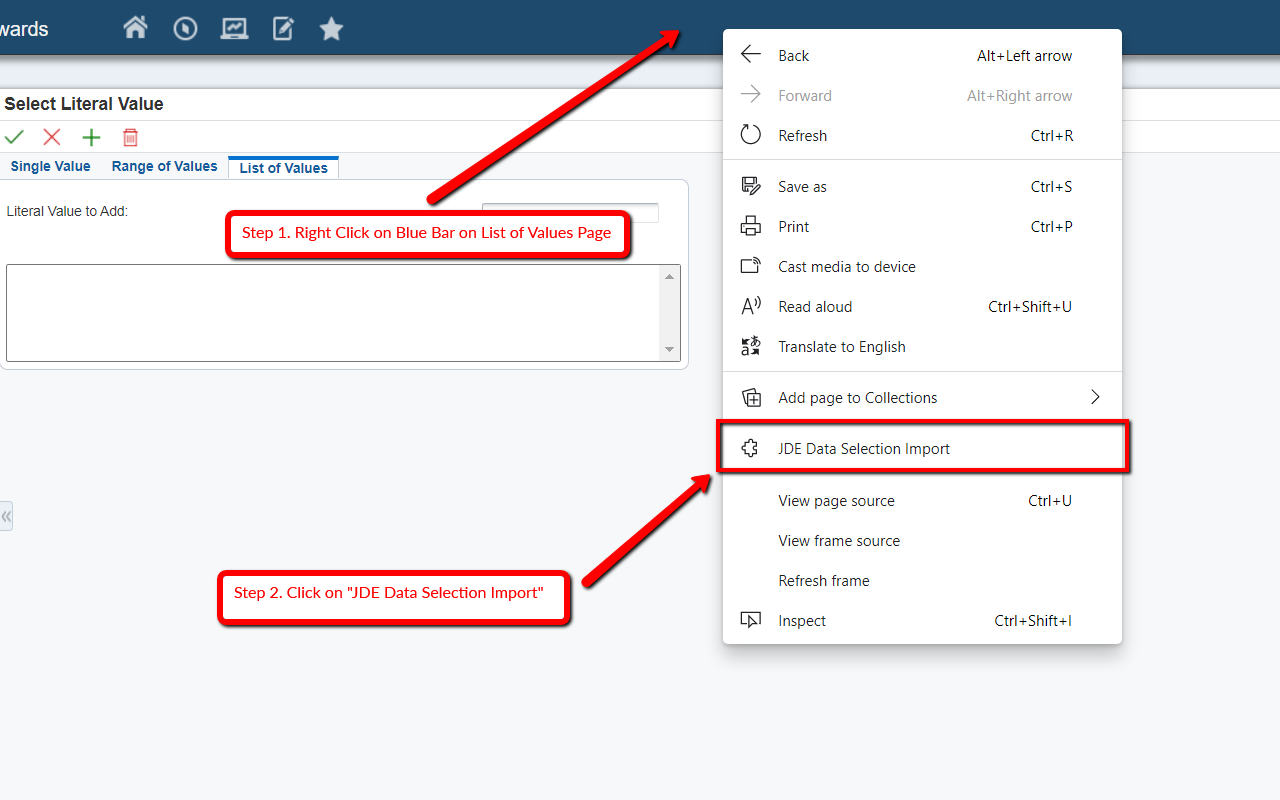
With this extension you can easily import a list of values into JD Edwards Data Selection instead of entering them manually one at a time.
In JD Edwards ERP, users run reports and use Data Selection to filter which records the report processes. Adding many values today means opening the List of Values tab, clicking Add, typing one value, and repeating that for every item. That becomes slow when you have a long list.
This Data Selection Import Tool lets you paste a list of values into a text box and click Add. The extension then adds each value into the Data Selection form for you. That saves time and reduces repetitive data entry.
To use it, open a JD Edwards Data Selection page, right-click, and choose “JDE Data Selection Import”.
Latest reviews
- Shanmukhayya
- This is an amazing plugin that eases the task of adding values! Thanks. But there is another request. Currently JDE allows to attach files one at a time. Do we have a plugin that helps us attach multiple files at a time?
- Audrey
- I use the JDE Selection Tool every day. It seems to not be working anymore. If anyone has found a work around, please share or if you have a connection to JDE let them know we need this extension to work.
- Brian
- Same here, multiple users have reported the tool has stopped working, did something in a recent Edge update break the extension?
- Scott
- Several users have lost the ability to use the extension this week in Edge. Wondering if there are known issues with any related updates? This is a 5-star tool when it is working properly!
- Nathalie
- very useful!!!
- Mary
- Great when it works. Sometimes, it randomly chooses not to work. Like now. I even rebooted. Might try Chrome.
- Ashutosh
- very useful and easy to use. Can you make this extension also extract existing values from E1?
- Dwayne
- a great time saver. I use in Chrome. But it does not work in Edge if you are emulating Explorer.
- ZHIYANG
- Perfect
- Daniel
- Must have tool for E1.
- Huang,
- Amazing!
- Jeff
- EXCELLENT!!! I like it very much!
- Tom
- This is an awesome tool for people migrating from World to E1. In World copying and pasting multiple values into the data selection is supported. In E1 it is not. This tool makes it possible.