
Screen Recorder & Editor
Extension Actions
- Extension status: Featured
Record screen, website and webcam to a video - free, quick and easy.
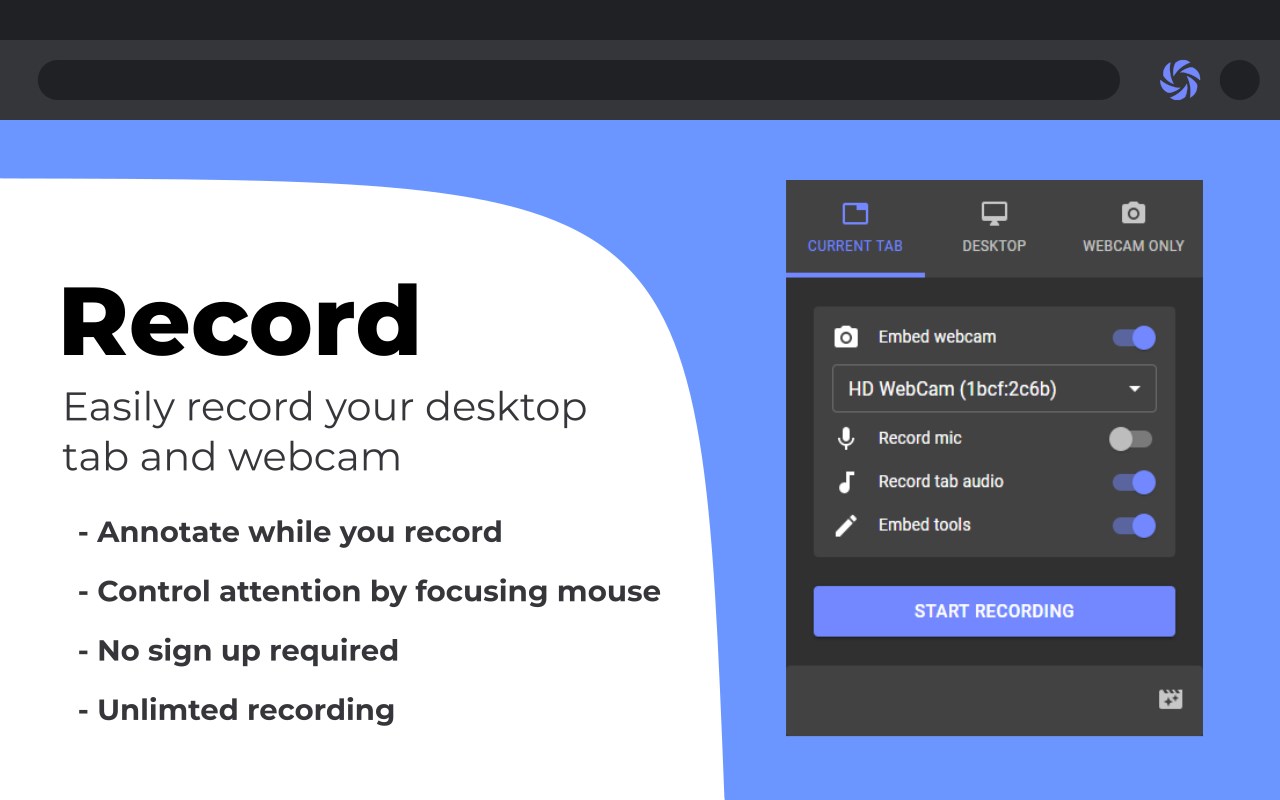
Reelia Record – Free, Fast & Easy Screen Recorder
Record your screen, website, or webcam in just one click. No sign-up required. No watermarks. Completely free.
🎥 Record Anything
- Capture your screen, tab, or webcam with audio.
- Embed your webcam & microphone for a screencast experience.
- Annotate while recording for clearer communication.
- Highlight mouse clicks & movements to keep viewers engaged.
🖊️ Manage & Edit Effortlessly
- Personal library to store & organize recordings.
- Trim, cut, crop & merge videos with our built-in editor.
- Undo/redo edits with ease.
🌎 Share Instantly
- No sign-up required – record & share in seconds.
- Export as WEBM, MP4 or GIF (GIF support added!)
- Upcoming: Direct uploads to Slack, YouTube & Google Drive!
🔥 Why Reelia?
✔️ Unlimited screen recording.
✔️ No watermarks.
✔️ High-quality videos.
✔️ Privacy-first: Everything stays on your computer.
⚡ Quick Shortcuts
⌨️ Alt + Shift + R → Start/stop recording.
⌨️ Alt + P → Pause/resume.
(Configure in edge://extensions/shortcuts.)
🚀 What’s Next? Help Shape Reelia!
✔️ Library for managing recordings – Done!
✔️ Bug fixes & performance improvements – Done!
❓ More editing tools
❓ Direct sharing support
💡 Have feature ideas? Found a bug? Let us know in the Support section!
🙌 Enjoy Reelia? Support us by sharing & leaving a review! 😊
Latest reviews
- Merlin
- banana.vtlove.world复制注册!送试用永久流量体验!加速器,看P站/推特/YB等不卡!不骗人试试就知道!(手机电脑全平台互通)
- Maria
- Malísima, grabe un video importante y cuando lo intenté guardar nunca apareció en la biblioteca. Me perdió el video y no me dejo guardarlo.
- Didier
- Nachdem ich mehrere Recorder getestet habe, entschied ich mich für Reelia. Win10 auf Edge läuft perfekt. Installierte zuerst aus dem Google-Store. Keine Probleme, ausser die Option 'Sytemtöne', vor der Aufnahme, war nur als Kästchen ohne Beschriftung vorhanden. Erneut aus MS-Erweiterung installiert und alles da. Keine Leistungseinbussen im Browser und noch nie Absturz. Auch wenn die Option 'Bildausschnitt selber wählen' wie bei fast allen Recorder nicht enthalten ist, so habe ich hier die Möglichkeit im einfachen Editor den gewünschten Ausschnitt in Ruhe zu wählen. Einfaches Videoschneiden geht und exportieren als Mweb oder MP4. Auch die Bibliothek nach der Aufnahme gefällt mir. Einfach und Option zum herunterladen möglich. Schade das ich 'Werkzeuge in Tab einbetten' nicht während der Aufnahme verschieben kann. Etwas grösser wäre gut und die grauen Tasten im schwarzen Balken sind schwer zu erkennen. Auch, wenn 'Bild in Bild' record, ist kein Audio dabei. TOP für kostenlos.
- yi
- l两个小时的录屏也打不开
- Pants
- 录制长时间视频(可能是大于3小时)无法保存
- Ashish
- Cannot share with link
- CHRIS
- I love this. Just a little laggy but, very well done
- Chien,
- This is good, specially the wave response function to confirmed correct MIC setting.
- bhukya
- better quality option please. this extension is perfect. just need better video quality.
- Chaz
- This tool works way easier and better than anything I've tried over the years. WOW!!!
- Nina
- The recorded video has incorrect seeking information, which make video players confused and not allow me to jump to another timestamp
- Huritt
- OK ITS BACK
- Scott
- Very well done. I am using a MacBook Pro and cannot find a desktop app that will do the same. This little extension is great.
- sanjana
- Embedded webcam &tools and Microphone recording not working
- Keyur
- Awesome and Easy
- 冠于
- It's super useful! Thanks a lot.
- 士華
- 不用付費,功能豐富,容易使用
- Isaak
- It works fine and it's easy to use, you can choose if you want to record your mic or you just want to record tab's sound, or just nothing :), it's up to you. The quality is great to be just an extension.
- Tran
- Quality of the recording is stunning, the video is very very sharp, much more than recordings from others (I tried all: Awesome recorder, Screen recorder, ect). It also has a library where you can manage your recordings. If you record in long time, you have to wait a bit for this extension to process before you close your browser.
- Aiden
- Works very well, and I was glad I was able to add more than one video into the editor. Overall, this app is better than any of the screen capturing apps I have used.
- Karthikeyan
- I was used as DESKTOP and then where is my Recorded Video? I couldn't see Download or Videos or any folders. whereas, TAB function works as well.
- Sagarjyoti
- After digging out the whole lot of useless screen recording plugins. This one I found to be the best. I generally do no give reviews but the developers really deserves it, a big shout out to all the back end developers who are keeping up this good work. Now getting to the features which one needs and those that this one has are: 1. No need to go through the hassle of registration. 2. Recording the tab, or window, or the desktop is just a click of a button. 3. Option to pause the recording and resume it back again. 4. Ability to record the audio of your desired tab. 5. Embed Tools option turns out to be extremely beneficial in some cases. 6. Option to record audio from PC's microphone and webcam as well. 7. The best part is you need not to fear about accidental closing of the tab that you were recording and losing the entire recording. The library feature ensures that you never lose your important recording. Although it is recommended that you download and save the video to your PC.
- Chaitanya
- where is support ?
- Hoang
- good good good for my lesson
- Chris
- Simple to use, and works really well.
- Sourav
- Great app, we can record complete computer screen along with webcam and microphone! really great
- Joao
- Veri naice beibi
- Dhruv
- Really helpful and easy to use thanks
- Syahmi
- Free and best video recorder ever
- Raihan
- the best recorder extentions ever
- Kurniadi
- the best free, user friendly, practical, simple, yet powerful ms edge tab recorder. hopefully in the future can do multiple tab recording.
- fatihah
- nice working good
- SAMANTHA
- Impressed and delighted with this simple tool, easy to use, no adds especially recoding options are good. only screen audio or mic audio.
- Angel
- this is really great, but it would be better if you could add share audio when share in window. thank you
- Siva
- Simple and easy to use extension to record the entire desktop, tab or web came only with audio and mic on. Wow, this is so simplistic.
- subrat
- verry good the best
- benjamin
- wow
- Aarnav
- You are doing it all wrong press alt + wind+ r to screen record through xbox game bar
- Reef
- Awesome, and very easy i have unlimited time without paying Noice
- McGowan,
- I love this its helping me make funny videos and more
- Leila
- The one star is off because sometimes my audio begins to glitch when i start it, but other than that, its better than the many others I've tried and even with glitchy audio, it gets the work done. I've been in online school all year and its been a life saver
- Miller,
- Works for short videos, but if you click Finished on a video recorded over an hour or two, it never prompts to save the file.
- Ethan
- very cool i can make vids and trim it good
- Ankit
- Exactly what I needed. Helped record a livestream (and just the tab with audio). One thing that was not great was being able to trim the video.. it wasn't straight forward.
- [email protected]
- very nice
- Kent
- Absolutely best extension in its class by far!
- Tijil
- Well I like it but can we get more color pens and thickness of the pen too.
- Peter
- As written in its description this add-on is absolutely not inquisitive. And besides this there is no need for mp4 as webm is recorded correctly with time data for which reason you can jump on play back (in recordings of other add-on you can't). I like its slim design. It is really easy to use. Well done!
- Meisha
- can you please add a button that allows the video to pause right at the start? i really need it.
- Parvez,
- AMAZING