
All in one web searcher
Extension Actions
Search anything on the internet easily by typing into ONE unified search box
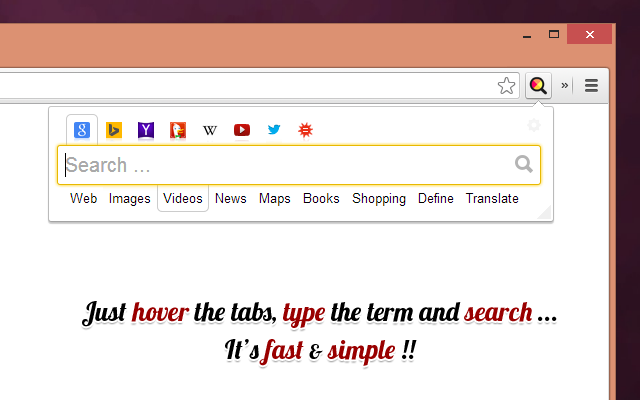
All in one web searcher allows to search any website easily by typing in one search box.
All in one web searcher is a simple yet powerful extension to search multiple sites with ZERO click. Add sites to search, customize the order and search anywhere quickly.
USING THE EXTENSION
----------------------------------
- Click the extension icon, simply hover over the search tabs and type the search term.
- Press enter to search the keyword in the selected search engine.
- Press "tab" or "alt" keys to cycle through tabs if needed.
- Add custom search engine sites as you need.
- Simple and quick way to search any page without a click !
FEATURES
---------------
- Simple and fast UI for quick searches
- Add multiple search sites easily and customize the order.
- Add sub search sites like "Images" search, "Map" search etc. for easy search.
- Keyboard shortcuts to cycle through the tabs.
- Custom/Automatic icons for the tabs can be used.
- No unwanted background process and memory. Light and fast extension.
- Available in two themes
- Text free extension and hence multilingual
DEFAULT SEARCH ENGINES
---------------------------------------
- Google with Web, Images, News, Videos, Maps, Define, Books, Translate, Shopping
- Yahoo with Web, Images, News, Videos, Answers, Sports search
- Bing with Web, Images, News, Videos, Maps search
- Wikipedia with Wikinews, Wikitionary search
- Youtube, Vimeo, Metacafe, Dailymotion, Hulu
- DuckDuckGo
- WolframAlpha
- Twitter
PRIVACY
--------------
All in one web searcher extension does NOT collect any kind of information. The last used search keyword is saved locally. For any concerns, please contact me at aakashweb.com
NOTE
--------
After installing, please go to options page and change the "Tab selection method" to hover or click according as per your preference.
Set a keyboard shortcut for opening the popup under "Manage extensions" page for even quicker search.
CHANGE LOG
-------------------
4.1:
- New option to open the results in new/same tab.
- Minor enhancements to design and options page.
- Updated jQuery and jQuery UI to the latest versions.
- Fix issue where 'alt' key not cycling through tabs.
- Replace deprecated events.
4.0:
- Removed tabs permission.
- Reorganized the assets used by the extension.
- Updated default search URLs to HTTPS
- Minor changes to the options page.
3.1:
- Added feature to export and import search engine customization settings
3.0:
- New simple Icon.
- Reorder tabs easily.
- Libraries updated to newest version.
- Small interface changes.
2.0:
- Core code re-written from bottom.
- New Icon.
- Instant popup load
- Customize the default order of the list.
1.0:
- Initial Version
Latest reviews
- 克範
- Microsoft Edgeは検索エンジン切り替えが面倒なのだ。 設定は面倒だが国内版に変更すれば使いやすいのだ。 Switching search engines is a hassle with Microsoft Edge. The settings are a hassle, but it's easy to use if you switch to the domestic version.
- zhihui
- 可以添加自定义搜索,最好加入划词搜索。
- Bert
- Alludes to be able to search a specific web page. It does not do that, so what is the value here? I already know how to "search the web" with the many search engines available.
- 家瑞
- Best I ever used, easy to edit your own search bar!!!
- Matthew
- This is a very helpful add-on for Edge. I regularly use both Bing and Google for general web searches, but don't like only having one default search engine for the browser omnibox, or opening different search homepages in new tabs before performing searches. This is exactly the browser extension I was looking for - with a single click of the add-on's icon, I can enter my search terms and see the results page in a new tab. The UI is unobtrusive and intuitive, and includes a light and dark theme option. The "hover" tab selection is a great feature, as you only need to hover the mouse over the desired search engine option to change which one to use for your search. The add-on is also very customizable, you can add and remove search engines from this add-on, as well as add content-specific search options, such as Google Images, Google Shopping, Bing Maps, Yahoo Sports, etc. Edge is now my daily browser on my Windows and Linux computers, and this add-on has become a must-have for me.