Scratch 3 Developer Tools
Extension Actions
- Extension status: Unlisted
Scratch 3 Developer Tools to enhance your Scratch Editing Experience on https://scratch.mit.edu
Hey I'm Griffpatch from Scratch - For those who are serious about their Scratch Coding, this is the tool for you! :)
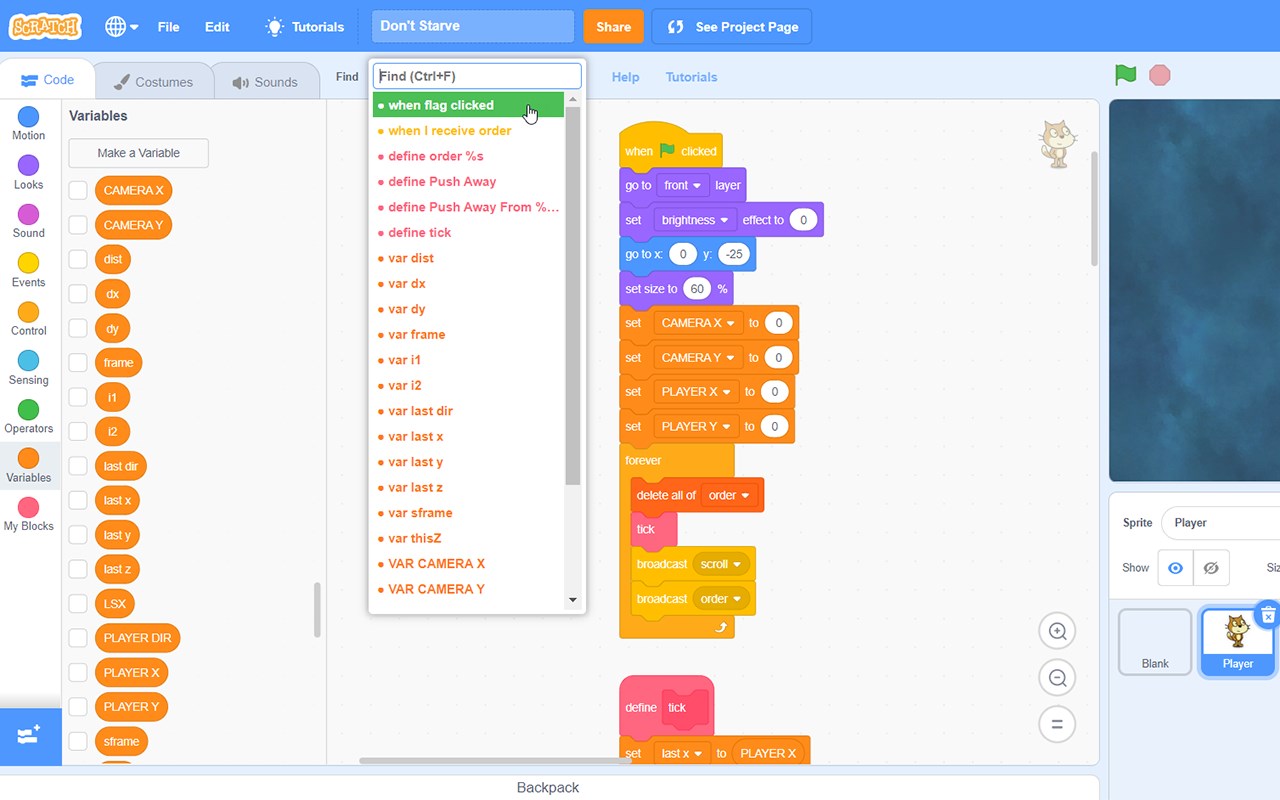
I've waited too long for an official way in Scratch 3 to jump to custom block definitions, etc... so I've begun to create my own browser extension that allows for speedy navigation to any custom block, event receiver, or other hat blocks in your project. Now supports locating variable and list references by name and an improved script tidier.
Simply install the browser extension, and then load up a scratch project. The new Find box will appear (Ctrl + F to jump to it or mouse over it), and all the hat blocks in the current sprite are listed in order of type, name, and then where they are on the page. Click on one (or use keyboard) to jump straight to the block stack in the editor! YAY!!!
New additions, middle click blocks to jump to definitions and search around or press Ctrl + Space to pop up a code block chooser to search and drop new blocks directly into your project!
Much more to come if you like this... and the Scratch Team is willing :) - Course they are *grin* - They love the Scratch community and so do I :) - Enjoy everyone and let me know if there's any problems at: https://scratch.mit.edu/users/griffpatch/
Change Log:
07 Oct 2021 - v1.20.2
● Remove "move costume to top/bottom" functionality
● Use Shift+Click instead of Alt+Click as an alternative to middle click
20 July 2021 - v1.17.1
● Major updates ported to Edge version
4 July 2020 - v0.2.4
● Bug fix for dragging element out of Ctrl+Space when you begin dragging from a emboldened area of the token.
3 July 2020 - v0.2.3
● Experimental Ctrl + Space block injection
● Fix for input box not appearing on project load.
● Fix for pressing Ctrl+Left or Right while trying to enter text
1 July 2020 - v0.2.1
● Bug Fixes
● Made Help / Tutorials link fade out when not hovering over toolbar to make interface cleaner
30 June 2020 - v0.2.0
● Fixed find bar disappearing when going to project page and back
● Support for Mac Meta Key in place of control so that Meta + F works too.
● Keyboard navigation (ctrl + left or right arrows) to get back to where you were, or in costume editor change costumes
● Middle click a block to jump to definition
● Context menu options - clean up (+), copy, cut & Paste at mouse cursor (yay!)
● Switch all instances of variable in sprite with another variable - can be used to great effect to solve problems like where you want to use a for this sprite only vs a for all sprites variable.
● Send sprite costume to top / bottom in costume editor by right clicking a costume.
● Added help + link to tutorials on youtube
20 Sept 2019 - v0.1.3
● Added Support for searching broadcasts & custom block usages (within same sprite)
● Merged any duplicate events together in dropdown (e.g. when sprite cloned)
20 Sept 2019 - v0.1.0
● Added Support for searching variables & lists, plus keyboard navigation between usages (left + right arrows).
● Drop down stays open and current item selected until you click away.
● Blocks are only scrolled into view if they are 'off screen' or hidden under the drop down.
● Tidy Up Scripts button - I think this works better than the standard scratch one - it trys to keep the general order of scripts the same, but pushes things out and arranges them neatly. It also removes the orphaned blocks and places them all down the far left for easy deletion.
v0.0.1 - Initial Release
● Enjoy!
Latest reviews
- Shravan
- Yes it does work on the new microsoft edge!!
- Thomas
- It makes coding on Scratch so much faster and easier! I'd definitely recommend it. I've been using it for a while now and I can't do anything without it!
- Ryan
- its good
- Lukas
- It says the website does not exist
- TIETJEN,
- THIS IS SO HELPFUL THANK YOU GRIFFPATCH
- Nathan
- It doesn't even open up
- Zac
- This can be really helpful for people who have big scripts of code in each sprite, this tool is extremely helpful since you can just jump to the custom blocks. Thank you Griffpatch!
- Arjun
- Plz add the thumbnail feature for the microsoft edge edition!!
- angela
- Hi Griffpatch , I first want to say that I love your projects and tutorials . I absolutely love your Chrome extension and I think that your extension has changed Scratch completely ; you have made Scratch coding easier for all of us . Thank you .
- Eyon
- you know this is absolutely awesome, right? gorgeous, absolutely gorgeous.
- [email protected]
- Very educational! My kid loves it!
- _dream
- Wow! A good Tool for Scratch 3. but dont support other Scratch3 Project..(????) 一个对Scratch 3作品制作非常有帮助的工具 不过....似乎不支持其他的Scratch 3的分支项目? 上方英文散装英语,请见谅:)
- Theron
- LOVE IT 100/10 CAN U FOLLOW ME ON SCRATCH AT scratch.mit.edu/users/EpicBrave_YT
- Sharu
- I personally love Scratch by itself but this extension has changed coding by a lot. It makes it much easier and quicker. This is a must have for every scratch coder from beginner and pro. I use it all the time (sharupo on scratch) and i think it is really good.
- Ben
- This is very useful. I'm not a really serious Scratcher, just medium but this is amazing. The Clean up Blocks(+) is very good and the Swap Variable is Sprite is a handy feature. The Copy and Paste Blocks feature are also a nice idea. Overall this is a nice addon to the Scratch we know and love. Thanks griffpatch.
- Zhenghao
- Amazing! This has helped me sooooo much, and I would definitely recommend this if you want an improved coding experience. Thanks a heap Griffpatch!
- Maurya
- Hey Griffpatch I follow on Scratch.mit.edu but does this extension work on the new microsoft edge?