PDF Reader and Editor
Extension Actions
- Extension status: Featured
A general-purpose Portable Document Format (PDF) viewer based on Mozilla's PDF.js library
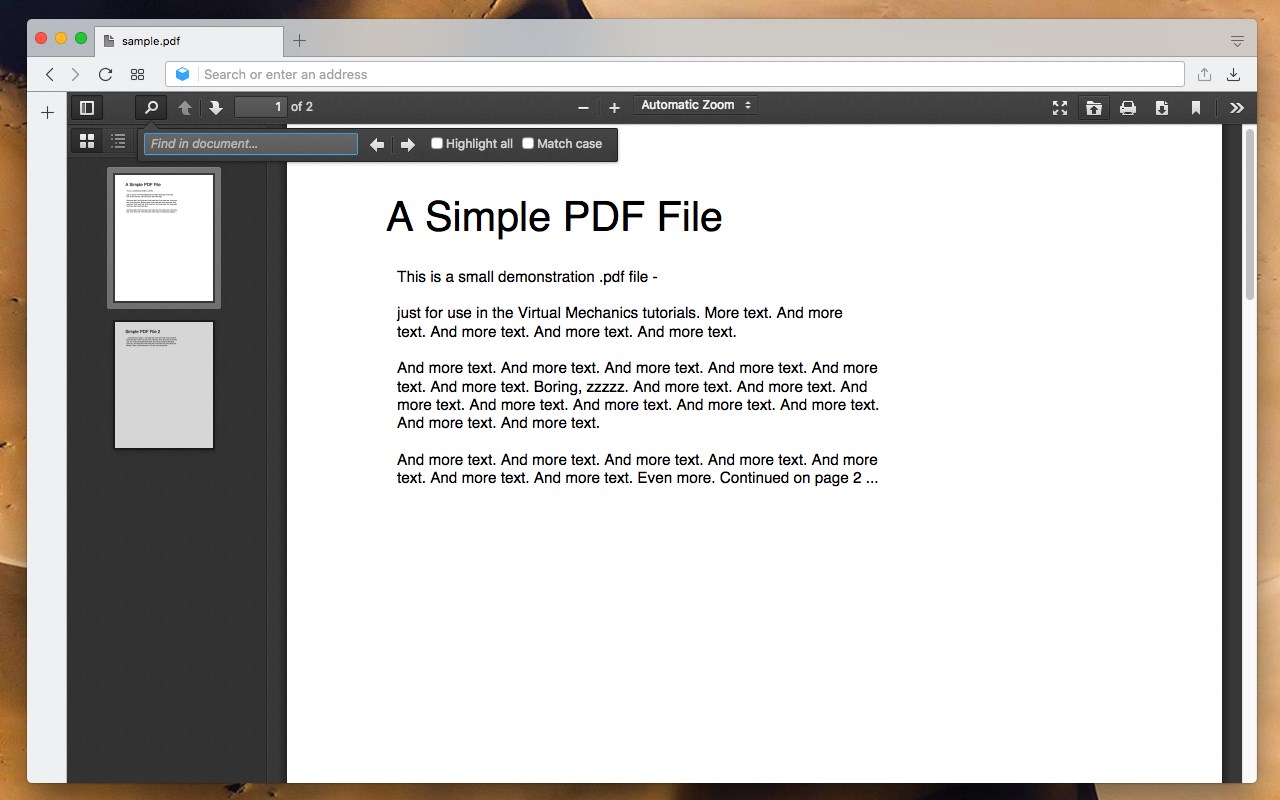
This extension integrates Mozilla's open-source PDFJS library to replace the default PDF viewer in Edge browser, enabling progressive fetching, parsing, and local rendering of PDFs without server involvement. It supports top-level display of remote and local files (with "Allow Local Access" enabled for FILE scheme URLs), providing smooth experience. For embedded PDFs in iframes, enable via right-click context menu ("Support embedded PDFs").
Features:
1. Light and dark theme options, with OS theme support and custom CSS for appearance customization.
2. Page navigation via "page" hash, thumbnails, bookmarks/outlines, and keyboard shortcuts (next/prev, jump to page).
3. Full-text search with highlighting, text selection/copy, and document properties view (title, author, etc.).
4. Drag-and-drop opening of PDFs, plus download/print support via browser dialog.
5. Displays signed/unsigned PDF signatures (no verification).
6. Partial support for PDF scripts and rendering interactive forms (AcroForm/XFA; can disable).
7. Editing tools: Insert text/images, draw/sign with pen/mouse.
8. Crop/extract pages to create new PDFs.
9. Pause extension to revert to native viewer temporarily.
Available Rendering Options:
- Disable Page Labels
- Enable Permissions
- Enable Print Auto-Rotate
- Enable WebGL
- History Update URL
- Ignore Destination Zoom
- PDF Bug Enabled
- Render Interactive Forms (AcroForm/XFA)
- Use Only CSS Zoom
- Disable Auto Fetch
- Disable Font Face
- Disable Range
- Disable Stream
Latest reviews
- galaxy
- 勾选了在inprivate允许,再隐身模式仍然无法使用,显示被edge阻止
- 川
- This extention can add CSS snippets. GREAT!
- Marget
- Hello developer I trust you're doing well! Currently, I'm exploring opportunities to grow my business by investing in Chrome extensions. Your extension has caught my attention, and I am genuinely interested in discussing the possibility of acquiring it. We can discuss the price and complete the transaction securely through a reputable escrow services (www.escrow.com or cryptoexchange.com). Google supports the smooth transfer of extension ownership from one account to another, ensuring your gmail account remains unaffected. If you have any inquiries or if this aligns with your plans, feel free to reach out to us via : Facebook: https://www.facebook.com/profile.php?id=100082468097071 Whatsapp: +1 6468971986 Skype: live:.cid.7ed1d897457692ce Telegram: @harryysandersonn Twitter: @Sanderson3Harry Looking forward to hearing from you!
- Jay
- Solved the biggest issue I had with Microsoft Edge by adding a hand tool to pdf's so I can move around the document without having to use the scroll bars. I found a thread on Microsoft where users had been requesting this feature for 3 1/2 years from Microsoft with no results.
- 军
- 问题: 标签页 标题 会出现与pdf名字不相关的数字 希望直接显示文件名 许愿: 希望增加 绘制功能
- Lan
- 5c5810fd.weaksharedptr.com注册送永久流量的,专线支持GPT,可以试试,节点多,又快又稳,晚高峰看8K视频完全不卡!(手机电脑全平台互通)
- Cavallone
- Please update to the latest PDF.js
- Wang,
- test
- D
- 这个应用完美的解决了EDGE打开PDF后因为渲染问题造成文字变形、虚化的问题,真的非常棒。我在使用过程中,发现一个问题:在没有运行EDGE时,初次打开本地PDF会调用EDGE本身内置的阅读器,不会调用此扩展。而在已经运行了EDGE后,比如随便浏览网页,总之就是打开了EDGE后,再打开本地PDF就会正常调用该扩展,希望能就此问题优化一下,在没有打开EDGE时,初次运行本地PDF也能直接调用此扩展。最后还有一个建议:阅读界面上方工具栏的占比可以再小一些,另外在工具栏中增加浅色深色的切换。
- A
- Unfortunately there's No options to highlight, cross-out or add notes to pdf text.
- Zvi
- Highly recommend this. Allows me to quickly search text in a PDF in Edge. Edge's PDF reader's search is slow
- 书滨
- 太棒了,比edge自带的阅读器好用太多,如果可以添加标记功能就更好了,赞!!!
- Roger
- When opening a link in Edge that is a PDF file, it did not allow hyperlinks within the open pdf file to be traversed. Opened the same pdf file in Chrome with a pdf reader extension, and it successfully opened the hyperlinks so that other pdfs could be viewed.
- Singh,
- Great add-on! This is hands down a much better PDF experience than the stock Edge PDF reader. Has added functionality such as different reading views and a sidebar to overview the entire document, smooth scrolling, and no jittery loading like that I have experienced on the stock reader.
- Predmet
- pdf.js surely works better than the default pdf reader of Chromium Edge.
- Felipe
- Please add the function render embedded PDF files in web pages, its help me a lot. thanks for the great job
- Tangerine
- 赞美 解决了新版edge不能书页对翻的问题 看ppt可以一页四个视图 帮大忙了
- Viola
- Great!!! Hope in the future version you will add the function to highlight!!! Thanks for your hard work❤
- 恩驰
- 新版edge没目录是我想到的..这个不错,如果能加画笔功能就好了
- Gheorghe
- I open drawings in the browser from the Sharepoint all the time. I wanted to use this extension for the handtool, very useful for dragging and navigating trough drawings in pdf. But for some reason it is a lot slower than the browser default and does not open in detail. Deactivated for now...
- 秉东
- 太有用了,新版edge居然不支持pdf目录功能
- 宝光
- 会禁止从edge里下载pdf文件,且在加载较大的文件(100MB以上)会时长出现插件加载错误的提示,希望解决
- 声宇
- 在新edge删减了pdf阅读功能的环境下,这个扩展很好用。但是它会禁止从edge里下载pdf文件,希望能修正这个问题
- 嘉
- Edge的pdf支持非常基本,双页视图都做不到。这个插件完全把火狐浏览器的pdf支持组件搬过来了,用起来确实方便了很多