OneNote Web Clipper
Extension Actions
Save anything on the web to OneNote. Clip it to OneNote, organize and edit it, then access it from any device.
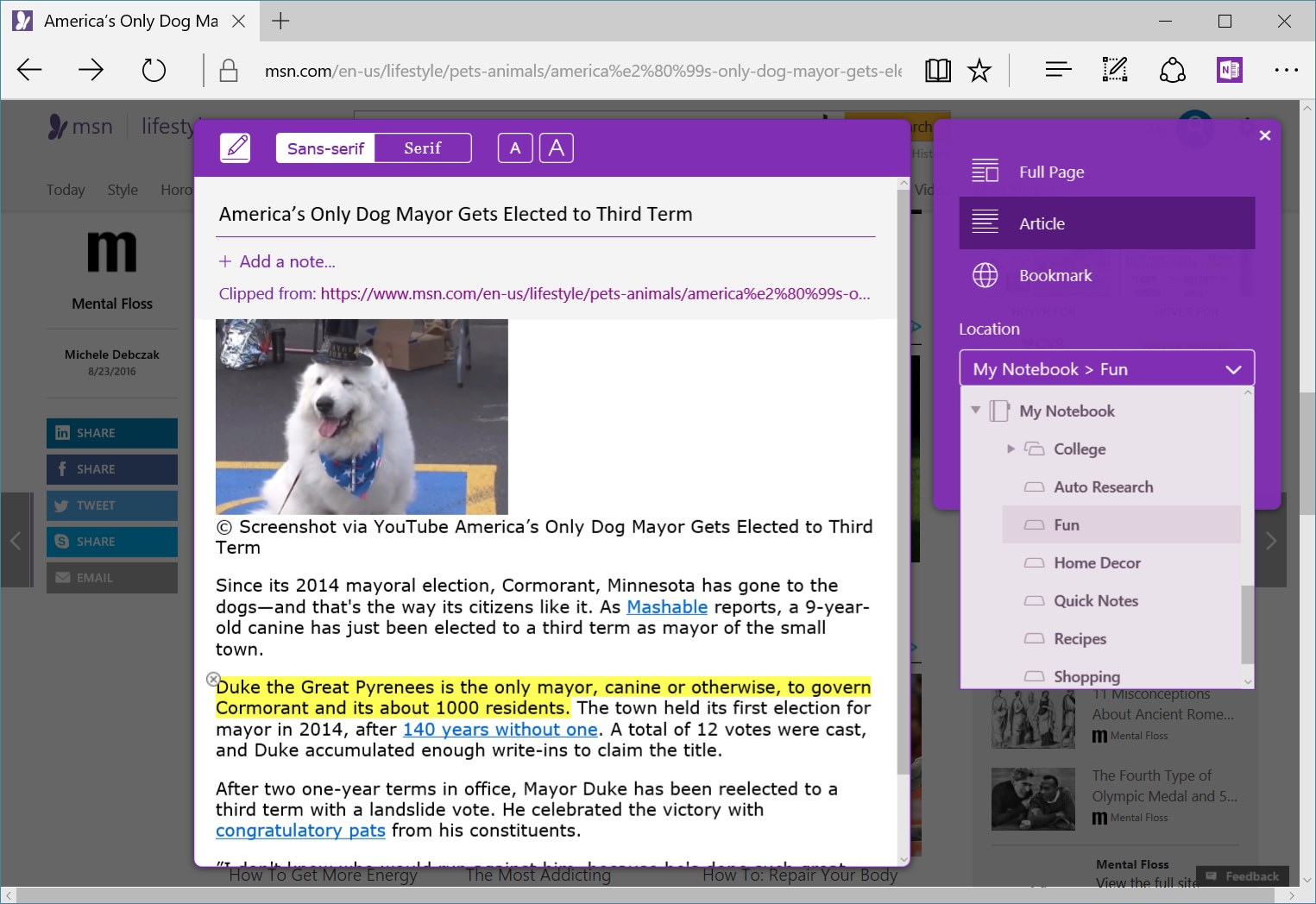
You're busy. OneNote Web Clipper lets you quickly clip all or part of a web page to OneNote, and save it for later. Clip images, pdfs, videos, or a visual bookmark of a page. Best of all, you can access them from any computer, tablet, or phone - even when you're offline.
CLIP YOUR WAY
- NO CLUTTER! Articles, recipes, or products can be clipped without all the ads, navigation, and noise.
- Highlight text, adjust the fonts, or add a note before you clip.
- Clip the whole page or several selections on the page. It's up to you.
WHAT TO CLIP
- All or part of a web page
- PDF files - online or on your computer
- Any image on a web page
- Videos from YouTube or Vimeo
- Create a visual bookmark of the page
GREAT FOR
- Travel
- Business
- Shopping
- Recipes
- Research
- News
- Inspiration
TAKE IT WITH YOU
- Anything you clip to OneNote will be available on all your devices, even if you're offline.
- Use OneNote's powerful search to find your information on any device.
- Share your information with others.
Latest reviews
- Bitencourt,
- top.
- Judith
- I had some issues signing into OneNote Web Clipper. I removed and then reinstalled the application and was able to sign in with my personal account. Since then, it's been working well.
- AngelaCarol
- Great as I don't use Google
- Trent
- Can't login with personal accounts. Can you please get this fixed?
- Michael
- Works great, when it works.... Users have mentioned for 2 weeks that they cannot sign in with personal accounts in Feedback and it appears that the extension will just stay broken??
- Jay
- Doesn't allow login with Personal version Microsoft accounts anymore, even ones tied to active 365 subscriptions. I was able to login to a work account, but that's suboptimal for what I use it for. They're driving users to unvetted 3rd party clipper extensions, which is not a great consumer strategy.
- Tony
- After 3 days of trying to get signed back in to the extension (for some reason it signed me out), I finally got in here and seen another comment from a user having the same issue (thanks Travis). Why can't we sign in? The full application from the app store is letting me sign in?
- Travis
- And just like that: This isnt working. keeps asking me to log in with my microsoft account, or just hangs. I love this tool and sad it's not working 'at the moment' :(
- Brent
- I have a love / hate relationship with this tool. When I'm on one focused topic, I love that I can quickly capture and consolidate information. But when I have multiple topics, it's cumbersome to send information to the right section or workbook. It's good enough that I depend on it...and then without warning, it breaks and my workflow is completely disrupted. Hoping we get a Clipper extension for 365 Notebooks soon. Maybe Microsoft will invest the effort to make that Clipper more effective and more reliable.
- Carlos
- Much, much improved recently. I have finally ditched Evernote. The only thing Evernote did better than OneNote was webclipping. But that's not true anymore. Thank you, MS. Keep it up the good work. I only had one weird issue recently where I had to deactivate and active the extension to get it to work. I fear a quirk like that will push some users away.
- Doug
- I love it when it works, which is most of the time, but I get occasional flickering and failure to capture on some sites. Stopping and starting the extension usually resolves the problem. Ironically, it works better in Chrome than in Edge. If that issue could be corrected, I'd rate it a 5.
- Palumbo,
- Doesn't work at all as others have said. And that a joke that Microsoft doesn't have the ambition to fix a very useful tool. So much for taking care of their customers....
- Len
- Working again this morning with my personal M365 account again. Signed in without issue this morning. I think the problem may have been related to Microsoft's migration to pass keys and Entre ID. At least, for me the problems with OneNote clipper seemed to coincide with my move to Passkeys and Entre ID. A tool that I've become highly dependent on. Great for collecting and organizing websites/pages into OneNote.
- James
- Sign in doesn't work anymore.
- Len
- Stopped working two days ago for my M365 personal account with passkey sign in. Works with my work account sign in, but without access to my personal M365 OneNote notebooks. Working again! However, there does seem to be something that is causing it to go into 'flicker' mode, requiring: 1. At least a disable / re-enable in Add in Management 2. If doesn't resolve, an uninstall / reinstall I think it may be related to Microsoft's migration to pass keys and Entre ID. At least, for me the problems with OneNote clipper seemed to coincide with my move to Passkeys and Entre ID. A tool that I've become highly dependent on. Great for collecting and organizing websites/pages into OneNote.
- Joy
- This used to be an amazing extension. Then they stopped offering it in Firefox. So I installed it in Chrome. Then it stopped working in Chrome. So, I installed it in Edge, now it is stuck in an endless loop with the opening panel constantly flipping even though I'm logged into Edge with my Microsoft account. I'm so frustrated and disappointed because it became integral to my workflow. Same with the mobile version. It opens up, but doesn't offer the option to capture the content I want other than in image mode, which doesn't allow editing. Is anyone reading these? Why is this happening and why isn't anyone correcting these obvious issues that many people are having? Why offer it if it's been abandoned? If you're not going to fix PLEASE remove the extension altogether.
- Mirza
- PLEASE. This single app "OneNote" should have a separate CEO and COO to look after it and work on making it stand up to the competition. And as a tribute to the loyal and high addicted users like me. Please look into fixing the issues/bug and update or upgrade with the improvements/feedback given by the loyalist. PLEASE.
- Mary
- Microsoft - WHY do you not care to fix your OneNote Web Clipper ? It has not worked since at least early 2025. Had previously used this incredible feature for MANY years -- and now the extension for it does NOT OPEN.
- Jarod
- 很好用,帮助我收集了很多资料。
- Patsy
- Soooo easy.... great way to keep control of purchases straight from the website... have been using OneNote for years..... and it just works...
- Mike
- I've used this extension for years, on multiple browsers. Works on nothing now, finally after months it to sign and now it just hangs up doing nothing. Totally useless ! has me thinking, time to get rid of OneNote also
- David
- Have been using this extension on Chrome for years and 99% of the time, it works great. I love clipping screenshots or saving articles and then converting to WORD for later reading. Have been recently using MS EDGE for a few things and so I added this clipper. Unfortunately, it rarely works...hard to believe that it works better with a 3d party program than with its own in-house family of apps...
- Hasani
- Works beautifully!
- T
- it works great for me
- Axel
- Eigentlich ein gutes Tool aber es läuft nicht zuverlässig. Hängt sich immer wieder auf. Muss dann neu installiert werden. Aber zur Zeit hilft aus das nicht. Im Moment nicht zu gebrauchen.
- Mark
- This is one of my must have extensions for Edge, and it mostly does a great job. But it's lacking a little in features now, I'd like more control over what it clips, and it seems to gradually get slower over time until eventually you have to delete and reinstall to get it working properly again.
- Martin
- I've loved OneNote since it was first launched - one of the most used applications on my PC. This Web Clipper complements it very well.
- 茸
- 在剪切页面的时候,经常出现不停地转圈情况,根本无法使用,垃圾玩意。还不如在谷歌浏览器上面的稳定。
- Blakey,
- Non-responsive and useless. Between this and the inconsistencies of OneNote across platforms, I wonder if all the devs have been fired. If not, I think it's time.
- Gregg
- Had to disable - no longer working, endless loop of pop up to sign in (I am already signed on)
- Gerhard
- Update: nach löschen und Neuinstallation funktioniert es jetzt wieder - daher nun 4 Sterne (wer weiß, wie lange es funktioniert, daher keine 5!) - Leider funktioniert es seit 16.01.2026 wieder nicht - es kommt keine Meldung, nur das Feld flackert dauernd, sodass man nicht darauf klicken kann! 2024 kam wenigstens noch eine Meldung wie "Beim Erstellen der Vorschau hat etwas nicht geklappt. Versuchen Sie es noch mal, oder wählen Sie einen anderen Ausschneidemodus aus."
- sgber
- 感谢!我觉得非常好用!
- Jenn
- used to work, doesn't anymore. either an endless loop of the pop-up flashing or nothing happening at all.
- Flame
- 感觉非常好用
- Wolfgang
- Very cool tool to capture web content (without ads) to save it in OneNote for later readings, sharing content, or to simply add information to the sections in OneNote that covers your interests.
- Sylvie
- Ne fonctionne plus même dans Edge
- 小平
- 我觉得非常好用,因为我是一个电脑小白,使用非常方便,功能全面,
- 传青
- 沙比插件无法正常打开,死循环
- 浩一
- 気になる情報をまとめて保存出来て良い!!!
- Yvon
- Depuis la dernière mise à jour je ne peux plus dispatcher l'emplacement de destination de mes articles à sauvegarder. Après un long moment de "nous chargeons les blocs notes" je suis renvoyé sur un emplacement par défaut : Ordinateur portable section Notes rapides.
- Guddu
- works well on browser
- 小龙
- 非常方便,灵活。 强烈推荐. 但有点小瑕疵。就是网页上有图片,gif格式,页面获取时是可以看到图片的,但是在应用程序上看就是无图片的。
- 小龙
- 非常方便,灵活。 强烈推荐
- Tim
- Great when it works but, sadly, it does not work more often than it does. I cannot select a Tab in OneNote so have to go with the default It breaks regularly - flashing and unusable Reinstallation results in a button but no actions Using MS Edge
- 振
- 已经离不开了
- Toniolo
- Ottima quando una cosa funziona bene è giusto confermare 👍👍
- Len
- Working again! However, there does seem to be something that is causing it to go into 'flicker' mode, requiring: 1. At least a disable / re-enable in Add in Management 2. If doesn't resolve, an uninstall / reinstall I think it may be related to Microsoft's migration to pass keys and Entre ID. At least, for me the problems with OneNote clipper seemed to coincide with my move to Passkeys and Entre ID. A tool that I've become highly dependent on. Great for collecting and organizing websites/pages into OneNote.
- Yuval
- Look as if it stopped working
- françoise
- N'est pas stable . Ne fonctionne plus depuis la dernière mise à jour de Microsoft 365. L'écran de connexion clignote rapidement de telle sorte qu'il n'est pas possible d'insérer les identifiants et mots de passe. Je dois à chaque fois le désinstaller, nettoyer les caches et fichiers temporaires, puis le réinstaller à chaque utilisation. Dommage car c'est un outil bien pratique.
- Arthur
- werkt niet meer