
Ricoh Cloud Print
Extension Actions
CRX ID
jbfcfldkdoodcbiaoojjdokamlmecceg
Description from extension meta
Ricoh Cloud Print for ChromeOS
Image from store
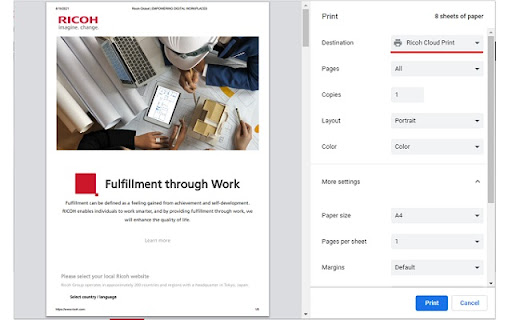
Description from store
By using Ricoh cloud printer app on Ricoh's multifunction printer, securely print out in location free via cloud network.
In order to use this function, it is necessary to contract with RICOH Smart Integration and have a RSI account.
Authentication method with cloud network
- Mail address, Password
- Tenant ID, User ID, Password
- Office365 authentication
Print Function
[Settings]
- Pages
- Copies
- Layout (Portrait, Landscape)
- Color (Color, Black and white)
[More Settings]
- Paper size
- Page per sheet
- Margins
- Scale
- Tow-sided
- Option (Headers and footers, Background graphics)
- User code
Support OS :
Chrome OS 89 or later