
Captura de tela e gravador de vídeo de tela
Extension Actions
- Extension status: Featured
Gravador de tela e captura de tela, ferramenta de captura de tela para gravar a tela. Tirar captura de tela. Gravar tela,…
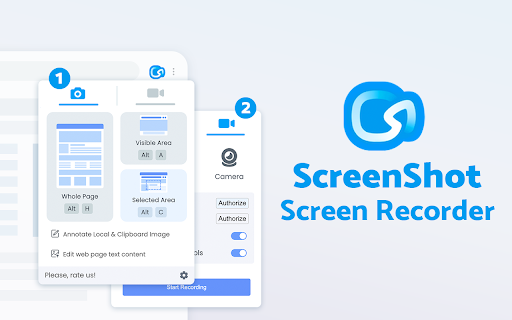
Faça capturas de tela impressionantes de sites inteiros e capture elementos da página. Desligada. Sem registro. Ferramenta de captura de tela - captura sites inteiros e áreas de usuário. Capturas de tela prontas podem ser editadas rapidamente (cortar, pintar, adicionar setas, legendas ou texto).
Você não verá nenhuma janela adicional com sites aqui. Por que perder tempo se você quer apenas uma captura de tela?
gravador de tela e gravador de vídeo de tela funciona para criar um arquivo de vídeo com mais oportunidades para baixar ou compartilhar imediatamente. Coopere facilmente com colegas de equipe ou familiares compartilhando conteúdo de vídeo para explicar claramente materiais e informações. grave de sua tela ou webcam, salve e compartilhe com conveniência usando aplicativos que combinam também ferramenta de captura de tela e conversor de formatos de vídeo.
conversor de arquivo de vídeo, portanto, permite alterar o formato de vídeo para executar o mesmo vídeo em outros dispositivos. Os formatos mais comuns estão disponíveis no conversor de vídeo Scrnli. Faça como está escrito: grave a tela e salve-a em um dispositivo para assistir mais tarde ou compartilhe com os amigos. Além disso, como a opção de converter arquivos em vários formatos para abri-los em outros dispositivos.
Quer compartilhar sua tela para casos como relatar problemas técnicos, fazer demonstrações de produtos ou tutoriais de instruções? Aqui estão os motivos para escolher a captura de tela e a captura de tela:
✔️ captura de tela da página inteira, não apenas da área visível ou da área selecionada;
✔️ screenshot no One-Click;
✔️ Armazenamento e processamento sem servidor;
✔️ Salve arquivos PNG ou copie-os para a área de transferência com um clique;
✔️ Não é necessário login ou registro;
✔️ Não há restrições de tamanho ou tamanho do arquivo;
✔️ Editar e descartar altera sua captura de tela;
✔️ Adicione elementos gráficos e de texto, como ponteiro, seta, quadrado e outras formas;
Gravador de vídeo de tela sem marca d'água
Ainda assim, encontre uma ferramenta de captura de tela sem marca d'água? Baixe este gravador de vídeo para capturar a tela de forma mais pura. Se você deseja capturar uma tela, gravar uma tela ou tirar uma captura de tela com eficiência, é um gravador de tela obrigatório.
Gravador de tela com WebCam
Ao usar este gravador de tela com WebCam, seu rosto e emoções podem ser gravados em uma pequena janela de sobreposição. Você pode ajustar livremente o tamanho da WebCam e arrastá-la para qualquer posição na tela.
Ferramenta de captura de tela para fazer uma página inteira ou captura parcial com mais edição, download ou adição de texto. Faça uma captura de tela completa da página da Web ou apenas qualquer parte dela com a oportunidade de editar, salvar e baixar a captura de tela para o seu PC. O aplicativo é iniciado a partir de um navegador que economiza totalmente o seu tempo. Basta clicar no ícone da extensão para escolher entre as opções de captura de página inteira ou uma parte selecionada.
O PDF Viewer for Chrome é uma ferramenta gratuita e muito útil que permite visualizar e editar qualquer arquivo PDF diretamente no seu navegador. O PDF Reader é a solução de PDF líder do setor. Ferramenta de conversão de PDF.
captura de tela página da Web inteira ou qualquer parte. Editar captura de tela. gravar screencast - gravar vídeo de sua tela.
✔ captura de tela captura de tela inteira ou parcial
✔ Edite e anote a captura de tela
✔ screencast - grave o vídeo da tela e da webcam
✔ Trim and Crop screencast
✔ Converter vídeo para gif e mp4
✔ Carregue e compartilhe rapidamente a captura de tela e o screencast
O PDF Screenshot fornece PDF.js como o visualizador de PDF padrão no Chrome. Este leitor de PDF suporta a renderização de arquivos PDF remotos e locais nos quadros superiores. Captura de tela para arquivos PDF.
Clique no ícone da extensão (no canto superior direito do navegador), escolha uma das opções de captura e observe a ferramenta Captura de tela capturar cada parte da página e depois transferir a captura de tela finalizada para uma nova guia, onde você pode editar a imagem e carregue-o como um arquivo para o seu PC.
Notas
Lembre-se de recarregar a página depois de instalar a extensão antes de tentar fazer uma captura de tela dela (o Chrome deve inicializar a extensão para cada página).
A ferramenta de captura de tela de extensão é totalmente gratuita e fácil de gerenciar para os usuários. Se nossa extensão for útil para você, dê-nos 5 estrelas!
Latest reviews
- Abhishek Bhadauriya
- it doesn't showing option for recording only show for screenshot , pls, fix this ASAP.
- Aleksander Habrzyk
- Just crashed after 1.5 hrs of recording an important interview. I wonder if the recording can be accessed?
- James Johnson
- This is the worst Chrome extension for screen recording I've used. doesn't work well, very limited options. Does not save files . Play back speed only slows to 75%. speed it up 2x..??! WEAK!
- Abolfazl
- Dont work!!!
- Yusef Ali
- The Best 4k No Membership Cool
- Sokly Phal
- I cannot make the whole page screenshot.
- Jules Bois
- I click the "Start Recording" button but nothing happens.
- SP Howell
- Thumbs up
- saman mahmodi
- its awesome thanks a lot .. ♥
- Sunita Arora
- very good
- Bill Gracey
- Doesnt work! :( won't respond.
- John H
- I really like this extension, it records very well, and I like the "This Tab" recording. I wish the app a timer.
- salim sarowar
- Excellent work
- Bob Bobage
- Stops recording the tab if you go to another page.
- andre sitorus
- its a good extension for recording all tab screen, desktop, and can support camera recording too, but can't record if a some administrator pop up in windows and its FREEEEEE
- CHAUDHARY TANUJ
- GOOD
- karno
- for free is goooooood
- Tom Carrick
- Best Screen recorder I've used. Simple, effective and does exactly what you need it to do. Wished I had found it years ago.
- Ha Tram
- Good
- Kitty
- Very usefull!
- Stan Duncan
- The program did well in the beginning, but suddenly stopped with no explanation. Now if I want a shot of a particular part of a page, I click on the button, and start to slide my cursor over the picture, but the edges of the copy are far up and to the left of the picture I'm trying to copy. And there doesn't seem to be any way to get it to line up with the beginning and ending of my cursor. Can anyone help me?
- Mohamed Ali
- I Like it, really... It's Very easy to use and helpfull !
- OUSSENY OUEDRAOGO
- I Like it, really... It's Very easy to use and helpfull !
- Antoine NICOLLE
- top test
- Jace Roesner
- It's good. but the only problem about it is when I take a video the frame rate drops like 40 percent and the resolution turns from 4k to 480p
- samuel bambang Suseno
- Great ext. Easy to use, really helpful to capture and share
- yaxyobek habibulloyev
- Good!
- Teten Kurniawan
- Amazing Chrome extension so far
- Cliff Young
- notworking
- Sam Nwosu
- Very helpful extension, it's easy and straight forward to use. I like the fact that I can record my screen and download as mp4 without any stress.
- Mehedi Hasan
- Dear Developer or maker of this amazing extension. If possible please fix the issue that sometimes recordings are not saved. This is happened to me couple of days. Please try to fix it. I love to use this extension for a long time. I hope I enjoy a lot after the upcoming update
- Bashir Ade-Jamiu
- im DONE with this, it dosent always saves your rocording so your 11 min recording is gone
- Abbas Bukera
- i do not know how it is i did not test it but i saw the reviews so i think it will be good kinda?
- Abdur Rahman
- Alhamdulillah, its a grreat extension
- Web Developer
- First it was awesome, i was using it everyday but now it is not working properly even if started working then got crash again and again.
- Miloš Milić
- Literally doesn't work. I'm clicking and nothing is happening; no screenshot is being made. Sham.
- RamAvtar Verma
- nice
- Shiva Chronos
- 全体をキャプチャしようとしたら、画面が下までスクロールして撮ったのかと思ったら、何も変化なしで、画面をマウスで上にスクロールしようとすると、自動的・強制的に下まで戻されてしまいます。 サイト閲覧さえ出来なくなりました。 ここで入力している時に、戻ってみたら、まともに動かせるようになりましたが、仮にキャプチャが撮れてるにしても、どこに保存されているのか分かりません。 設定には、保存先を指定できる所が無いです。 完全に使えなくなったので、他のものに変えます。
- Anita Zuli Rahmawati
- ok
- Stephen Sock
- doesn't work. press record and nothing happens
- Amr Emam
- very good
- Akshay Ekka
- works well
- Ashish Alexander
- no option to share via link or to publish to youtube.
- Tom Dean
- Works great for everything except for MP4 export. The file it creates isn't compatible with QuickTime.
- Shivangi Pandey
- Was having some issues with it when I initially installed it, but I guess the app underwent some updates and it's super cool. The tab in recording goes mute while the process is going on, so that I can watch any content or play any music in another tab hassle free. Different video saving formats are helpful. Love this.
- HABIB MALTIBA
- this app looks very good and quite helpful
- Lee
- Used to be good but for some reason it no longer works. The tab opens and I can select the options but the "Start Recording" button no longer functions.
- EMMANUEL AKOBUNDU
- Super Cool!!!!!
- Emilien Girerd
- Top
- Mowen
- Can't download long time video