Kiosk Extension
Extension Actions
Enhance the Kiosk Experience
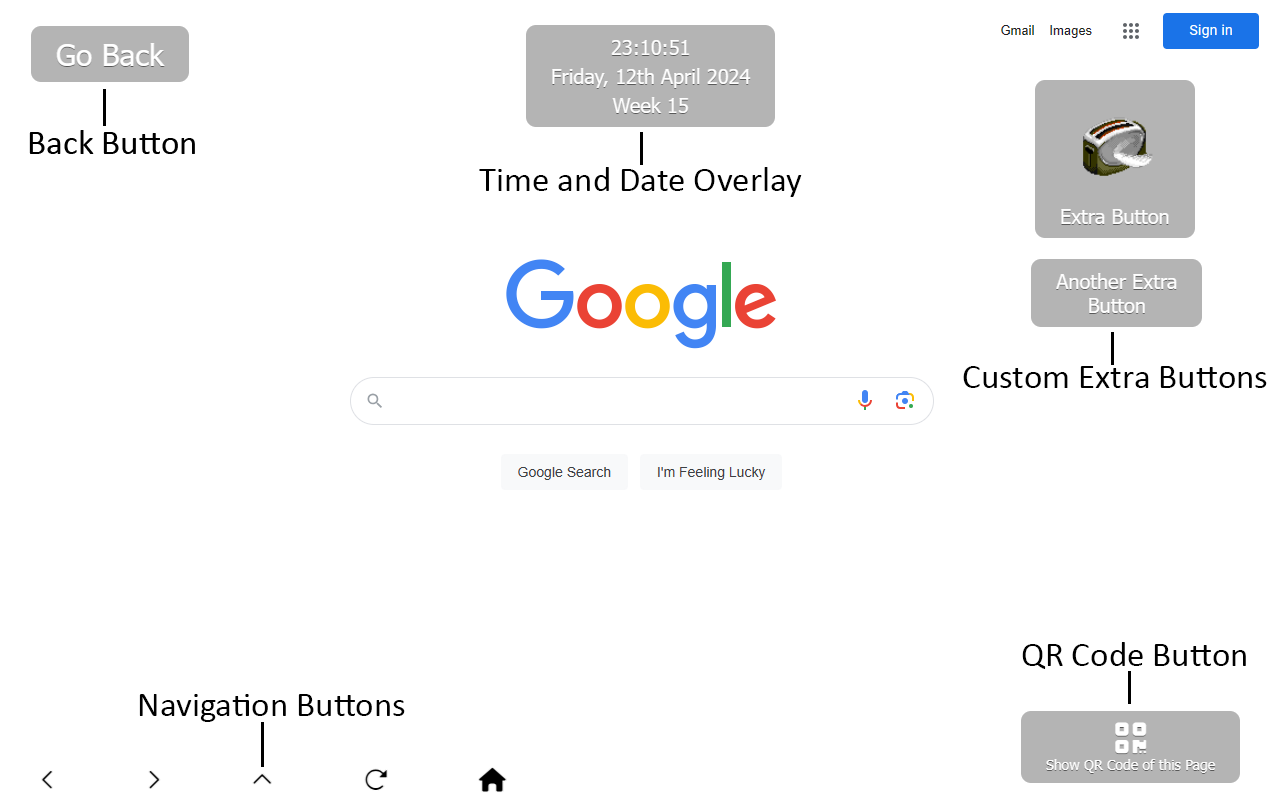
Add advanced browser controls for Chrome kiosk mode and Edge kiosk mode, designed to enhance the experience of touchscreen kiosks launched with the --kiosk flag.
Whether you're managing a public terminal, self-service station, or retail display, this extension offers a comprehensive set of features to improve usability, enforce security, and simplify administration.
Feature Highlights
• Back-to-home button on all pages
• Navigation buttons
• Custom extra buttons
• Time and date overlay
• URL rotator for dynamic content
• Disable mailto: and tel: links
• Force all links to open in the same tab/window
• Apply custom CSS to all pages
• Allow/Deny page lists for content control
• Block common keys and keyboard shortcuts
• Add QR code overlay with current page URL
• Auto-refresh page after idle timeout
• Password-protected Options page
• Sync settings via chrome.sync across kiosks using the same account
Notes
Developed and maintained solely on my spare time.
Buttons is repositioned via drag-and-drop
Navigating to any URL containing kioskexit1337 will close the tab
Back button appears automatically on PDF/media URLs
Internal error pages (e.g. DNS_PROBE_FINISHED_NXDOMAIN) redirect to homepage
May require enabling in Incognito/InPrivate mode
Latest reviews
- Model
- Love the functionality but it does not handle different screen sizes across devices. Our buttons look good on a 4k display but not on a 1080p display, as the location is completely off screen.
- Alejandro
- Works great for what I need it, But doesn't refresh successfully when there is an MP4 playing.
- Yohann
- Doesn't work with --edge-kiosk-type=fullscreen Would be perfect else