
MatTalX - Write math symbols
Extension Actions
- Extension status: Featured
Write mathematical expressions anywhere - Convert LaTeX commands to plain text and paste it on any platform!
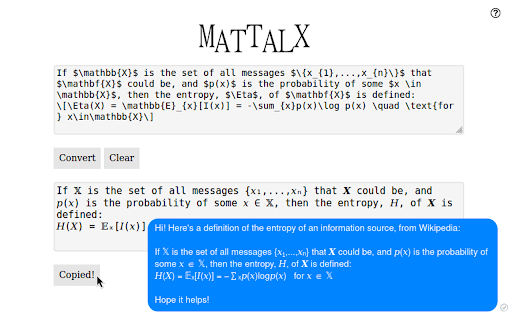
With MatTalX (pronounced "Math Talk"), you can convert a simple command, like e^{x} or \alpha into 𝑒ˣ and 𝛼 respectively. They can then be sent via Facebook, Twitter, Instagram, Teams, Gmail, and every other online platform.
You can finally talk about physics, mathematics, chemistry, and (even) chess with your friends! There are more than 1000 commands and you can even create your own! They are quite easy to remember, especially if you are already familiar with LaTeX! If not, simply open the completion popup!
Copy and paste " H(t) | \psi (t) \rangle = i \hbar \frac{\partial}{\partial t}| \psi (t) \rangle " in the upper square, click "Convert" and see what happens!
Simple, free, and open-source!
** Documentation **
Full and comprehensive documentation is available if you put your mouse above the question mark (?) on the top right corner of the popup that will appear once you open MatTalX.
Latest reviews
- Kerem S
- I got error
- Ganesh Sriram
- This is a very handy extension! As an engineering professor I often need to use dashes, super/subscripts and Greek letters in Gmail and course websites. Previously, my only option was to copy these symbols from elsewhere (e.g., Word or Windows Character Map), but this was very clunky. With this extension, I find myself saving a lot of time. For those trying to insert an em dash, \emdash works. There seems to be no equivalent for the en dash.
- Random Life
- Very useful and handy!
- Random Life
- Very useful and handy!
- Jacob Peyser
- Really useful!
- Jacob Peyser
- Really useful!