
Custom Cursor Changer for Chrome
Malware Detected
This extension has been flagged as potentially malicious.
Extension Delisted
This extension is no longer available in the official store. Delisted on 2025-09-16.
Extension Actions
- Malware
- Removed Long Ago
Get custom cursor for Chrome on Computer, Chromebook, Windows 10, Mac. A huge library with lots of free sets and collections
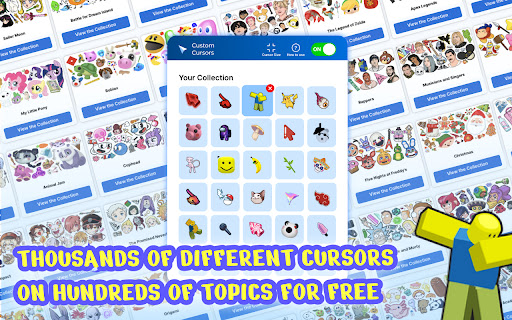
Custom Cursor Changer is a great extension for Chrome that lets you change your browsing experience by creating your own mouse pointers. With the massive library of this extension, you can find anything to suit your style, whether it's a set of alien symbols or something else entirely. Change your cursor now and get ready for an awesome experience!
Use a lot of cursor collection on webpages and websites:
- 3d
- aesthetic
- animal
- animated
- anime
- bear
- bigger
- black cat
- bleach
- cake
- cartoon
- cat
- celebrity
- cherry blossom
- cookie
- cool
- cute
- decorative
- deviantart
- different
- digimon
- dim
- flower
- funny
- game
- gaming
- girly
- gucci
- hatsune
- heart
- love
- marshmello
- marvel
- master sword
- minimalist
- mousecape
- navi
- night diamond
- pewdiepie
- pink
- plant
- pokemon
- roblox
- sailor moon
- space
- star
- supreme
- sushi
- tiny
- tokyo ghoul
- white chroma
You may have searched for one of the following, trying to find the best solution:
windows change cursor color
change mouse pointer color windows 7
how do you change your mouse
download mouse pointer color windows 10
custom cursor for pc
how to change cursor style
how to change mouse cursor on chromebook
how to change cursor speed on windows 10
cursor speed settings windows 10
change mouse pointer css
how to change your mouse sensitivity on windows 10
cursor change in windows 10
change cursor colour
customize mouse pointer
how to change your mouse cursor on google chrome
how to get a custom cursor on windows 10
c# custom cursor
how to make mouse cursor bigger
html set cursor
how to change what your cursor looks like
custom cursor for windows 7
how to change the arrow of the mouse
mac change cursor icon
custom cursor windows
css change cursor to hand
change your mouse cursor
how do you change your mouse pointer
change mouse pointer windows 7
change pointer size windows 10
how to have a custom cursor windows 10
how to change my mouse cursor
custom cursor for desktop
how to change the cursor in windows 10
how to make a mouse cursor
how to delete custom cursor for chrome
custom cursors windows 10
custom cursor for windows
custom pointer windows 10
Now you can sit back and relax - you found 100% best suiting solution for what you looked for!
Install now and surprise yourself and others every day!
To change the cusors simply click on Add To Chrome and Add Extension.
Next you will see a new button in your browser toolbar.
Click on it and you will be able to choose one of our top cursors.
To view the whole collection simply click Get More Cursors and browse the biggest cursors library on the web.
Nowadays, all Chrome users can customize their cursor. So, if you are not satisfied with the default cursor and want to bring a custom one, you’ve come to the right place.
We will show you how to get it for Chrome on Computer, Chromebook, Windows 10, Mac, etc. Go through the post to know about it.
Step 1: First of all, open up Chrome and go to the Custom Cursor Changer for Chrome website. Now add the extension by clicking on Add to Chrome button.
Step 2: Once installed, click on Add New button from the pop-up window that appears.
Step 3: Next, click on Select Image button from the window that comes up after clicking on Add.
Step 4: Now select an image from collection.
Make Chrome your own. Personalize your Chrome browsing experience.
Latest reviews
- bob bob
- I like it but I cant do try anything on?
- Anas Muhammad Fadly (Northvistaps)
- its nice
- Wei-Wei Chen
- How do you open it
- Natalya Rodriguez
- how do you even open it?
- Little Flork
- HOW DO U EVEN PUT THE CURSOR ON?!??!??!?!?!?!??!?!?!
- Twisted dragon (Peanut Franklin)
- Excuse me my sister got this and it wouldnt let her go baCK TO DEFUALT???!!! can u help her out plzzzz 😥
- david dominik
- It wont work but it's good
- Aanya Kulkarni
- I absolutely loved this! Though I do wish there was an owl house pack...
- Doc Doctor (Doc)
- LOTS of cursors but can we please get Helluva Boss and Murder Drone ones?
- Wuppa Wuppa
- does not work
- Диана Аксенова
- Greatest cursors extension
- Irina Voroshilova
- Looked for it for ages, it's awesome!
- Melissa Stevens
- it was great, love it.
- Nataliya Poltavtseva
- Great! Best custom cursors! Get it ASAP!
- liza kuzmina
- If not this one, then I don't know which custom cursors extension to use out there. This one helps a lot, since I have bad eyes and can set a big cursor!
- Anton Popov
- Wow! Love it! Custom cursors rule! Found my favorite characters from around the net!
- Akinfiy Merzheevskiy
- Work like charm like no other custom cursors extension. The best custom cursors for google chrome!
- Максим Панарин
- Loving it every day! Great packs, a lot of choice, no lags, works everywhere!
- Valentine Stoianov
- Using it for almost a year now - greatest extension , alwayd up to date and huge library of custom cursors!
- Farhan Ahmad
- fake
- Myracle Hiskey (Myra/She or They)
- Did not work. It only worked on the extension page, but didn't work on edge- How to get it to work???
- NATHAN JACOBS
- how do u do it it snot workingggg
- Buzz Cola
- OMG! Just got this, its amazing! I could already tell by the looks, Its really cool and you should get this.