
2FAS Auth - Two Factor Authentication
Extension Actions
- Extension status: Featured
2FAS Browser Extension is simple, private, and secure: 1 click, 1 tap, and your token is automatically entered!
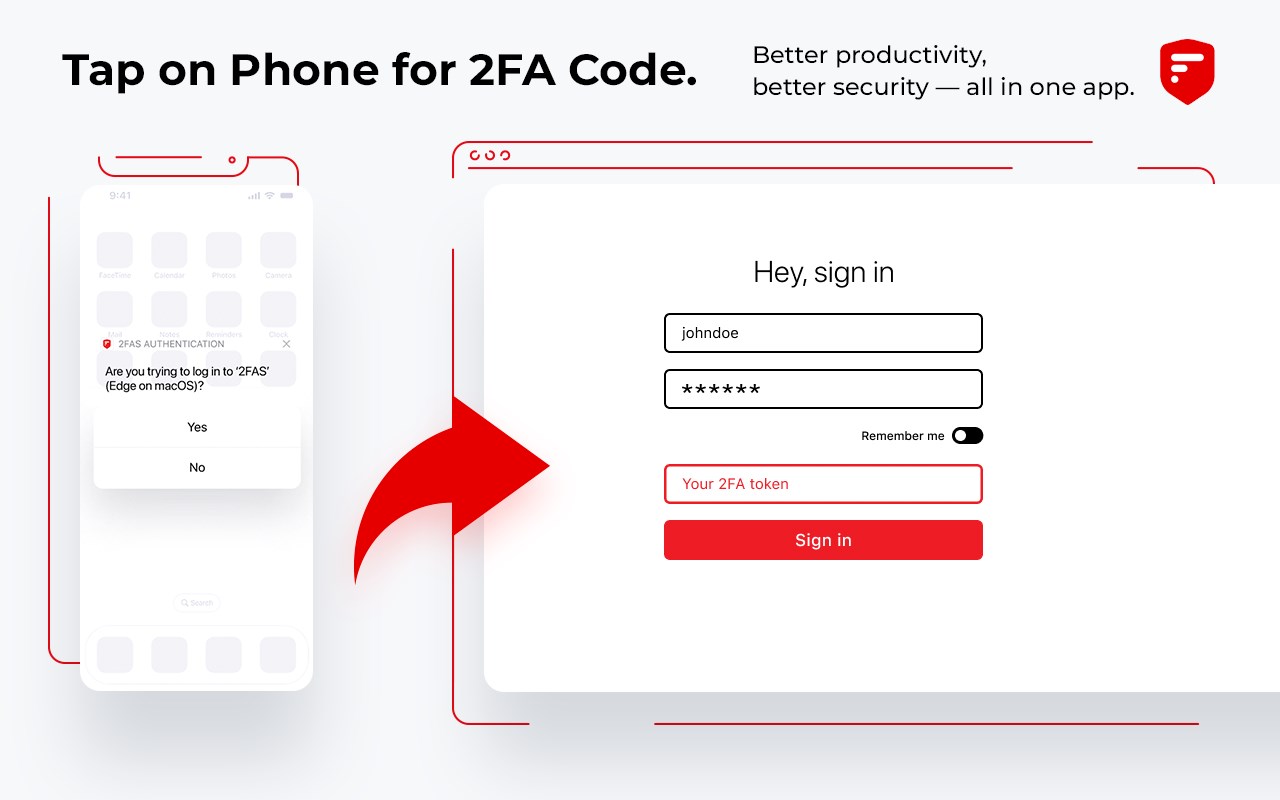
2FAS Auth Browser Extension is simple, private, and secure: 1 click, 1 tap, and your token is automatically entered!
Add 2FAS Auth to your web browser with our extension! Enter 2FA tokens automatically without re-typing for better security!
The 2FAS Auth Browser Extension allows you to log in to any online service with 2-factor authentication enabled, faster!
Easy set up in three steps:
1. Install the extension on your desktop browser
2. Open the 2FAS Auth app on your phone and pair your phone with your desktop browser
3. Start using the 2FAS Auth Browser Extension
When you want to log in using a 2FA token, simply select two-factor authentication token input field, click the 2FAS Auth Browser Extension icon, and confirm login on your phone!
Secure and fast log in.
Simply pair the service you want to login to with your 2FAS Auth app, then 2FAS Auth will automatically select your token for future logins, no searching or typing required!
Free access — no account required.
2FAS Auth is an easy-to-use authentication app that protects access to your online services and accounts.
Relying on a single password for your personal accounts, like Facebook or Instagram, often puts your data and sensitive information at risk.
The 2FAS Authenticator App generates one-time codes called Time-based One-time Passwords (TOTP) or HMAC-based (event-based) One-time Passwords (HOTP) for your account. By creating these codes offline and changing them every 30 seconds or every login, 2FAS drastically increases the security of your information.
Latest reviews
- kater
- Umständlichstes 2FA-Tool ever! Man löst eine 2FA-Anfrage aus, die aber erst auf dem Handy bestätigt werden muß, dann muß man erst auch noch ausgewählen für welchen Dienst man den Code braucht, dieser wird dann zurück an den Browser geschickt und dort angezeigt... Ja, sorry! Da habe ich den Code schneller mit der Hand einegegeben wenn ich das Handy eh schon in die Hand nehmen muss...!
- Stuart
- Absolutely love this 2FA app, and I've used loads. Love how it can send a request to my iPhone which I then click on to get the code to fill in on my browser - no typing.
- Conki
- 还可以吧 没中文
- Isaac
- Bruh It Said I Need A Phone And Im A Child Parent Of ([email protected]). 1 Star Bye The Way Sub To youtube.com/@IsaacAbiy1
- Julien
- Superbe application, remplace aisément Google Authentificator.
- 曦
- Very useful!!! Of course,wish it having Chinese translation editions. thanks so much
- Chris
- best of the two factor authenticators.
- Andrea
- Great replacement for Authy - works well in combination with your mobile. You can get an NFT :D
- Austin
- Worked GREAT for a while, and now I have to disable/re-enable the extension every morning when my machine wakes up
- WILLAS
- Poucos brasileiros sabem, mas o 2FAS é simplesmente o melhor autenticador de 2 fatores disponível para pessoas comuns como nós. A menos que você seja um Chefe de Estado como Putin e Donald Trump, estará bem seguro com o 2FAS. Lembre-se de baixar o aplicativo também.
- Anton
- Overall: 2FAS is a strong contender for the best free 2FA authenticator app. It's open-source, secure, private, and packed with features that make it easy to add an extra layer of protection to your online accounts. If you're looking for a reliable, easy-to-use, and privacy-focused 2FA app, 2FAS is an excellent choice. It offers all the essential features for free, making it a top pick for securing your online accounts.
- VIDALIE
- Extraordinaire application. Fiable, sécurisée, et si pratique ! J'en parle autour de moi; Seul petit regret, pas de validation à partir de l'Apple watch possible...
- Grzegorz
- Awesome tool! Great work