
Share webpage via Gmail
Extension Actions
CRX ID
dpmgfbniiojpbadgbgcimklddcgiibgn
Status
- Extension status: Featured
- Live on Store
Description from extension meta
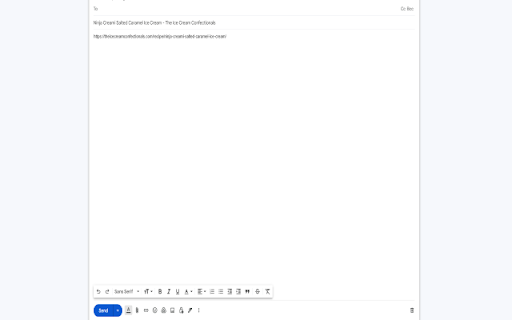
Email current webpage. Website title becomes the subject and website URL becomes the message body.
Image from store
Description from store
This Chrome Extension provides a convenient way to compose and send emails using information from the active tab. Upon activation, the Extension launches Gmail in a new tab, with the current webpage's title automatically set as the email subject and the URL inserted into the email body. This allows users to effortlessly communicate with intended recipients by simply filling out the designated "To:" field.
Latest reviews
- Gina Greene
- Unfortunately this didn't work for me. The main profile I use doesn't have email connected to it so I need to email from a different profile, but when I try to use the profile switcher this doesn't create the email. Would love if there was the ability to customize the options (e.g. which mail client to use and which profile). Thanks!
- John Staples
- Works pretty well in Brave.
- Marti Barletta
- Thank heavens - Works just the way it's supposed to! Holding out for 5 stars only because "perfection" would be to have the option to include a preview of the page header, or highlighted text, as desired.