
Ós polar Fons de pantalla
Extension Delisted
This extension is no longer available in the official store. Delisted on 2025-09-17.
Extension Actions
- Minor Policy Violation
- Removed Long Ago
Canvia la pàgina de pestanya nova de l'extensió de Ós polar Wallpaper amb el fons de pantalla de fons HD de Ós polar.
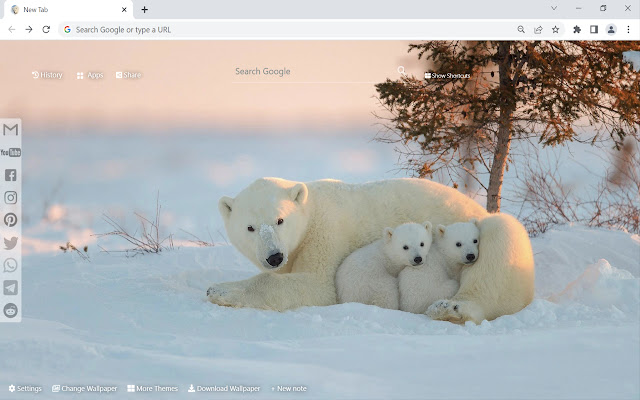
This extension features some of the great Polar Bear background to make you feel good on your Chrome browser.
Extension Features:
1. Shuffle Polar Bear wallpaper every time you open a new tab.
2. Randomize Polar Bear background or favorite it in wallpaper selection panel.
3. Get easy access to popular sites with Google search.
4. Quick access to your emails and social media accounts.
5. Show current date and time automatically.
6. New Note for you to write down your tasks.
7. Easy access to your history websites.
8. Add website to Shortcut panel for quick access.
9. Quick access to Google apps.
10. Quick access to More Themes.
11. Easy Sharing to Social Media.
12. Enable fun snow, rain, falling leaves, fireworks animation in new tab.
If you have any questions about our Polar Bear wallpaper new tab extension or just want to give us some feedback, feel free to send us a message or write a review! We'd love to hear from you. You can mouse over to Support tab on the extension, then click on "visit the developer's support site" to contact us.
If you wish to remove this new tab extension, follow this steps:
1. Click the 3-dot icon at the top-right corner of your screen.
2. Hover your mouse on More tools then click Extensions.
3. Find the Polar Bear wallpaper extension.
4. Press "Remove"
- OR -
Right-click the extension icon on the extension bar (next to the URL bar) and select Remove from Chrome.
Latest reviews
- Aaron Huang
- This extension is great! Very simple and able to write anything on the notes and add website to shortcut. Love it.
- Adley Chew
- Nice.
- Adalynn Lim
- Love it.