
YouTube Summary with ChatGPT & Claude
Extension Actions
- Extension status: Featured
- Extension status: In-App Purchases
Summarize YouTube videos, web articles, and PDFs to save time, powered by ChatGPT, Claude, Mistral AI, and Gemini.
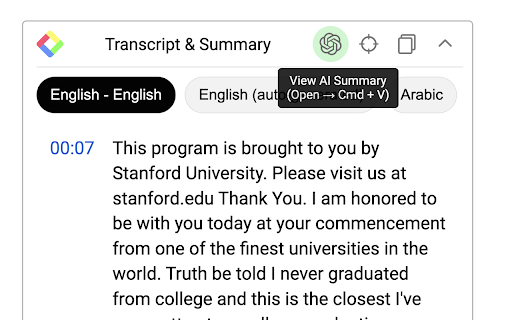
YouTube Summary with ChatGPT & Claude is a free Chrome Extension that lets you quickly summarize YouTube videos, web articles, and PDF you're consuming. Use this extension to save time and learn more quicker. YouTube videos, web articles, and PDF summarization functions are powered by ChatGPT (OpenAI), Claude (Anthropic), Mistral AI and Google Gemini.
## What are the benefits of using YouTube Summary with ChatGPT & Claude?
The main benefits are saving time, increasing productivity, and improving learning. YouTube Summary with ChatGPT & Claude reduces the need to watch long videos when you're just looking for the main points. The summaries let you absorb information quickly so you can spend time on other tasks.
## How do I use YouTube Summary with ChatGPT & Claude?
Using YouTube Summary is easy. After installing the browser extension, simply open a YouTube video you'd like to summarize. Click the YouTube Summary icon in your browser toolbar, and it will generate a summary and provide an option to access the video transcript if available.
You will see a summary of the video with or without timestamps. You can click on the timestamps to jump to the corresponding part of the video. You can also click the "Copy Transcript" button to copy the transcript of the YouTube video to your clipboard.
## Can I customize the length of the YouTube video summaries?
Yes, you can customize the length of the video summaries generated by YouTube Summary. Adjust the settings within the extension to tailor the summaries to your preferred level of detail. Also, you can customize the prompt to use to summarize the content.
## Is YouTube Summary with ChatGPT & Claude suitable for educational purposes?
Yes, YouTube Summary with ChatGPT & Claude is a valuable tool for educational purposes. It provides concise summaries and transcripts that can aid in research, studying, and learning from YouTube videos.
## Can YouTube Summary with ChatGPT & Claude handle videos in languages other than English?
Yes, YouTube Summary is capable of summarizing videos in multiple languages, making it a valuable tool for international users. You can also choose what language you want the transcript to be in.
Fore more details, please visit the website:
https://glasp.co/youtube-summary
Latest reviews
- Humphrey Oteng-Adjei
- This is a game changer.I am able to get better analysis with the transcript when I paste it to any LLM.
- customer service BO5 41O 5OO3 Jeera
- Turns long videos into quick summaries, saving tons of time
- SATISH KUMAR
- its fantastic....
- Abdulloh
- very good
- suport bank
- perfect simple
- Vinh
- Error display on Edge
- Chef Bruna Ávila “Chefinha”
- the best one
- Fakhraddin Seyfaddini
- ok
- Farid Anwar
- ok
- pure coffe
- good
- Jeffrey E. Sidi
- EXCELLENT, REALLY HELPFUL!
- Maraoui Khalid
- another useless extension, On-page summary is a premium paid feature
- Viajar&Possível
- An excellent extension, it captures the entire video transcript. 10 out of 10.
- 글로키움
- Great!
- bluetti sea
- good
- José Córdova
- I love this extension, it is super useful and fast. Use it if you want to save time!
- Ali Rind
- Very helpful
- Austrian Prince
- it injects hidden promotional prompts and links into AI chats without user permission... and it doesnt allow unlimited copy-paste for free... cmon guys, copy-paste shold not be a premium feature... uninstalled and intalling instead Copy Youtube Transcript
- Vidit Aggarwal
- Been using it for a long time. love it.
- Beid Karim
- Top I appreciate, it's very useful .
- Aarav Singh
- charging money , asking for subscription for just copying text of summery.
- felipe silva
- top
- A YT
- very good ilike IT
- Giah Manh
- good
- Salman Mansour
- the worst
- Jianr Le
- great extension
- Adrian Ccanto
- ITS PERFECT
- Nông nguyễn
- very good
- nkE S
- Good hope
- Fleming
- No Transcript Available... 😢 Try Again
- abscar888
- see see
- Tim Street
- This thing is an absolute gem. I use it to get transcripts from other YouTube videos to learn more about a subject. I can feed all of the transcripts into an AI and have something distilled without having to sit through all the YouTube videos. Definitely a huge advantage for me.
- Person J
- can only use 3 times a day. Waste of money
- Nguyen Duong
- The app is great, but it seems to have bugs now. It stopped working.
- Michael Hoang
- cant remove the stupid built in prompt which ask the AI to search the web on glasp. You need to upgrade to pro to remove this, absolutely retarded.
- rui zhang
- gog
- Linh Châu Kim
- I love it
- yinghui hu
- useful and userfriendly, save time and energy.
- Ngọc Khanh Nguyễn
- Great!
- л oquoYi
- Seriously? Even copying text is behind a paywall? 😅
- Xuyen Hoang
- good
- ħ
- One click transcript for quick browse or detailed study, extremely useful, especially with long videos. Recommended based on my satisfying experiences.
- Alan Peterson
- Doesn't work? Home page is not intuitive. Does not show how to transcribe a YouTube video. I don't see any way to insert the YouTube video URL. There is NO Submit button, or any way to submit for "submitting for summarization!"
- Viễn Đạt Nguyễn
- Wow! tks team!
- Rodrigo Cortes
- Incredible use for personal and professional wishes. 10/10 really recommended.
- Kyril Chrysos
- Loving it!
- jesse johnson
- Used it for a year, really happy with it but for some reason it doesn't work anymore... I can't click on the buttons and the bar is now left aligned over the video... tested it on different devices.
- Hiền Nguyễn Thu
- ot
- longdu71
- Very helpful
- Mah Bis
- Super