
TweetDeck Shortcut Plus
Extension Actions
- Live on Store
Add more keyboard shortcuts on TweetDeck.
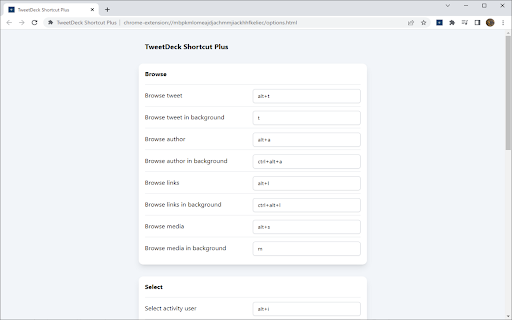
Keyboard shortcuts can be changed from options page.
Browse:
- Browse tweet (default: "alt+b")
- Browse tweet in background (default: "b")
- Browse author (default: "alt+a")
- Browse author in background (default: "ctrl+alt+a")
- Browse links (default: "alt+l")
- Browse links in background (default: "u")
- Browse media (default: "alt+s")
- Browse media in background (default: "i")
Select:
- Select author (default: "alt+p")
- Select first hashtag (default: "alt+h")
- Select first image (default: "o")
- Select quoted tweet (default: "alt+k")
- Select likes (default: "alt+f")
- Select retweets (default: "alt+r")
- Select activity user (default: "alt+i")
Column:
- Add author column (default: "alt+u")
- Add activity user column (default: "alt+y")
- Remove column (default: "alt+d")
Others:
- Download media (default: "w")
- Quote tweet (default: "q")
- Delete tweet (default: "alt+delete")