
FocusGuard - Free Site Blocker
Extension Actions
- Extension status: Featured
- Live on Store
Free website blocker for enhanced productivity. Custom blocklist and password protection. Stay focused, and block distractions.
If you want some time to browse online but hope to avoid a full-blown internet spiral, a site blocker might be perfect for you.
Set a time limit for distracting sites. When you reach the limit, a block goes into place. That means you still get to check your feed now and then, just not for too long or too often.
Site blocker is designed to help you stay focused on studying, learning, and working. Blocks all time-westing websites to keep you productive and away from all the distractions the internet offers.
To use a site blocker, set a password, decide which websites you want access to, and let the site blocker block the rest. If you want to visit a site you have blocked, enter your password, and decide how long you want to be on the blocked site.
If you’re a parent, you can set the password for your child. Or, if you’d like to use it yourself, have a friend or partner put it for you to help you concentrate.
And voila! You now have a set of internet guardrails that help to help you stay productive and on task whether you’re studying, remote learning, or need an extra boost of self-control to finish a project.
⭐️Features⭐️
👉 Block sites, including its subdomains
Remove all distracting and harmful websites from your life by blocking them for you while you need to stay focused and productive.
👉 Allowlist
Add exceptions to the blocked websites list. Sites from this list avoid all blocking settings.
👉 Focus mode
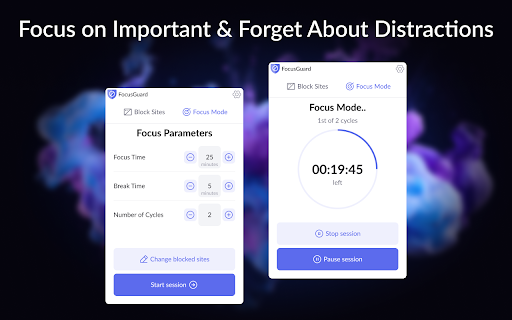
The focus mode timer lets you control your schedule via the Pomodoro technique. Break down your tasks into intervals followed by a short break. With ‘Focus Mode,’ you can set times to disable websites and browse freely.
👉 Time management
Show how many work cycles you completed during a session. So you’ll be able to get all your tasks done and still have time to browse your favourite sites and apps in between.
👉 Password protection
If you start focus mode, you can stop it with a passcode of your choosing, making it harder to procrastinate. You can also password-protect the options page to keep you from efficiently removing sites from your list.
👉 Unstoppable focus mode
Select the option to hide the pause and stop buttons in the extension settings. And you won't be able to stop blocking sites until the block time expires.
👉 Funny blocked page
You will now see funny images if you are trying to enter a blocked site. To do this, you need to enable this option in the site blocking settings. You will still not be able to enter the blocked site, but perhaps a funny picture will make you smile :))
Block Site is one of the best productivity tools available to help people procrastinate less, become more productive and reach their life goals. You’ll never have to worry again about how to stay focused at work.
⭐️Note⭐️
To block sites in incognito mode, you need to activate Allow run in incognito mode checkbox on the chrome://extensions page.
Latest reviews
- Stephanie
- Doesn't actually block sites, there's no way to set a daily or weekly schedule, this is a waste of time.
- Ethan Z
- not hard enough to block bruh
- Yuvan I
- great tbh
- Raghav Bhatia
- W blocker
- gonecybo
- if you happen to have an empty line in your blocklist, all sites will be blocked, and the extension does not give you any indication regarding this, making it seem like the core-feature does not work at all. the developers should consider adding a warning underneath the input modal, to make sure not to use empty lines. alternatively user input could be cleaned up before evaluating it. blindly applying a regex to the blocklist is bad design.
- Eshan Jha
- very easy to use, but also very easy to unblock sites. i used this blocking tool to block another blocking tool so its harder for me.
- Aiichiro Nitori
- Neat stuff.
- Luiz Felipe de Souza
- Helpful.
- bilal saleem
- very very useful
- karma haguin
- easy to use and functional
- Slick Series
- what u see is what u get, easy lightweight blocking
- Joseph Gallagher
- Perfect for decluttering my focus
- Mayank Gupta
- Great lightweight extension for blocking websites.
- Samridhi
- legit the best free website blocker. highly recommended
- erafune
- Spams you with a "rate me" popup. Well here you get what you deserve.
- Trọng Luân Võ (Lulu Dev)
- Superb!!
- Isabella W
- perf
- Johan George Joemon
- It Works!! That's it and that's all I want.
- Iman
- The best actually free website blocker out there. Simple, intuitive and effective!
- KIRAN Kanor
- sweet & simple
- Kamalesh Karthic
- Simple and gets the job done
- MrPowerX95
- best ever but also a feature like allowlist allowlist: block everything except allowed domains or subdomains
- Ishant Sabale
- does the job
- Aristide kwizera
- NIce app forever
- Filip Bačík
- Good
- shivjot rathore
- Very user friendly and convenient
- . Ribhu
- I use it to stop doomscrolling on yt shorts. I know.
- Mayank Kumar
- best
- vimukthi dahanayake
- Simple and straightforward
- Varun Raote
- Simple and straightforward
- Rudy
- simple and does the job, love it :)
- Noah Ree
- chinese people
- Jiří Jalůvka
- ok
- Siddhanth Shetty
- Just has what you need.
- Anirban Sinha
- Simple and just works. Thanks for the efforts
- Noah Roberts
- Simple. Works.
- Raphael D
- Works well, except that I couldn't yet get it to block "youtube.com" but allow "music.youtube.com"
- Waqar Hussain
- Saved me many time of getting revealed my chats and data :D
- Christabel Acquah
- perfect. not buggy like most i've used. very effective
- G C
- Frustratingly good.
- jose agustin sosa dabdoub
- useful
- Ryan
- Very useful.
- Pranjal Raj
- good
- Prakash Khati
- the best blocker imo just one feature i would like to add is blocking for perio of time like say for eg: 4:00 - 8:00.
- Divij Verma
- Works very well
- Lego Bulilder
- Super Helpful
- Levi Weeks
- Would like the option to block out a set time so I don't have to turn it on and off.
- 闕以諾
- Great, but if there is a function that I can set a time section then the websites will be blocked in that section, it will be even better. For example, i can set 8:00-17:00 as a focus section, then the websites will be blocked in that time.
- Oliver Plank
- simple and effective
- Jake Phillips
- Would give it zero