
Akamai MFA
Extension Actions
- Live on Store
The Akamai MFA app for Chrome is the companion to the Akamai MFA mobile app. The Akamai MFA Chrome extension makes it possible to…
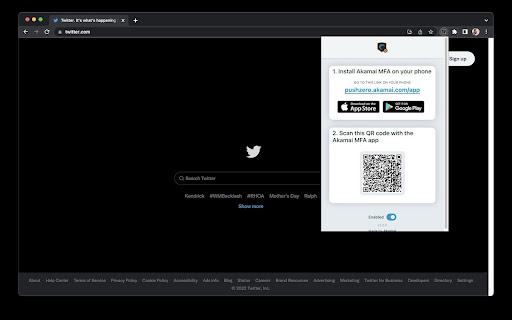
The Akamai MFA app for Chrome is the companion to the Akamai MFA mobile app.
The Akamai MFA Chrome extension makes it possible to use your phone or tablet as a security key authenticator with the Chrome browser.
Akamai MFA makes authentication easy and secure:
- No more passwords or 6-digit codes
- Push to login
- Phishing resistant
Akamai MFA utilizes the standardized FIDO2, U2F, and WebAuthn protocols to provide secure, phishing resistant authentication on the web with your mobile device.
Get started in 3 steps:
1. Download the Akamai MFA authenticator app on your mobile device
2. Enable the Akamai MFA Chrome browser extension
3. Scan the QR code using the Akamai MFA app
==Zero Trust==
Akamai MFA is built on top of an end-to-end verified and encrypted architecture to perform authentication with zero trust. Your keys are stored in your device's secure hardware and never leave your device.
Learn more here: https://www.akamai.com/mfa
Latest reviews
- Mike Tuttle
- Super simple to use for all my needs.
- Khánh Nguyễn
- Doesnt work with fido2
- Khánh Nguyễn
- Doesnt work with fido2