
Permitir cópia +
Extension Actions
- Extension status: Featured
Permitir cópia. Remova a proteção contra cópia. Grátis, fácil. Ativar cópia de texto, menu de contexto, botão direito do mouse.…
🤩 Se você gosta de "Allow Copy +" avalie 5 estrelas para a extensão 🤩
CARACTERÍSTICAS:
- remova a proteção contra cópia, ative o texto de cópia, remova a seleção de bloco;
- permite clicar com o botão direito do mouse e ativar o menu de contexto;
- ativar/desativar para domínio específico;
- sincronizar com todos os navegadores chrome com a mesma conta do google;
- gratuito e fácil de usar.
🚨🚧🚨RECURSOS BETA: (Por favor, não seja rigoroso com esses recursos, eles ainda estão em modo de teste)
- extrair texto de imagens (extrair texto de imagens no mural do LinkedIn, no mural do Instagram e em alguns outros sites);
- extrair texto do Google Docs e de sites que usam a mesma tecnologia.
COMO USAR:
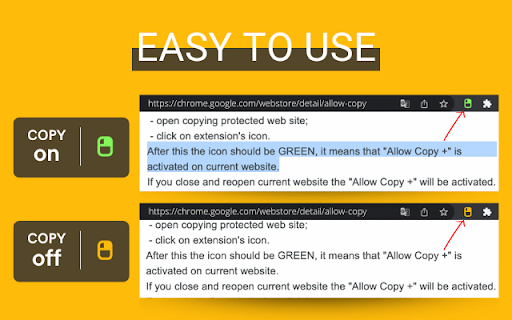
Basta clicar em ÍCONE. VERDE - cópia ativada. LARANJA - cópia desativada. A ativação funciona para o site (domínio).
COMO USAR, DETALHADAMENTE:
Está desativado por padrão e você pode ver o ícone LARANJA.
Para ativar a seleção e cópia de texto:
- site protegido contra cópia aberta;
- clique no ícone da extensão.
Depois disso, o ícone deve ficar VERDE, significa que "Permitir cópia +" está ativado no site atual.
Se você fechar e reabrir o site atual, o "Permitir cópia +" será ativado.
Para desativar para o site basta clicar no ícone mais uma vez (o ícone deve mudar para a cor LARANJA).
- Como faço para copiar uma página da Web protegida contra cópia?
- Como copiar texto de um site em que a função de cópia está desativada?
- Como faço para copiar texto de uma página da Web protegida no Chrome?
- Como faço para copiar texto de um site com conteúdo protegido?
- Como posso copiar texto de uma página da web onde o texto está protegido contra cópia?
- Como faço para copiar texto de um site que não pode ser copiado?
- Como faço para copiar texto de sites que não permitem isso?
- Por que não consigo copiar texto de alguns sites?
- Como você força a cópia de texto de um site?
- Como faço para copiar um texto não selecionável?
- Como faço para ativar o botão direito do mouse e copiar se estiver desativado?
- Como faço para copiar texto quando o botão direito está desabilitado?
- Como habilitar a cópia com o botão direito no Chrome?
- Como copiar e colar sem clicar com o botão direito?
- Por que não consigo clicar com o botão direito para copiar e colar?
Toda esta pergunta tem uma resposta correta - Permitir cópia +.
Fico feliz em ajudar.
Por favor, adicione revisão à extensão "Allow Copy +".
Obrigado.
Latest reviews
- Kays Kadar
- So far works as advertised - Perfectly!
- Aadan Orozco
- cracks mastodontes
- bushbellbest
- Hello, developer, thank you so much I wish I could set it to be activated at the same time as Chrome starts
- Oussama Laknia
- It does the task perfectly
- Muhamad Komarudin
- Such a really really helpful tool! This can solve many problems and issues we had, I can even download limited Zoom video recording with this! Hope you always have great days Dev!!
- Companygonj safallow
- Great this system extension on Chrome
- Dheeraj Nedungadi
- great extension!
- Ibrahim Khan Shahed
- Great
- Shehroz
- nice
- Durga prasad
- super
- santiago Lozada
- it's so awesome i love it!
- Mason
- Excellent lightwight plugin, working perfectly for copying texts from websites that disabled mouse right click actions. Easy to use, text copying feature can be switch on/off by clicking the plugin icon, also it remembers the on/off state for each website. Although the "copy text from image" beta feature seems not works on my machine, looking forward to use it when it's officially released.
- Jane
- nice
- ham sam
- good
- Harse
- works as intended, may require a refresh or something, but works relatively clearly, not majorly annoying
- Anonymous A.
- A strange extension. Instead of just working all-the-time, you have to go to the extension bar, click the extension bar, then click the icon. And after that, a distracting bright icon starts bouncing in the bottom-left corner. This is entirely unnecessary for such a simple extension. This lack of intuitiveness subtracts 2 stars. A 5/5 extension would just work. This one requires needless steps on every page you want to use it on, and then presents an obnoxious pop-up you can't get rid of when using it. 3/5.
- Online Business Badao
- didn't work on my windows 11 chrome browser. so i am uninstalling it. only orange icon shows on sites no option to turn it on.
- Nguyễn Tiến Đạt
- Good
- Christopher SW
- What can I say? It's perfect !
- USABallLibertyOrDeath USABallLibertyOrDeath
- It works perfectly and it's super simple to use. Great job to whoever made this. You guys are the OG.
- Liam Hornberger
- Works!
- GUYZY
- the best of all
- proCoder
- very nice 10/10
- Sriram Kumar
- good app
- Clinton
- Nice app
- Andre Van Niekerk
- Def made my life easier!!
- David Calderon
- 5/5 This Definitely helped me !!
- Bilal Maher
- Amazing, helped me with my assignments that didn't allow copying and pasting, 5 stars!
- Umbra
- Works as intended.
- Gabriel
- Very helpful and useful chrome extension
- Rokonuzzaman (Derma Designer)
- Very nice!
- Seo Manager
- Best App
- Kathy Henderson
- Very nice!
- mk creator
- GOOD NICE
- Sam Schaub
- Had a 115 question assignment due and I forgot about it, would of taken me 5+ hours to do and the website it was on doesn't allow copy and pasting. Luckily this extensions saved my life. Best extension ever and i never write reviews but had to for this one. Really useful
- ian
- BEST COPIER I EVER USED TBH, RECOMEND YALL CHAEATERS 😉
- Mohammad Ahmad
- Use this everyday, Amazing!!
- هنان صابر
- I have nothing to say. This tool is so so helpful. It saved me. Thank you!
- Philipp
- exactly what i was looking for!
- E Z
- Can't copy contect from this: https://nerd.wwnorton.com. Please fix that.
- Cozy Comfy
- Works really well, saves me from inspect elementing each time
- Mikki Rodgers
- awesome!
- Favour Azuhka
- The best! I don't know what to say really but this extension is amazing, I would a 100% recommend this.
- Anthony Burnham
- Brilliant little HACK to allow copy from protected websites. Thank You
- Caren Hoàng
- user-friendly and helpful
- Oyebadejo Deryck
- Very very good
- matthew hu
- Amazing!!!
- Gia Phát Nguyễn Cao
- Works wonder, props to the developer team
- Trevor Mulcahey
- works great. easy to use too
- A. R.
- Just perfect! Thanks ☺