
Galīgais skaņas pastiprinātājs
Malware Detected
This extension has been flagged as potentially malicious.
Extension Delisted
This extension is no longer available in the official store. Delisted on 2025-09-17.
Extension Actions
- Policy Violation
- Removed Long Ago
Vienkārši pastipriniet audio mūzikai, video un zvaniem tieši savā pārlūkā. Iegūstiet skaidru, augstu skaņu tikai ar vienu klikšķi!
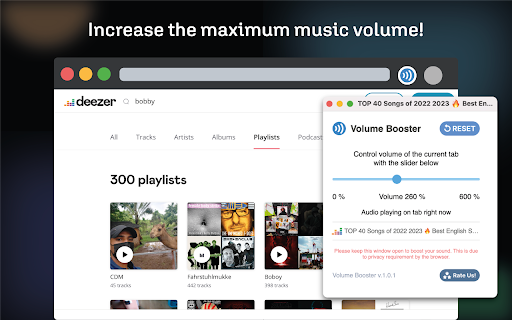
Izmēģiniet šo skaļuma pastiprinātāju — vienkāršu pārlūkprogrammas papildinājumu skaņas līmeņa kontrolei. Izmantojot skaļuma pastiprinātāju, pārlūkprogrammas skaņas padarīšana skaļāka vai maigāka ir ātra un vienkārša. Vai nepieciešams lielāks skaļums mūzikai, videoklipiem vai tīmekļa spēlēm? To paveic tikai viens klikšķis. Skaļuma rīks ir vienkāršs — vienkārši izmantojiet slīdni, lai to mainītu.
Mūsu skaņas pastiprinātājs dara vairāk nekā tikai skaņas līmeņu iestatīšanu. Tas uzlabo arī jūsu audio. Tas padara skaņu skaļāku, bet joprojām skaidru. Varat iestatīt augstāku skaņu, nekā to parasti atļauj jūsu pārlūkprogramma. Tagad varat saglabāt skaļāku skaņu jauku un skaidru.
Skaņas maiņa katrai vietnei ir grūts darbs. Mēs to atvieglojam. Uznirstošais logs parāda visu vietņu sarakstu, kurās tiek atskaņota skaņa, vienkārši noklikšķiniet uz vajadzīgās un noregulējiet skaļumu vēlamajā līmenī
Ja vēlaties iestatīt skaļumu sev piemērotā veidā, varat to izdarīt. Varat izvēlēties skaņas līmeni katrai cilnei ar videoklipiem, mūziku un brīdinājumiem. Tas nozīmē, ka jūsu pārlūkošana skan tieši tā, kā jums patīk.
Ātri mainīt skaļumu no rīkjoslas nekad nav bijis tik vienkārši! Turpat nomainiet audio LVL, nav jāatver pilni iestatījumi. Tas ir lieliski piemērots ātrai skaņas korekcijai.
Skaļuma regulatora dizains ir glīts un lietotājam draudzīgs. Tas ir vienkārši, tikai ar slīdni un atiestatīšanas pogu. Nav sarežģītu iestatījumu, tikai vienkārša audio vadība.
Ņemiet vērā skaļruņu drošību, izmantojot skaļuma regulēšanu. Pārmērīgs skaļuma palielinājums var kaitēt jūsu skaļruņiem. Uzmanīgi pārvaldiet audio līmeņus, lai nesabojātu ierīces skaņas sistēmu.
Īsāk sakot, šis ir obligāts pārlūkprogrammas papildinājums ērtai audio LVL kontrolei. Tas ir vienkāršs, ātrs un lieliski piemērots ikdienas lietošanai tīmeklī. Mazām skaņas izmaiņām vai lielam skaļuma palielinājumam. Uzlabojiet savu tīmekļa skaņu ar viegli lietojamu skaņas vadību.
Try volume max, a simple browser add-on for sound level control. With volume max, making your browser's sound louder or softer is quick and easy. Need more sound for music, videos, or web games? Just one click does it. The volume tool is easy – just slide to change.
Volume max does more than just set audio levels. It boosts your audio too. It makes sound louder but still clear. You can turn up the sound higher than what your browser usually allows. volume max keeps the louder sound nice and clear.
It's a chore to change sound for each site. volume max makes it easy. It changes the sound level based on the site you're on. Go from a loud video site to a quiet blog, and volume max changes the sound for you.
If you like to set things your way, volume max lets you. You can pick sound levels for videos, music, and alerts. This means your browsing sounds just how you like.
Volume max has a quick-use icon on your toolbar. Change the sound right there, no need to open full settings. This is great for quick sound tweaks.
The design of volume max is neat and user-friendly. It's simple, with just a sound slider and a boost button. No complex settings, just easy sound control.
Sound safety matters in volume max. It tells you when the sound is too high for your ears. You can even set a sound limit to keep your hearing safe.
In short, sound max is a must-have browser add-on for easy sound control. It's simple, quick, and perfect for daily web use. For small sound changes or a big boost, volume max is your tool. Upgrade your web audio with sound max.
Sound booster also remembers your settings. Once you set the volume for a site, it stays that way. Next time you visit, volume booster automatically sets the volume to your preference. This means less fiddling with volume controls every time.
Volume booster is perfect for all sorts of users. Whether you're watching videos, listening to music, or playing games, it ensures your volume is just right. It's especially useful for those who keep multiple tabs open. You can have different volume levels for each tab, no mix-up.
Trouble hearing a quiet video? audio booster's boost function can help. It makes quiet sounds louder, so you won't miss a thing. And if a site is too loud, just turn the volume down with a click. It's all about having control over your browser's sound.
Volume booster is lightweight and won't slow down your browser. It runs smoothly, ensuring your browsing experience stays fast and enjoyable. Plus, it's free to use. Just add it to your browser, and you're set for better sound control.
In case you're worried about ads or privacy, sound booster is safe. It doesn't track your browsing or show annoying ads. Your browsing stays private, and your screen stays clean.
Sound booster is easy to install. Just go to your browser's extension store, search for volume booster, and click 'Add'. In seconds, you'll have a powerful yet simple volume control tool right in your browser.
To wrap up, sound booster transforms your browser's volume control. It's straightforward, versatile, and enhances your audio experience. With volume booster, managing sound is no longer a hassle. It's a breeze. Try audio booster today and take control of your browser's volume like never before.
Beyond basic sound control, sound master also offers custom audio profiles. Set a quiet profile for reading or a louder one for videos. Switching profiles is easy, and volume master applies your chosen sound level instantly. This feature is great for quick changes without adjusting the slider each time.
Volume master is not just for personal use. It's ideal for shared spaces too. If you're in a library or office, you can keep your volume low. At home, boost it up for a richer sound. audio master adapts to your environment, giving you the right volume always.
For parents, volume master offers peace of mind. Control the volume on your kids' devices to ensure they're not listening too loud. It's a simple way to keep their hearing safe while they browse, play, or watch online.
Volume master's interface is user-friendly, even for those not tech-savy. The design is clean, with big, easy-to-see buttons. Adjusting volume is straightforward, making it accessible for all ages. It's perfect for anyone who wants hassle-free sound control.
The extension also features a mute button. Silence all tabs with one click, perfect for quickly stopping sound when needed. Unmuting is just as easy, bringing back your set volume levels.
Volume master is always up-to-date. Regular updates keep it running smoothly and add new features based on user feedback. These updates ensure that volume master stays useful and effective for controlling your browser's volume.
In sumary, volume master is a versatile, user-friendly browser extension for managing volume. Whether for personal, work, or family use, it offers easy and effective volume control. Simple to install and free of charge, volume master enhances your browsing experience with perfect sound levels. Try volume master now and experience the ease of refined sound control in your browser.
Volume Chrome Tool
In our web world, volume are key. When you stream a song, join a web call, or watch a clip, the its volume matter a lot. A new Chrome add-on now changes how we manage volume online.
Meet the Chrome Tool for Volume. It's easy to use and helps you control volume on any site. This tool is a must for better volume in your Chrome browser.
Volume booster lets you take charge of sound. With a few clicks, you can set volume just right. You get the best volume for each sound. Volume booster is easy to use, so anyone can get the hang of it fast.
A top feature of this sound booster is how it can lift volume. If you've had issues with low sound or volume in videos or tracks, this tool is a big help. It can boost volume high, making sure each sound is clear. This is great for those who need loud sound.
The sound booster design is simple. It fits right into your Chrome bar, so you can get to volume controls fast. You use a slider to change volume, making it easy to adjust.
The tool works on all sites. This means you can manage volume the same way for videos, tunes, and games. This makes things easy, as you don't need different tools for sound.
Also, the volume booster remembers your sound volume for each site. Set your volume once, and the tool keeps it that way each time you go back. This makes browsing with your own volume a breeze.
For tech fans, the volume booster has more to offer. You can set up volume for different times, like soft volume for night or loud sound for a workout. This lets you match sound to what you do or feel.
Safe and private use of sound booster is key for this tool. It needs few permissions and keeps your web use safe. This sound booster is all about better volume while keeping your data safe.
In short, the Volume control tool for Volume is vital for a better sound experience online. It's simple, effective, and has lots of features for sound. Whether you need more volume for a quiet video or want to tweak sound, this tool has it all. Get clear, tailored volume with this smart Chrome add-on.
Latest reviews
- sujeeth yenungandula
- good
- Muhammad Raafeh
- waste
- Manu T
- waste
- Gabrielaa_
- top
- Taha Naveed
- Good for pc with low sound speakers.
- Michael Acero
- good for low volume device
- Reena Singh
- its good but doesnt reccognise the audio being played.
- Mubeen Akram
- good app
- ACCUstudies CEO
- much needed on YT... especially for the decent & classical music lover !!!
- Djjffj Fjfjf
- legal
- Júlio Dias
- Top
- Shivank Chandel
- good
- Alexis Meinke
- i love this bc when the audio is quite in yt it makes it louder and better for me to hear I LOVE ITT
- dyna dixon
- AMAZING,THIS IS THE GOAT!!!!!!!!!!!!!!!!!!!!!!!!!!
- ayub
- very good im impressed
- Kevin Schoeppe
- works just as described. thanks, and keep up the honesty as well as the good work!
- Suraj Kumar
- good
- Dominik Krzeszewski
- GIT
- miguel lomanto
- top
- Anna Colleen
- doesn't work
- muzamil king
- nice
- om deshmukh
- nice
- KatCit Doe
- doesn't make audio quality horrible, doesn't pinpoint your exact location via ip address and sell it to advertisers, it just WORKS.
- Kartik Rao
- very nice app and very usefull app for my laptop
- Kenneth
- The Best ever experience!
- Shrrivathsan S 690
- Awesome
- NASR
- cool
- Lashae Will
- THANK YOU
- mary ann calleja
- niceeee
- Abdul Musawwir
- genuine and helpful much recommended
- Besshraoui douaa
- WOW
- Sitiveni Pamini Finau Jr Sinipata
- I see
- TLR TEQÝ
- fire
- Lewis Henriques
- super top
- Jociemma Zayas
- it doesn't even let me move the bar!? IT'S BAD!!!!!
- Benjamin Burch
- this is a really good app recommend it
- Fareha
- Nice!
- Ruben Ortiz Lara
- GOOD
- Surendra kumar Maheshwari
- good
- adrianna johnson
- good
- Sigit Atmaji
- helpfull.. many thanks
- Juan Gutierrez
- good
- pawan kumar Jha
- Awesome. You will njoi the experience ! Must try! Thanks
- Luna Lucy
- Good quality
- n3lan
- goof
- hazheel mayorga
- perfect
- Julia South
- It has glitches
- Jan Pottinger
- does not change volume on my Chromebook plus
- Justin Begay
- the heretic ngjpw
- me when the: