
Color Finder
Extension Actions
- Live on Store
Install color finder Chrome extension & detect RGB & HEX color codes with ease. Best Color Identifier for Chrome.
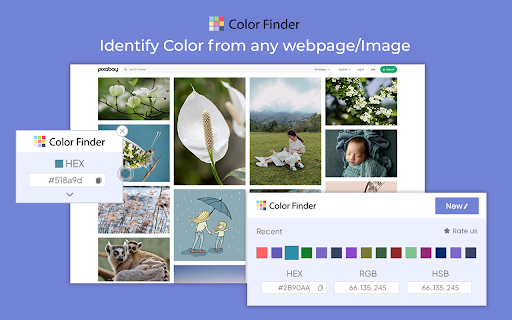
Finding the perfect color just got easier in 2025. Color Finder is your go-to Chrome color picker for detecting and identifying RGB color codes and HEX color codes from any webpage. Designed for designers, developers, and anyone who needs accurate color detection, this free Chrome color tool lets you quickly capture colors with ease. Transform your browser into a powerful color code identifier and streamline your workflow with this efficient web color extraction tool.
Key Features of Color Finder
Accurate Color Detection: Precisely identify RGB color codes and HEX codes from any webpage, including gradients and subtle shades. This feature makes it an ideal HEX color finder and RGB color detector for all your web-based projects.
Easy-to-Use Interface: Activate with one click and hover over any color to display its color code in a clear pop-up format. A perfect color picker for designers working on branding or digital art.
Lightweight & Fast: A free Chrome color tool that integrates seamlessly into your browser without slowing down your experience.
Free & Open Source: As an open-source color detector, Color Finder encourages community contributions and offers transparency for all users.
How to Use Color Finder
Install the Extension: Click “Add to Chrome” to install Color Finder, the most reliable Chrome color picker.
Activate Color Detection: Open any webpage and click the Color Finder icon in your toolbar to begin.
Hover to Detect Colors: Move your mouse over any color on the page to view its RGB color codes and HEX codes instantly in a pop-up window.
Copy the Color Code: Use the “Copy” button to save the color code to your clipboard and utilize it in your projects
Why Choose Color Finder?
Color Finder stands out as the best web color extraction tool, offering hassle-free color detection directly from your browser. Whether you're creating consistent branding, web design, or digital art, this HEX color finder and RGB color detector enhance productivity by delivering accurate results in seconds.
Choose Color Finder for its efficiency, ease of use, and reliability as a color picker for designers and developers. With this free Chrome color tool, you can ensure precise color codes for every project without any complexity.
FAQs
1. Can Color Finder detect colors in gradients or complex backgrounds?
Yes, Color Finder accurately detects color codes even in subtle gradients or complex backgrounds.
2. How do I copy a color code?
After activating Color Finder, hover over the desired color. A pop-up displays the color code, with a “Copy” button for easy copying to your clipboard.
3. Will Color Finder affect my browsing speed?
No, Color Finder is designed to be lightweight, so it won’t impact browsing performance or slow down your system.
4. Is Color Finder free to use?
Yes, Color Finder is entirely free and open-source, making it accessible to all users.
Latest reviews
- Nick Avery
- Doesn't work
- Mary Cissell
- Amazing! So much faster than looking through code!
- Brad Koop
- Doesn't work at all. Zero stars.
- Tribu Soft
- Doesnt work. At all.
- Natasha D
- Doesn't Work
- ahmed ageil
- not working
- Josie Webster
- I can't get it to work. I have tried other colour finder and they don't work either. I wonder if it is a setting on my computer that is causing the problem? Anyone know?
- Abdul Razak
- Can i give negative rating ? stuff doesnt work at all
- Susan Bates
- I thought it was great! My daughter uses it all the time and she, too, finds it helpful and accurate. Game changer!
- Joanne
- Doesn't work or respond on a lot of pages
- abdullah alezzi
- Doesn't work
- Sara Antunovich
- Doesn't work
- Noah Opsahl
- Doesn't work
- Britt Howard
- Didn't work, annoying.
- Padma Harika
- Stupid one. Never works
- Yousuf
- worst
- Heine Nørby
- Doesnt work
- bloodflare
- Worked 1 time and broke
- Lina Hammami
- not working
- Cheryl Lawson
- Sad it didn't work for me on a Chromebook.
- Natania Martínez
- Didn't work for me, not intuitive
- John Cañares
- I doesn't work.
- RG Games
- Embora seja uma das melhores extensões do Chrome, minha classificação baixa, se dá pra chamar atenção dos DEV, pois depois da ultima atualização que deve ter acontecido hoje, 17 de maio, muitas fontes do navegador, além de mudarem de cor automaticamente, ficaram em negrito. Espero que ou revertam a atualização, pois funcionava ótimo ou então, atualizem quanto antes. No momento, irei deixar desativado, pois realmente ferrou com tudo aqui!
- Clientes Media Manager
- Although it is one of the best Chrome extensions, my rating is low, if you can call the attention of the DEV, because after the last update that must have happened today, May 17th, many browser fonts, in addition to changing color automatically, were in bold. I hope they either revert the update as it worked great or they update as soon as possible. I'll leave it off for the moment as it really screwed up here!
- Clientes Media Manager
- Although it is one of the best Chrome extensions, my rating is low, if you can call the attention of the DEV, because after the last update that must have happened today, May 17th, many browser fonts, in addition to changing color automatically, were in bold. I hope they either revert the update as it worked great or they update as soon as possible. I'll leave it off for the moment as it really screwed up here!
- 작은귤
- More usable than any other color extension I've ever used !
- 김동재
- More usable than any other color extension I've ever used !
- Bsaiuday kiran
- Simple yet powerful extension. Just loved the way it works without making complicated. Kudos to the developers for making such an awesome extension
- Bsaiuday kiran
- Simple yet powerful extension. Just loved the way it works without making complicated. Kudos to the developers for making such an awesome extension