
LinkedRadar - OpenAI GPT4 For LinkedIn
Extension Actions
- Live on Store
Revolutionize your LinkedIn strategy with ChatGPT-Driven Replies and Achieve 10x Engagement.
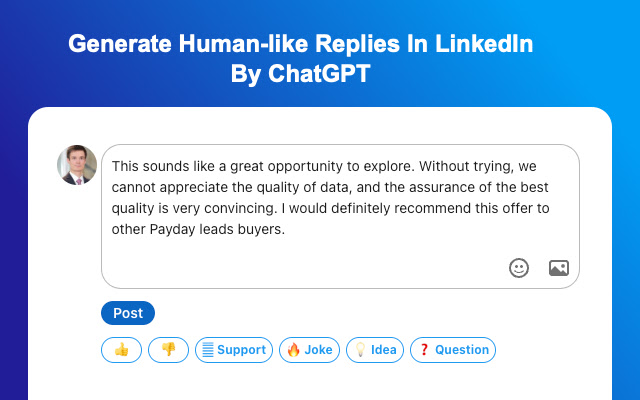
Tired of low engagement on LinkedIn? ChatGPT is the solution you've been looking for. Our advanced AI-generated replies are optimized for maximum engagement and designed to drive more interactions on your posts. With ChatGPT, you can achieve 10x growth in your engagement and transform your LinkedIn strategy.
Unlock the power of content with ChatGPT - the ultimate browser extension for accessing Chatgpt! Click Ctrl/⌘+M to use OpenAI Chat GPT on LinkedIn website anywhere.
ChatGPT For LinkedIn has a revolutionary new UI for using OpenAI's ChatGPT on LinkedIn sites.
Here's how it works:
➡️ Simply select any online content by your mouse
➡️ Click on Cmd+M (Mac) or Ctrl+M (Windows) to open extension window
➡️ Choose what you want to do with it (create a reply, comment, make it shorter, or add some fun)
➡️ Click the switch icon, extension will automatically jump to https://chat.openai.com/chat
➡️ Click "Copy to " button on https://chat.openai.com/chat, extension help you copy ChatGPT response back to LinkedIn page.
➡️ And voila! You'll get an 80% done reply at your fingertips.
Chat GPT For LinkedIn brings the power of OpenAI's GPT-3 to your browsing experience, GPT-3 For LinkedIn is focused on reliability and keeping up with recent changes.
Features:
Easily access ChatGPT by clicking on the icon in the toolbar. The popup will appear and you can start a conversation with ChatGPT.
Quickly access Chat GPT from the navigation bar (aka Omnibox) by typing gpt and pressing space.
Get answers from search result pages on popular search engines such as LinkedIn group, LinkedIn Event and LinkedIn Post.
Run ChatGPT from the context menu.
We strive to keep up with the fast-paced development of ChatGPT to bring you the best possible experience.
If you encounter an error, try opening chat.openai.com again. The service may be under high demand.
If you continue to experience issues, please report a bug in the review section of our extension's page.
You can also use ChatGPT For LinkedIn to get GPT response on all your LinkedIn searches. It's also currently easy to use.
Master Complex Excel Formulas and Codex:
➡️ Provide Chat GPT-3 For LinkedIn with a prompt that describes the desired function or operation and ask it to generate a formula or code based on that prompt.
➡️ It would then analyze the prompt and suggest a formula or code that would accomplish the desired task.
➡️ Provide ChatGPT For LinkedIn with a prompt that describes the context of the post and the desired tone and content of your reply, and ask it to generate text based on that prompt.
➡️ It would then analyze the prompt and suggest words and phrases that would fit well with your desired tone and content.
Effortlessly Summarize Your Content on LinkedIn Website
➡️ Provide ChatGPT For LinkedIn with the full text of your content and ask it to generate a summary based on that text.
➡️ It would then analyze the text and suggest a summary that includes the main points and key details of the content.
💫 Troubleshooting
If you have any difficulties reach out to WhatsApp ID: +86 180 2303 4541 or email to [email protected]
🙋FAQ:
👉 Do you upgrade/modify the extension?
Yes, we do! In fact, at this very moment, we’re working on features that are probably going to be added. We have a goal of making ChatGPT For LinkedIn the best ChatGPT extension out there, and we take this mission very seriously.
👉 Are all of the features totally free to use?
Our extension is currently free and we are trying to always have one version of service that is free. But we would have to put in a small paywall in order to sustain the service. We have plans to do so in the coming weeks. With the paid service you can have faster service, without daily limits and high priority customer support. We aim to best serve you in a model that is most affordable to you.
👉 What is ChatGPT?
ChatGPT is a state-of-the-art language model developed by OpenAI that uses machine learning and natural language processing to provide accurate responses to a wide range of questions. With its advanced algorithms and vast knowledge base, ChatGPT is designed to provide personalized and insightful answers to users in real-time. Continuously learning and evolving, ChatGPT is the go-to source for individuals and businesses seeking accurate and up-to-date information.
👉 What is OpenAI?
OpenAI is an artificial intelligence research laboratory consisting of a team of leading researchers, engineers, and entrepreneurs dedicated to creating safe and beneficial AI. Founded in 2015, OpenAI conducts cutting-edge research in machine learning and natural language processing, and is responsible for creating some of the most advanced AI systems in the world. Its mission is to promote and develop AI in a way that benefits humanity as a whole, while also advancing the state of the art in the field. Through its research and development initiatives, OpenAI is driving the future of AI and paving the way for a safer and more intelligent world.
👉 How do I install ChatGPT For LinkedIn in my browser ?
To install ChatGPT For LinkedIn on your browser, you will need to follow these steps:
1) In your browser open the browser's app store or extension store
2) Search for the ChatGPT For LinkedIn extension in the browser's app store or extension store (or click for : Google Chrome | Mozilla Firefox | edge)
3) Click on the "Add to Browser" or "Install" button to begin the installation process.
4) Follow the prompts to give the extension permission to access certain parts of your browser, if prompted.
5) Once the installation is complete, you will be redirected to our boarding page
6) That’s it ! viola !you are done :) .Please pin the ext. to get more benefits.
👉 Which model does ChatGPT For LinkedIn use?
ChatGPT For LinkedIn is uses GPT-3 also termed in the GPT-3.5 class of models that are trained by using Reinforcement learning on top of GPT-3 models.
👉 What is the difference between ChatGPT & GPT3?
ChatGPT and GPT-3 are both state-of-the-art language models developed by OpenAI, but they differ in terms of their applications and capabilities. GPT-3 is a highly advanced language model that can generate natural language responses to a wide range of prompts and questions, with an enormous knowledge base and excellent predictive abilities. On the other hand, ChatGPT is designed specifically for chatbot applications, with a more focused set of capabilities and a more personalized response style. ChatGPT is ideal for applications that require real-time conversation, while GPT-3 is better suited for tasks that involve generating large volumes of written content. Both models are highly advanced and have their unique strengths and applications, making them invaluable tools for businesses and individuals seeking to harness the power of AI.
👉 What counts as a query in ChatGPT For LinkedIn search?
When you are using the ChatGPT For LinkedIn spotlight(using cmd+M) and click enter thats basically one query.
If you are on the search engine page and click on search in ChatGPT For LinkedIn that also counts as a query.
👉 Why am I getting this error message- ”Your prompt or context is too long! And we just cant handle it. Please reduce its length”? Is there any limit on my input query?
Yes there is limit of 3500 characters in english words (for other languages the limits would be lesser).
👉 How do I keep a track of my queries?
We show your query count on our on our extension bar. So pin the extension bar in your browser and just by clicking it you will get the number of queries used/left for your subscription.
👉 Is chatgpt banned in my country?
You need to google to check if ChatGPT is banned or not in your country.
👉 Will I get to use ChatGPT For LinkedIn if my country is blacklisted from using chatgpt?
ChatGPT For LinkedIn is available on all countries. So you can use our product from anywhere in this world.
👉 Why do I keep getting this message: “Our Servers Are Running Too Hot! Please Check Back After Some Time” ?
This message pop's up when OpenAI servers to our queries are not responding. Typically this issue gets resolved in an hour or so.
LinkedIn is a trademark of LinkedIn Inc., registered in the U.S. and other countries. This is an independent project and has no relationship to LinkedIn or LinkedIn Inc.
Latest reviews
- Palaniappan M
- Doesn't work
- RX2 H
- Incredibly useful tool for social media. Highly recommend it. Five stars!
- D.M. G.
- Not sure here, will return..
- Umesh Bobe
- Very useful & effective tool
- Umesh Bobe
- Very useful & effective tool
- Dilek aşan
- great
- Dilek aşan
- great
- Chin John
- doing wonderfully okay
- Chin John
- doing wonderfully okay
- Shubham Patel
- LinkedRadar served as an exceptional platform for not only amplifying my professional network on LinkedIn, but also for facilitating meaningful interactions that elicited thoughtful responses from connections. The software elegantly bridges the gap between digital networking and genuine engagement, making it a valuable asset in any professional's toolkit.
- Shubham Patel
- LinkedRadar served as an exceptional platform for not only amplifying my professional network on LinkedIn, but also for facilitating meaningful interactions that elicited thoughtful responses from connections. The software elegantly bridges the gap between digital networking and genuine engagement, making it a valuable asset in any professional's toolkit.
- Ryan Thomas
- Great and useful tool! Highly recommend.
- Ryan Thomas
- Great and useful tool! Highly recommend.
- Amy C
- This is such a useful tool
- Amy C
- This is such a useful tool
- Uttam Kumar Mondal
- Excellent Tool
- Uttam Kumar Mondal
- Excellent Tool
- LOMAX ASSOCIATED ADVOCATES
- Exceptionally good
- LOMAX ASSOCIATED ADVOCATES
- Exceptionally good
- Ramesh Rajan
- It is as smart as it can get. Don't go looking for it to add your personality to the content. Make sure to edit the content a bit. It is an impressive tool that saves a lot of time. Well done.
- Ramesh Rajan
- It is as smart as it can get. Don't go looking for it to add your personality to the content. Make sure to edit the content a bit. It is an impressive tool that saves a lot of time. Well done.
- Alex
- Great idea. For mac users, be aware that it replaces the CMD M shortcut for Chrome on Mac and there is no way to untoggle it.
- Alex
- Great idea. For mac users, be aware that it replaces the CMD M shortcut for Chrome on Mac and there is no way to untoggle it.
- Cindy B
- Great!!!
- Cindy B
- Great!!!
- Igor - [ ᴛᴏᴘ ʀᴇᴠɪᴇᴡᴇʀ ]
- Great idea and works well!
- Igor - [ ᴛᴏᴘ ʀᴇᴠɪᴇᴡᴇʀ ]
- Great idea and works well!
- Jean-Charles R
- Similar page doesn't work
- Jean-Charles R
- Similar page doesn't work
- Juliana Galluccio
- Amazing and really helps
- Juliana Galluccio
- Amazing and really helps
- Tomasz Laskowski
- jj
- Tomasz Laskowski
- jj
- Yi Yan
- Very useful!!!!
- Yi Yan
- Very useful!!!!
- MD RAIHAN AKOND
- ok
- MD RAIHAN AKOND
- ok
- #P Joshi
- useless
- #P Joshi
- useless
- Chibuzor Okafor
- it is an awesome program and makes everything easy with its simple choice of words
- Chibuzor Okafor
- it is an awesome program and makes everything easy with its simple choice of words
- Sanmi Thompson
- Its been awesome for me and guess what, I stumbles upon it lol
- Sanmi Thompson
- Its been awesome for me and guess what, I stumbles upon it lol
- Menahem Nir
- I am a new user and overwhelmed by the professional advantage for me.
- Menahem Nir
- I am a new user and overwhelmed by the professional advantage for me.
- Teresa Calero
- Great tool. No single error and the grammar correction tool seems to be working wonders. Thank you!
- Teresa Calero
- Great tool. No single error and the grammar correction tool seems to be working wonders. Thank you!
- Reshma Thomas (IT Solution Consultant)
- Its throwing me error, that the fetch is not working.
- Reshma Thomas (IT Solution Consultant)
- Its throwing me error, that the fetch is not working.
- Adetola Ogunkunle
- However great this tool might be, it simply refuses to work for some people; I happen to be one of them!