
CrosManager - A Web-based System Monitor
Extension Actions
- Extension status: In-App Purchases
- Live on Store
Take charge of your Chromebook with focused monitoring tools!
🌟 𝗪𝗛𝗔𝗧'𝗦 𝗡𝗘𝗪
- Bug fixes.
- Localization begins (German).
- Added notification for newly created shortcuts.
The Premier System Manager on ChromeOS!
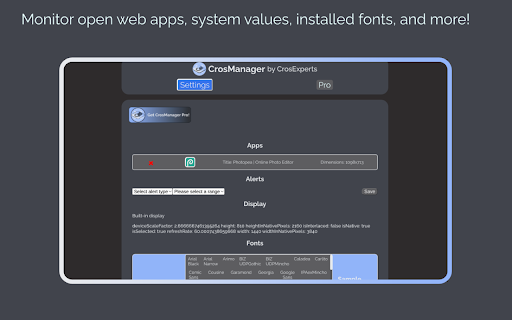
🏢𝗠𝗔𝗡𝗔𝗚𝗘 𝗬𝗢𝗨𝗥 𝗖𝗛𝗥𝗢𝗠𝗘𝗕𝗢𝗢𝗞
- Keep an eye on CPU, RAM, temperature, and more!
- Change your browser font with one click.
- Read in-depth information on default and attached screens.
- Check storage space and network speeds from the pop-up window!
🧩𝗖𝗢𝗡𝗧𝗥𝗢𝗟 𝗘𝗫𝗧𝗘𝗡𝗦𝗜𝗢𝗡𝗦 & 𝗔𝗣𝗣𝗦
- Enable/Disable your extensions with a click on the pop-up window.
- See all open PWAs in the Options page, then close them when you’re done.
- Hover over extensions to stay aware of what permissions they’re using.
💨 𝗤𝗨𝗜𝗖𝗞 𝗖𝗢𝗠𝗠𝗔𝗡𝗗𝗦
- Run Quick Commands to enable/disable annoying web rules.
- Re-enable the Chrome context menu using the Context Menu Unblocker!
- Website blocking your clipboard? Use the Copy/Paste Unblocker!
⏲𝗞𝗘𝗘𝗣 𝗔𝗟𝗘𝗥𝗧 𝗧𝗢 𝗬𝗢𝗨𝗥 𝗗𝗘𝗩𝗜𝗖𝗘'𝗦 𝗡𝗘𝗘𝗗𝗦
- Set audio and visual alerts to watch your battery, RAM, and CPU usage.
- Customize your alerts to tell you what you want to know!
- Watch the extension icon for changes in your battery, RAM, and more.
- Get up to 3 alerts as a free user and an unlimited amount with CrosManager Pro!
- Use the Optimize tool to disable unused browser tabs and web apps.
🦾 𝗖𝗥𝗢𝗦𝗠𝗔𝗡𝗔𝗚𝗘𝗥 𝗣𝗥𝗢
For just $2.99, you get:
- Network monitoring: Read in-depth information on your browser traffic and recent downloads.
- Quick Proxy Setup: Enable/Disable proxy settings from the pop-up menu.
- App Editor: Customize bookmark apps & PWAs using the App editor. Want to create a shortcut with a personalized icon? Now you can!
- CrosKeys integrations: Control CrosManager using your keyboard!
- More alerts: Create an unlimited amount of alerts!
- Make CrosManager your own by adding custom sounds to your alerts!
🔒 𝗦𝗧𝗔𝗬 𝗣𝗥𝗜𝗩𝗔𝗧𝗘 & 𝗦𝗘𝗖𝗨𝗥𝗘
- We use the latest, most secure extension technologies from Google to accomplish what we do. Manifest Version 3 keeps you safe from harmful extensions and we embrace it wholeheartedly.
- CrosManager Pro payments are handled by Stripe. This system is used and trusted by Google, Amazon, Zoom, and others.
- CrosManager Pro sign-ups are handled through ExtensionPay. This library is open-source, allowing you to read and verify every line of code contained within it.
𝗔𝗗𝗗𝗜𝗧𝗜𝗢𝗡𝗔𝗟 𝗜𝗡𝗙𝗢𝗥𝗠𝗔𝗧𝗜𝗢𝗡
- Some CrosManager Pro features require an internet connection.
- We developed CrosManager for Chrome OS and it will not work 100% on Windows, Mac OS, or Linux.
https://www.crosexperts.com/privacy-policy
For full patch notes and support, visit us on our subreddit:
https://www.reddit.com/r/CrosExperts/
Latest reviews
- Jürgen Bongartz
- Unfortunately not compatible with the Brave Browser
- Kellyn Delgado
- This extension has totally replaced the old Cog app for me and then some. Being able to see my CPU usage from the extension bar is really handy and I love being able to enable/disable extensions on the fly.
- Kellyn Delgado
- This extension has totally replaced the old Cog app for me and then some. Being able to see my CPU usage from the extension bar is really handy and I love being able to enable/disable extensions on the fly.